Assigning an RLS role to a Mail-enabled group rather than a Microsoft 365 group
Short answer
A Group2, as a mail-enabled group, is a documented supported member type for an RLS role.
Question
Key Takeaways
Microsoft documents that RLS role membership accepts distribution groups, mail-enabled groups, and Microsoft Entra security groups — Microsoft 365 groups and Teams teams are explicitly unsupported, and roles attach to semantic models, not to workspaces or reports.
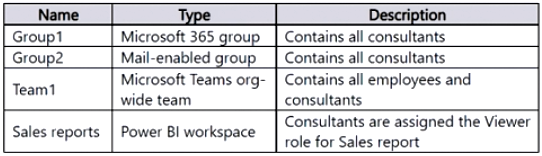
A dashboard uses row-level security with a new Consultants role, and the resources on offer are a Microsoft 365 group, a mail-enabled group, a Teams org-wide team, and the Power BI workspace itself.
Common mistake: Assigning the role to the workspace or to whichever group contains the consultants by description — the group's type decides eligibility, and a Microsoft 365 group fails that test regardless of membership.
Expert Analysis
Why the Answer Is Correct
The resources table shows Group2 is a mail-enabled group containing all consultants. Microsoft's row-level security documentation lists the supported group types for role membership as distribution groups, mail-enabled groups, and Microsoft Entra security groups, so the Consultants role can be assigned to Group2 directly and every consultant inherits the role.
Why the Other Options Are Wrong
Group1 is a Microsoft 365 group, and the same documentation explicitly notes Microsoft 365 groups are not supported for RLS role membership. Team1 is a Microsoft Teams org-wide team, which is also not among the supported types and additionally contains all employees, not just consultants. Sales reports is a Power BI workspace — roles are defined and assigned on the semantic model level, not on a workspace or report object, and the consultants already hold Viewer on that workspace anyway.
Community Comment Notes
A well-endorsed comment quotes the Microsoft Learn passage enumerating distribution, mail-enabled, and security groups while excluding Microsoft 365 groups, which settles the choice of Group2. Another comment answering Sales reports confuses role assignment (semantic model scope) with workspace access, which the question already covers separately.
Official Reference
https://learn.microsoft.com/en-us/power-bi/create-reports/desktop-rls
This link opens the official vendor documentation in a new tab.
Community Votes
67% of anonymous learners picked answer A. Votes are pick records left by other test-takers — they are not the verified answer.
Discussion 19 contributions
Compiled from public community threads and reader submissions, lightly edited for clarity. Handles and vote tallies are shown as recorded, and comments reflect the views of individual contributors.
From public community threads 19
-
627628c 👍 7 Answered AA. Group 2. Per Microsoft Learn, here's why: "You can use the following groups to set up row-level security: Distribution Group Mail-enabled Group Microsoft Entra Security Group Note that Microsoft 365 groups aren't supported and can't be added to any roles." https://learn.microsoft.com/en-us/fabric/security/service-admin-row-level-security Because of this, it should be Group 2.
-
irena.petkovich 👍 3 Answered AYou can use the following groups to set up row level security. Distribution Group Mail-enabled Group Security Group Note, however, that Office 365 groups are not supported and cannot be added to any roles.
-
El_Montasser89 👍 3Answer is A! https://learn.microsoft.com/en-us/fabric/security/service-admin-row-level-security#add-members
-
a638741 👍 3I think the answer is D:Group 1 as it's a MS 365 group that you can assign not a Mail enabled group
-
LuluSkyy 👍 3I agree the answer is sales report
Show 14 more comments
-
lmml_et 👍 2 Answered Ahttps://learn.microsoft.com/en-us/fabric/security/service-admin-row-level-security#manage-security-on-your-model
-
Davery 👍 2 Answered CRoles are assigned in PowerBI Service which means the answer must be C sales reports
-
desibaby09 👍 2 Answered CSales reports RLS is implemented at the dataset level within Power BI workspaces.
-
5bf040d 👍 1 Answered AIn the Power BI service, you can add a member to the role by typing in the email address or name of the user or security group. You can't add Groups created in Power BI. You can add members external to your organization. In the Power BI Service, you can create workspaces and groups to organize and share reports, dashboards, and datasets. However, these Power BI workspace groups (or app workspace groups) are not the same as security groups (e.g., Microsoft Entra Security Groups, Distribution Groups, or Mail-enabled Groups). Power BI workspace groups (created in the Power BI Service) cannot be assigned to RLS roles. https://learn.microsoft.com/en-us/fabric/security/service-admin-row-level-security
-
jaume 👍 1 Answered BOffice 365 Groups without mail-enabled security features cannot be directly used to manage roles in Power BI, as they lack the necessary integration for permissions
-
a5de5a2 👍 1 Answered DGroup1 is a Microsoft 365 group, which supports RLS role assignment. and its answered by chatGPT
-
LuluSkyy 👍 1what's the correct answer then?
-
Endeetheanalyst 👍 17Sales Report
-
Monsta 👍 3 Answered AGroup 1 is the right answer
-
namuuu 👍 1 Answered CJustifies the questions
-
b92fc92 👍 1 Answered CC in my opinion
-
b92fc92 👍 1 Answered Cwhy not C?
-
d5e1798 👍 1group 1
-
jiheneB 👍 1Why A ?
Reader comments & corrections
No reader corrections yet — spotted an error or have a note? Share it below.
Related Analysis
Practice All PL-300 Questions
Access 116 questions with complete answers and detailed explanations.
View Full PL-300 Practice Test →