How to Configure Active/Passive Dedicated Interconnect?
Short answer
CE Advertise a lower MED on the active Interconnect connection from the on-premises router. Configure the advertised route priority as 200 for the BGP session associated with the passive Interconnect connection.
Question
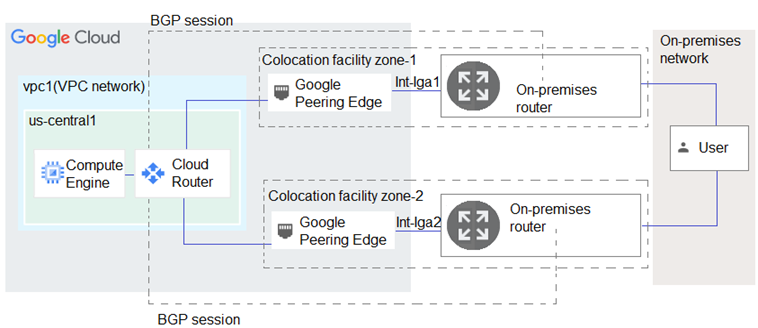
Key Takeaways
This question tests your understanding of how GCP Cloud Router and on-premises routers use BGP attributes to control traffic flow, with the common trap being reversed priority/MED directionality.
Mastering active/passive Dedicated Interconnect requires correctly applying BGP route priority and MED to steer ingress and egress traffic. The community consensus confirms that setting a higher priority on the passive link and a lower MED on the active link ensures seamless failover.
Common mistake: Many candidates incorrectly select A and C, mistakenly believing that a higher advertised route priority (200) makes the active interconnect more preferred, when GCP actually treats lower numeric values as higher priority.
Expert Analysis
Why the Answer Is Correct
Configuring an active/passive Dedicated Interconnect relies on steering traffic in both directions. For ingress traffic entering Google Cloud, advertising a lower Multi-Exit Discriminator (MED) on the active connection ensures on-premises routers prefer that path (Option C). For egress traffic leaving Google Cloud, BGP advertised route priority determines selection within the Cloud Router, where a lower value wins. Setting the passive connection’s priority to 200 while keeping the active at the default 100 guarantees that all return traffic routes through the primary link (Option E).
Why the Other Options Are Wrong
Option A incorrectly assigns a priority of 200 to the active interconnect, which would actually demote it to a backup role since higher numbers indicate lower preference in GCP. Option B suggests a priority greater than 10,200, which falls outside standard operational ranges and serves no purpose here. Option D advertises a lower MED on the passive link, causing on-premises routers to direct ingress traffic away from the intended active connection. Together, these choices either invert the desired traffic flow or introduce invalid configurations.
Community Comment Notes
Candidates consistently highlight that the default BGP advertised route priority in Cloud Router is 100, making a value of 200 ideal for the passive link [1][6]. Multiple experts confirm that MED exclusively governs ingress routing from the customer side, reinforcing why a lower MED belongs on the active interconnect [4][7]. Several users reference official Google Cloud documentation to validate that combining these two attributes creates a reliable active/passive architecture [1][5]. Despite initial confusion from overlapping exam questions, the overwhelming majority converges on CE as the definitive solution.
Official Reference
- https://cloud.google.com/network-connectivity/docs/router/concepts/overview
- https://cloud.google.com/network-connectivity/docs/router/how-to/configuring-bgp
- https://cloud.google.com/network-connectivity/docs/router/how-to/updating-priority
These links open the official vendor documentation in a new tab.
Exam Strategy
When tackling interconnect failover scenarios, always separate ingress and egress traffic control: use MED to influence on-premises router decisions and BGP advertised route priority for internal Cloud Router selection. Verify the numeric directionality (lower equals preferred) for each attribute before selecting options to avoid common inversion traps.
Community Votes
67% of anonymous learners picked answer CE. Votes are pick records left by other test-takers — they are not the verified answer.
Discussion 10 contributions
Compiled from public community threads and reader submissions, lightly edited for clarity. Handles and vote tallies are shown as recorded, and comments reflect the views of individual contributors.
From public community threads 10
-
desertlotus1211 👍 3The base priority is 100. there is no region to region cost. So you want to set the base priority of the passive interconnect to 200 and keep the active one default of 100. the MED will be 100 for active and 200 for passive. A&E are the answers https://cloud.google.com/network-connectivity/docs/router/concepts/overview
-
hamish88 👍 2The default Priority is 100, it doesn't make sense to give a priority of 200 or more than 99 to the active link. 200 should be the priority for the passive link then.
-
Don_Kjeldsen 👍 2will say C & E the passiv connection needs to have a higher MED number than the active so setting the passiv to 200 means that the active needs to be sat to under 200
-
ccpmad 👍 1C and E follow Google Cloud best practices for active/passive Dedicated Interconnect setup. (C) Advertise a lower MED on the active Interconnect connection from the on-premises router. -Controls ingress traffic (traffic entering Google Cloud). -A lower MED value makes the on-premises routers prefer the active Interconnect. (E) Configure the advertised route priority as 200 for the BGP session associated with the passive Interconnect connection. -Controls egress traffic (traffic leaving Google Cloud). -A lower priority (higher number) for the passive connection ensures it is only used if the active connection fails. Why not (A)? (A) sets a lower priority for the active connection, but best practices recommend setting a lower priority for the passive connection (E) to ensure failover.
-
[Removed] 👍 1Advertised router priority is a value sent to Cloud router -> lower mans higher priority. Set the active to prioritt of 200, it gives more priority to the passive (default is 1001). Same per MED -> lower is MED value, more priority you give to that connection. So, if you choose a lower MED value for the active connection, means that you are giving preference to route the traffic to the acrive one rather than the passive.
Show 5 more comments
-
ian_gcpca 👍 1to address what is being asked, we need to advertise lower MED for active and passive interconnects. The diagram shows the BGP sessions between on-prem and cloud routers which uses MED. Which is why we need to set the MED values to direct the routing flow. https://cloud.google.com/network-connectivity/docs/router/how-to/configuring-bgp
-
zzaric 👍 1A&E Default base priority is 100: https://cloud.google.com/network-connectivity/docs/router/how-to/updating-priority
-
RKS_2021 👍 1Correct Answer is CE
-
RKS_2021 👍 1A and C are correct.
-
gonlafer 👍 1Agree, A&C
Reader comments & corrections
No reader corrections yet — spotted an error or have a note? Share it below.
Related Analysis
Practice All PCNE Questions
Access 80 questions with complete answers and detailed explanations.
View Full PCNE Practice Test →