Troubleshooting Asymmetric Traffic on Google Cloud Interconnect
Short answer
C From the Google Cloud console, navigate to the Hybrid Connectivity, select the Cloud Router, and view BGP sessions.
Question
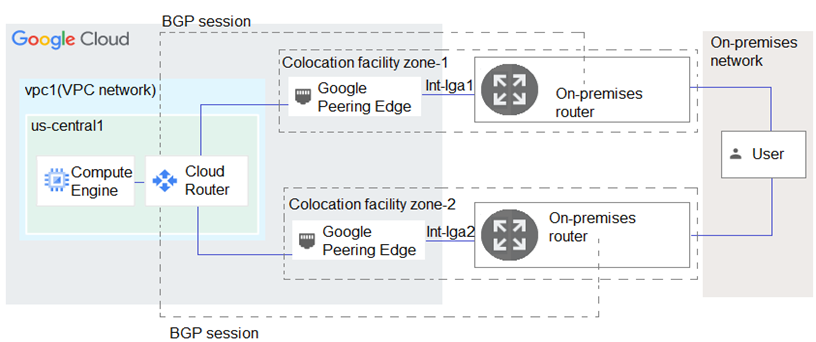
Key Takeaways
Tests identification of the correct diagnostic interface for dynamic BGP state verification while filtering out syntactically flawed CLI commands.
This question evaluates your ability to diagnose BGP session asymmetry on Dedicated Interconnect using Google Cloud's native tools. Community consensus strongly recommends the Cloud Console BGP session viewer, as CLI alternatives in this specific question contain intentional syntax traps.
Common mistake: Option B is frequently selected because it references the correct underlying diagnostic command, but candidates miss the deliberate CLI syntax error that renders it invalid during the exam.
Expert Analysis
Why the Answer Is Correct
Option C leverages the Google Cloud Console to inspect active BGP sessions, providing immediate visibility into peer states, advertised routes, and next-hop attributes. This graphical interface aligns with official troubleshooting methodologies for hybrid connectivity, allowing engineers to quickly confirm whether both VLAN attachments are establishing symmetric BGP peering. By visualizing session health and route advertisements, administrators can pinpoint configuration drift or policy mismatches causing asymmetric traffic.
Why the Other Options Are Wrong
Option A relies on VPC Flow Logs, which capture packet-level telemetry but cannot diagnose BGP session establishment failures or routing policy discrepancies. Option B references the correct get-status functionality but includes malformed flag syntax, making it technically invalid and unsuitable for exam selection. Option D utilizes routers describe, which outputs static infrastructure configuration rather than dynamic routing table data required for active path analysis.
Community Comment Notes
Several candidates explicitly called out the syntax error in Option B, highlighting that exam questions often embed these traps to test precision [1][3]. Debates centered on whether get-status or describe was superior, with experts clarifying that session state trumps static config for this scenario [2][6]. The majority agreed that the console navigation path mirrors Google's documented support workflow for interconnect diagnostics.
Official Reference
- https://cloud.google.com/network-connectivity/docs/router/how-to/viewing-router-details#viewing-router-status
- https://cloud.google.com/network-connectivity/docs/router/support/troubleshoot-bgp-routes
- https://cloud.google.com/vpc/docs/using-cloud-routers#bgp_sessions
These links open the official vendor documentation in a new tab.
Exam Strategy
Always verify CLI command syntax carefully; even minor flag misplacements can invalidate an otherwise correct technical approach. When troubleshooting dynamic routing issues like BGP asymmetry, prioritize tools that display real-time session states and learned routes over static configuration dumps or packet logs.
Community Votes
47% of anonymous learners picked answer C. Votes are pick records left by other test-takers — they are not the verified answer.
Discussion 8 contributions
Compiled from public community threads and reader submissions, lightly edited for clarity. Handles and vote tallies are shown as recorded, and comments reflect the views of individual contributors.
From public community threads 8
-
gonlafer 👍 6 Answered CI'd say, C. B has syntax errors.
-
3574e4e 👍 2 Answered BYou would want to see routes and their next-hops, the command following command will show those: gcloud compute routers get-status ROUTER_NAME \ --project=PROJECT_ID \ --region=REGION [https://cloud.google.com/network-connectivity/docs/router/how-to/viewing-router-details#viewing-router-status]
-
[Removed] 👍 1 Answered BThis command will show you the BGP session status, the advertised and learned routes, and the last error for each VLAN attachment. You can use this information to troubleshoot the asymmetric traffic flow and identify any issues with the BGP configuration or the Interconnect connections.
-
ian_gcpca 👍 1 Answered CB could have been correct if it wasn't for the syntax error, in exam, if its syntax error its wrong. correct sysntax ===> gcloud compute routers get-status mycloudrouter --region REGION --project PROJECT_ID best answer in this case is C
-
r0b00t 👍 1 Answered DReview output of command: gcloud compute routers describe ROUTER-NAME https://cloud.google.com/network-connectivity/docs/router/support/troubleshoot-bgp-routes
Show 3 more comments
-
hamish88 👍 1 Answered DB has a syntax error. D is mentioned in the link shared by r0b00t.
-
nkastanas 👍 1 Answered Dgcloud compute routers describe ROUTER-NAME
-
waelghaith 👍 2 Answered BI'll go with B
Reader comments & corrections
No reader corrections yet — spotted an error or have a note? Share it below.
Related Analysis
Practice All PCNE Questions
Access 80 questions with complete answers and detailed explanations.
View Full PCNE Practice Test →