Which Groups Can Be Added to a Windows Local Group?

Add devices to Microsoft Entra ID Implement identity and compliance
Answer Correct answer: A — Add only Group2 to Computer1's local Group4; local groups cannot be nested and domain distribution groups are not security-enabled members of local groups.

Your network contains an Active Directory domain named contoso.com. The domain contains a computer named Computer1 that runs Windows 10. You have the groups shown in the following table. exhibit Which groups can you add to Group4?
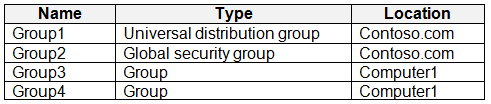
  1. Group2 only Correct Answer
  2. Group1 and Group2 only
  3. Group2 and Group3 only
  4. Group1, Group2, and Group3

Community Insight

The test measures whether you know that a Windows workstation local group accepts only domain security group members, and the trap is confusing AD 'domain local' security groups with computer-local groups or assuming any AD group type is eligible.

This MD-102 question tests Active Directory group nesting rules for a Windows 10 local (computer) group on Computer1 in contoso.com. Applying Microsoft's documented restrictions, only Group2 — a domain security group — can be added to Group4, because local groups cannot be nested and domain distribution groups cannot become members of local groups.

The most common wrong pick is C (Group2 and Group3), because learners apply the domain-level nesting table for domain local groups — which does allow other local groups and universal groups — to a computer-local group on a workstation, where nesting is simply not supported.

Community Discussion (60 comments)

ThomasE 👍 1 Selected: A
Definitely A. Universal distribution groups are for email distribution lists only. You cannot nest a local group inside another local group. I've tried it and you simply cannot even see the other local groups. I even found this: In Windows local groups cannot be added into other local groups (which is to say, nested groups are not supported). Note: This pertains to local groups and not domain groups where group can be nested.
Victor3 👍 1 Selected: D
D https://learn.microsoft.com/en-us/previous-versions/windows/it-pro/windows-server-2003/cc755692(v=ws.10). The nesting rules are based on group scope, not on whether the group is security-enabled or a distribution list.
TysonBeatty 👍 2 Selected: D
Just tested this on a machine and it is most definitely D. This table shows it pretty clearly. https://learn.microsoft.com/en-us/windows-server/identity/ad-ds/manage/understand-security-groups#group-scope
GPPRO 👍 3 Selected: C
local group could be added to local group so c is correct.
moluccanvibe 👍 2 Selected: C
What Windows allows in a local group A local group on a Windows machine can contain: - User accounts (local or domain) - Domain security groups (Global, Universal, Domain Local) - Other local groups on the same machine A local group cannot contain: - Distribution groups (because they are not security principals)
Robert69 👍 1 Selected: C
Group1 (Universal distribution group): Cannot be added because Group4 is a Security Group. Group2 (Global security group): Can be added. Global security groups can be members of Domain Local groups. Group3 (Domain local security group): Can be added. Domain local groups can contain other Domain Local groups within the same domain.
SheaHask 👍 1 Selected: C
https://learn.microsoft.com/en-us/windows-server/identity/ad-ds/manage/understand-security-groups
f6367e7 👍 1 Selected: C
Group1 (Universal distribution group) ❌ Cannot be added – not a security group. Group2 (Global security group) ✅ Can be added – it's from the domain and is a security group. Group3 (Local group on same computer) ✅ Can be added – local groups can include other local groups on the same machine.
Knight_Of_Peace 👍 3 Selected: D
1) Universal group can be member of: "Local groups on computers in the same forest or trusting forests" 2) Global group can be member of: "Domain Local groups from any domain in the same forest, or from any trusting domain" 3) Domain local group can be member of: "Local groups on computers in the same domain, excluding built-in groups that have well-known security identifiers (SIDs)" Ref: https://learn.microsoft.com/en-us/windows-server/identity/ad-ds/manage/understand-security-groups#:~:text=Local%20groups%20on%20computers%20in%20the%20same%20forest%20or%20trusting%20forests
cd2cfde 👍 1
I’m sorry but it’s true for universal security groups, not for distribution groups. Answer is C
carllaurel 👍 1 Selected: D
https://learn.microsoft.com/en-us/windows-server/identity/ad-ds/manage/understand-security-groups
TedEx2 👍 1 Selected: C
it' C - you can add a global security group, but not a universal distribution group to a local group
Pisces225 👍 4 Selected: C
Read for yourself, it's laid out clear as day in the table at the top of the page: https://learn.microsoft.com/en-us/windows-server/identity/ad-ds/manage/understand-security-groups
LionelDerBoven 👍 3 Selected: A
After extensive research: Group 1 Universal type group can't be added to group 4 (local). Universal type groups can"-'t be added to local groups. Group 2 (global) can be added to a local group (group 4) Group 3 can't be added to group 4 because local groups can not be nested (even on the same device).
dnt91 👍 4 Selected: D
Domain Local Possible members : Accounts from any domain or any trusted domain Global groups from any domain or any trusted domain Universal groups from any domain in the same forest Other Domain Local groups from the same domain Accounts, Global groups, and Universal groups from other forests and from external domains https://learn.microsoft.com/en-us/windows-server/identity/ad-ds/manage/understand-security-groups
93831b0 👍 1
An AD computer, a local group can include: - Local users and groups from the same computer. - Domain users and groups (including domain local, global, and universal groups) from the same domain or trusted domains. It looks as the given answer is correct
HellfireZA 👍 2 Selected: A
Lab tested on company tenant. Only security groups can be added to other groups.
Cezt 👍 3 Selected: A
group nesting is not supported for local groups
Jt909 👍 4 Selected: A
Correct Answer is A - Lab-tested. Only Domain Security groups (universal, global and domain local ) can be addedd. Any kind of Domain Distribution groups(Uni/Glob/Dloc) is not selectable by the picker. Computer1 local group cannot be added. Confusion is probably due to Domain Local grups and Computer Local groups...
CJL324 👍 2
A Group3 is a local group specific to Computer1. Local groups can contain users, global groups, and other local groups from the same computer. However, they cannot be added to groups from other domains or computers. Since Group4 is also a local group on Computer1, it cannot contain Group3 because local groups cannot be nested within each other. Therefore, Group3 cannot be added to Group4.
MR_Eliot 👍 5 Selected: A
A is correct. I have tested this in my lab.
zeos_ucok 👍 3 Selected: D
https://learn.microsoft.com/en-us/previous-versions/windows/it-pro/windows-server-2003/cc755692(v=ws.10)?redirectedfrom=MSDN Group 4 is domain local group which can include any groups
flc 👍 2
I just tried in a lab environment to create two groups (Security Group and Universal Distribution) on a domain and two other local groups (group3 and group4) on the Win10 device that is joined to the domain. I attempted to add group3 and the 'Universal Distribution' group to group4, but it wouldn't allow me to do so. Then I tried adding the 'Security Group', and it was successfully added to group4 without any issues. Therefore, I can confirm with 100% certainty that the correct answer is 'A: Group2 only.'
VLAG 👍 1 Selected: D
Given answer D is correct. Based on following link https://learn.microsoft.com/en-us/windows/win32/ad/nesting-in-native-mode#:~:text=A%20domain%20local%20group,other%20domain%20or%20forest "A domain local group can contain universal groups, global groups and accounts from any domain or forest. A domain local group can also contain other domain local groups from the same domain that the group belongs to. A domain local group cannot contain other domain local groups from any other domain or forest." So, a Domain Local Group (Group4 in question) can nest: 1. other Domain Local Group from the same domain (Group3 is from the same Location: Computer1) 2. Global Security Groups (Group2) 3. Universal distribution Groups (Group1) Any helpful comment is welcome.
Maclouis116 👍 1
Distribution groups cannot be added to computer groups
Darkfire 👍 2 Selected: A
A seems right https://learn.microsoft.com/en-us/windows/win32/ad/nesting-in-native-mode https://learn.microsoft.com/en-us/windows/win32/ad/group-objects https://ss64.com/nt/syntax-groups.html#:~:text=Nesting%20one%20Group%20within%20another%20with%20a%20different%20scope
Softeng 👍 1 Selected: C
You can't nest Universal Distribution Group into a local group.
Maclouis116 👍 1
You also cannot nest local groups so answer is A
BigStan82 👍 4 Selected: A
Answer A. You cannot add a local computer group to another local computer group. You cannot add a universal distribution group to a local computer group. Universal distribution groups are designed for email distribution and are not security enabled. The only way to add universal distribution group is to convert it to universal security group and then you can add it to local computer group
Anonymouse1312 👍 2 Selected: A
local groups CANNOT be nested
Krayzr 👍 2 Selected: A
A. Group2 only
NoursBear 👍 1
It looks like it's group 1 and 2, I didn't think so till I found this great table https://ss64.com/nt/syntax-groups.html#:~:text=Universal%20groups%20can%20be%20nested,Global%20or%20a%20Universal%20group. A universal group can go into a local computer group
NoursBear 👍 1
scrap that too. Didn’t see it was Universal Dist Group thought it was just universal group which could have been added
onepunchkenshin 👍 1 Selected: C
ChatGPT will tell you that C is the correct answer. The question doesn't tell that Group3 and Group4 are the local groups.
NoursBear 👍 1
But it does tell you that these groups are local computer groups, since the location is computer 1
Amir1909 👍 1
A is correct
belyo 👍 2 Selected: D
Answer is correct the local groups can contain: Universal and global groups from the forest that contains the domain that the computer is a member. Domain local groups from that computer domain. Users from any domain in the forest. the vice versa is not possible - you cant add domain local to universal / global
iTomi 👍 2 Selected: D
I think answer D is right: A universal group can be a member of domain local groups or other universal groups. A global group can be a member of domain local groups or other global groups in the same domain. * A domain local group can be a member of another domain local group in the same domain. https://blog.netwrix.com/2023/04/26/active-directory-nested-groups/
iTomi 👍 2
https://activedirectoryfaq.com/2017/10/nesting-groups-in-active-directory/
madsa 👍 3
If group 4 is a domain local group, I can add any group to it.
madsa 👍 2
A global group cannot contain a Universal Group, but a device can be put on in any group, Domain local, universal or global, so the answer is correct, to apply nesting rules the question need to be more specific.
HawkieEyes 👍 1 Selected: A
Answer is A. Cannot add distro groups (Group1), and cannot nest local groups (Group3). Group2 is the only group that can be added
BlackCat9588 👍 1
Why Group 3 cannot add to Group 4? Where said the Group 4 is "Local" Group? just marked "Group" only.
ZaFletch 👍 3 Selected: A
Only the domain security group is addable
Suresh_2411 👍 6 Selected: A
Group 4 is a local group therefore Universal Distribution Groups cannot be nested. Group 4 is a local group of same device so other local Groups from same device cannot be nested.
OyYaGotta 👍 2
It's not actually.
picho707 👍 3 Selected: A
The correct answer is A. Group 4 is a local group therefore Universal Distribution Groups cannot be nested. Group 4 is a local group therefore other local Groups cannot be nested.
93831b0 👍 3
I get why the majority here will choose A. But because the key difference here is that the question is not about group nesting in en Entra tenant but about on-site AD. And on-site AD allows more complex nesting scenarios compared to Azure AD. There fore i lean towards D.
OyYaGotta 👍 2
That's not right at all. Global Administrators have permission control of local Groups and Universal Distribution Groups distribute all sorts of GPO's to local machines, even across domains. It's possible but not necessary, to nest a GA in a local Group. GA has permissions to all forested Groups in the Domain.
Temptset 👍 3
This is correct!
Alscoran 👍 4 Selected: A
Cannot nest. A similar question was on the learn.microsoft.com website. "You can add only domain security groups as members to Windows local groups. You cannot nest local Windows groups, and you cannot add domain distribution groups as members of local Windows groups. " https://learn.microsoft.com/windows/win32/ad/adding-domain-objects-to-local-groups
someone1337 👍 4 Selected: C
tested in lab and answer is C.
majerzg 👍 3
I'm sorry, but you haven't tested it. You will not add a local group to a local group!
BJS78 👍 3
Answer: A Tested: you cannot add grpups to local grpups. Only "Other objects", "Built-in security principals", "Users" are allowed on a member computer. Distribution groups cannot be added to local groups at all.
picho707 👍 2
I am withdrawing this answer after further research.
NoursBear 👍 1
I think the answer is correct, here from my search: for me it's CGroup 2 and Group 3. From my search: A universal group can contain users, global groups, and other universal groups from any domain in the forest. A universal group can be a member of domain local groups or other universal groups. A universal group cannot be a member of a global group. Group 4 seems to be a local group
NoursBear 👍 1
scrap that... A
moshkoshbgosh 👍 6 Selected: A
Nesting of local groups is not supported on workstations or member servers - https://learn.microsoft.com/en-us/previous-versions/windows/it-pro/windows-7/ee681621(v=ws.10)?redirectedfrom=MSDN
volto 👍 13 Selected: C
Answer D is wrong. Unable to add local security group, universal distribution group. Just another local computer group or domain security group. The correct answer is C.
picho707 👍 2
The correct answer is "C". A universal distribution group cannot be added to a local group however a security group can be nested to a local group.

Comments & Corrections

No comments yet — spotted an error or have a note? Share it below.

Log in to comment, report an error, or add a note about this question.

Submitted for moderation before publishing. Keep it helpful and respectful.

Expert Analysis

Why the Answer Is Correct

Microsoft states plainly that on Windows workstations and member servers you "can add only domain security groups as members to Windows local groups" — you cannot nest local Windows groups and you cannot add domain distribution groups as members of local Windows groups. Group4 is a local group on Computer1, so the only eligible member among Group1, Group2 and Group3 is Group2, the domain security group (global, universal security, or domain local security). Several commenters confirmed this with hands-on lab tests, and multiple sources noted that A was validated in their own environments. That yields exactly one addable group: Group2.

Why the Other Options Are Wrong

Group1 is another local computer group on the same device, and local-to-local nesting is unsupported on workstations and member servers (it is only available on domain controllers), so it cannot be selected in the picker. Group3 is a universal distribution group; distribution groups have no security token, are designed for email distribution, and therefore cannot be added as a member of a local group unless first converted to a universal security group. Option C fails because it wrongly includes Group3, and option D fails because it includes both the un-nestable local group and the distribution group. The domain-level "possible members" table quoted by some commenters describes nesting among domain local groups inside AD DS, not membership of a computer-local group.

Community Comment Notes

The comments are strongly split between A and C, with the A camp offering the decisive evidence: MR_Eliot and Jt909 report "A is correct. I have tested this in my lab" and note that "Any kind of Domain Distribution groups(Uni/Glob/Dloc) is not selectable by the picker." BigStan82 explains the mechanism exactly: "You cannot add a local computer group to another local computer group" and distribution groups are "not security enabled." The C voters (Pisces225, someone1337) lean on the AD DS security-group table, which governs domain local group nesting rather than Windows local groups, so that reasoning does not apply to Group4.

Official Reference

Exam Strategy

On MD-102, always identify the group's scope and location first: a computer-local group, a domain local group, and a global/universal group follow completely different nesting rules. Remember the short rule for workstations — local groups cannot be nested, and only domain security groups (never distribution groups) may be added as members.

Frequently Asked Questions

Why can't Group3, a universal distribution group, be added to the local group Group4?

Distribution groups have no security identifier and cannot be used to grant access, so a local group cannot accept them as members. Converting Group3 to a universal security group would make it eligible.

Doesn't the AD DS nesting table allow local groups to be nested?

That table describes nesting among domain local groups inside AD DS (on domain controllers). A computer-local group on a Windows 10 workstation cannot contain any other local group.

More MD-102 FAQ →

Related Analysis

Practice All MD-102 Questions

Access 92 questions with complete answers and detailed explanations.

View Full MD-102 Practice Test →

← Back to MD-102 Study Guide