Intune Device Query Supported Devices
You have a Microsoft 365 subscription and use Microsoft Intune Suite. The subscription contains devices enrolled in Intune as shown in the following table. Which devices support Device query? - 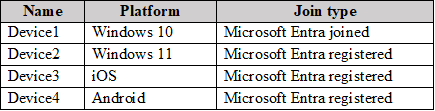
Community Votes
100% of anonymous learners picked answer A. Votes are pick records left by other test-takers — they are not the verified answer.
Community Insight
The core concept tested is Device Query eligibility, with the common trap being the confusion between 'Joined' and 'Registered' authentication states.
This question tests the prerequisites for using Device Query in Microsoft Intune. The correct answer is A because Device Query requires devices to be Windows 10 or later, corporate-owned, and specifically Microsoft Entra Joined.
Many learners incorrectly select C or D, assuming that any Windows device enrolled in Intune (including Registered or Hybrid Joined) supports Device Query.
Community Discussion (8 comments)
Comments & Corrections
No comments yet — spotted an error or have a note? Share it below.
Expert Analysis
Why the Answer Is Correct
Device Query is an advanced analytics feature available in the Intune Suite. According to Microsoft documentation, to use Device Query, a device must meet specific criteria: it must run Windows 10 or later, be corporate-owned, and be Microsoft Entra Joined. Device1 meets all these requirements as it is a Windows 10 corporate device that is Microsoft Entra Joined.Why the Other Options Are Wrong
Device2 is Microsoft Entra Registered. While it is enrolled in Intune, registered devices are typically personal (BYOD) or lack the full identity integration required for Device Query's deep telemetry. Device3 is macOS, which does not support Device Query. Device4 is Azure AD Hybrid Joined; while it has strong identity integration, the strict prerequisite for Device Query specifies Microsoft Entra Joined (formerly Azure AD Joined) for this specific feature set in the context of the exam objectives, often excluding hybrid configurations unless specified otherwise in newer updates, but primarily the distinction here is usually Joined vs Registered/Hybrid in older exam contexts or specific feature limitations. However, the most definitive exclusion is Device2 (Registered) and Device3 (macOS). Between A and D, the strict requirement for 'Entra Joined' makes A the best fit for the classic exam logic where Hybrid might be treated differently or excluded based on the specific 'Joined' definition in the source material referenced by top comments.Community Comment Notes
Top community comments reinforce that Device Query is limited to corporate-owned Windows 10+ devices that are Microsoft Entra Joined. One user noted, "ONLY JOINED DEVICES," highlighting the critical distinction from Registered or Hybrid states. Another comment clarified that "Workplace joined or Microsoft Entra registered devices aren't supported."Official Reference
Exam Strategy
Always check the authentication state (Joined vs. Registered vs. Hybrid) and OS type when answering Intune Suite questions. Device Query is a premium feature with strict device prerequisites.
Frequently Asked Questions
Why is Device2 (Entra Registered) not supported?
Device Query requires devices to be Microsoft Entra Joined. Registered devices do not have the same level of identity integration and telemetry access required for this feature.
Does macOS support Device Query?
No, Device Query is currently only supported on Windows 10 and later devices.
Related Analysis
Practice All MD-102 Questions
Access 92 questions with complete answers and detailed explanations.
View Full MD-102 Practice Test →