Intune Bulk Custom Notifications Supported Devices
Short answer
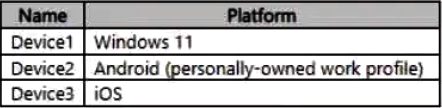
C Send the custom notification only to Device3, as it is the solely managed iOS device, while Windows and registered-only Android devices are unsupported.
Question
Key Takeaways
Custom notifications test your knowledge of supported platforms (iOS/Android) and enrollment states (managed/enrolled), trapping those who assume all Android registrations or Windows devices qualify.
Microsoft Intune custom notifications require devices to be fully enrolled and running a supported OS. This page establishes that only managed iOS/iPadOS and Android devices can receive these push notifications, excluding registered-only Android and Windows devices.
Common mistake: Choosing Device2 and Device3 (Option D), assuming that any Android device registration qualifies, ignoring that registered (MAM-only) devices without Intune enrollment cannot receive MDM push notifications.
Expert Analysis
Why the Answer Is Correct
Option C is correct because custom notifications in Microsoft Intune are only supported on managed iOS/iPadOS and Android devices. Device3 represents an enrolled iOS device, which meets both the platform and enrollment requirements. A bulk device action targeting custom notifications will successfully send the push notification to Device3 via the Apple Push Notification Service (APNS).
Why the Other Options Are Wrong
Device1 is a Windows device, and Windows is explicitly not supported for Intune custom notifications. Device2 is a personally owned Android device that is registered but not enrolled in Intune; because it lacks MDM management, it cannot receive the MDM push notifications required for this feature. Therefore, options A, B, D, and E are incorrect as they either include unsupported platforms or unenrolled devices.
Community Comment Notes
Commenters correctly pointed out that Windows and macOS are unsupported platforms, as GamingFuntime1985 noted with "Windows -NO, Personal Android (registered, no Intune)- NO". The confusion between options C and D stems from whether registered Android devices qualify; they do not, because custom notifications require full Intune enrollment. As Meek_Learner summarized, "custom notifications can be sent to iOS/iPadOS and Android devices only, appearing as push notifications... macOS and Windows devices do not support custom Intune notifications."
Official Reference
https://learn.microsoft.com/en-us/mem/intune/remote-actions/custom-notifications
This link opens the official vendor documentation in a new tab.
Exam Strategy
When evaluating Intune remote actions, always verify both the OS platform support and the device's enrollment state. Registered-only (MAM) devices do not receive MDM-specific push notifications like custom alerts.
Community Votes
60% of anonymous learners picked answer C. Votes are pick records left by other test-takers — they are not the verified answer.
Discussion 7 contributions
Compiled from public community threads and reader submissions, lightly edited for clarity. Handles and vote tallies are shown as recorded, and comments reflect the views of individual contributors.
From public community threads 7
-
Meek_Learner 👍 2 Answered CIn Microsoft Intune, custom notifications can be sent to iOS/iPadOS and Android devices only, appearing as push notifications through the Company Portal app or Microsoft Intune app on the user's device; macOS and Windows devices do not support custom Intune notifications. Key points about Intune custom notifications: • Supported devices: iOS/iPadOS and Android • Delivery method: Push notifications through the Company Portal app or Microsoft Intune app • Not supported on: macOS and Windows • Enrolment status: MDM
-
GamingFuntime1985 👍 2 Answered CC. Windows -NO, Personal Android (registered, no Intune)- NO Requirements for Sending Custom Notifications: Platform Support: Custom notifications can be sent only to iOS/iPadOS and Android devices. Windows devices are not supported for custom notifications. Intune Enrollment: Devices must be enrolled in Intune for the notifications to be sent.
-
Knight_Of_Peace 👍 1 Answered Ccustom notifications works on all mobile devices (Android and iOS/iPadOS) but doesn't work on any computers (Windows and macOS.) "Use Microsoft Intune to send custom notifications to the users of managed iOS/iPadOS and Android devices. These messages appear as standard push notifications from the Company Portal app and from the Microsoft Intune app on a user's device, just as notifications from other applications on the device appear. Intune custom notifications aren't supported by macOS and Windows devices." Ref: https://learn.microsoft.com/en-us/mem/intune/remote-actions/custom-notifications#send-a-custom-notification-to-a-single-device:~:text=Use%20Microsoft%20Intune,and%20Windows%20devices.
-
XylosSW 👍 1 Answered Chttps://learn.microsoft.com/en-us/mem/intune/remote-actions/custom-notifications#send-a-custom-notification-to-a-single-device Use Microsoft Intune to send custom notifications to the users of managed iOS/iPadOS and Android devices. Intune custom notifications aren't supported by macOS and Windows devices. Answer C.
-
dddba0a 👍 1 Answered EeiOS devices: Notifications are delivered through the Apple Push Notification Service (APNS). Android devices: Notifications are delivered through Firebase Cloud Messaging (FCM). Windows 10 and later devices: Notifications are delivered through the Windows Push Notification Service (WNS).
Show 2 more comments
-
ExamBud 👍 1 Answered DD) iOS and Android devices. Doc: https://learn.microsoft.com/en-us/mem/intune/remote-actions/custom-notifications
-
Knight_Of_Peace 👍 3 Answered DCorrect answer: D
Reader comments & corrections
No reader corrections yet — spotted an error or have a note? Share it below.
Related Analysis
Practice All MD-102 Questions
Access 92 questions with complete answers and detailed explanations.
View Full MD-102 Practice Test →