Cloud Policy Service for Microsoft 365 Device Support
Short answer
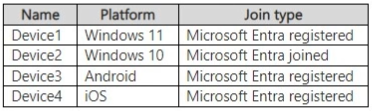
E You can use the Cloud Policy service on Device1, Device2, Device3, and Device4 because it supports Windows, macOS, iOS, and Android.
Question
Key Takeaways
The Cloud Policy service applies to devices running Windows, macOS, iOS, and Android regardless of domain-join status; the common trap is assuming it only applies to Windows or domain-joined devices.
The Cloud Policy service for Microsoft 365 allows administrators to manage Microsoft 365 Apps for enterprise across various operating systems. This page establishes that all major platforms (Windows, macOS, iOS, and Android) are supported, making Option E the correct answer.
Common mistake: Choosing an option that excludes iOS or Android devices, assuming Cloud Policy is restricted to traditional desktop operating systems like Windows and macOS.
Expert Analysis
Why the Answer Is Correct
The Cloud Policy service for Microsoft 365 is designed to enforce policy settings for Microsoft 365 Apps for enterprise across multiple platforms. As noted in the official documentation, policy settings roam to devices running Windows, macOS, iOS, and Android. Therefore, if the four devices in the scenario represent these supported operating systems, Cloud Policy can manage Microsoft 365 Apps on all of them, making Option E correct.
Why the Other Options Are Wrong
Options A, B, C, and D incorrectly exclude one or more devices from being managed by the Cloud Policy service. These options reflect the mistaken assumption that Cloud Policy is limited to specific platforms like Windows and macOS, or that it requires devices to be domain-joined or exclusively Intune-managed to apply policies.
Community Comment Notes
Community members confirmed that all four devices are supported because the service applies across multiple operating systems. As Moot2 noted, "Policy settings are available for devices running Windows, macOS, iOS, and Android", emphasizing that the platform coverage is comprehensive. Another user provided the official Microsoft documentation link to validate this broad support.
Official Reference
https://learn.microsoft.com/en-us/microsoft-365-apps/admin-center/overview-cloud-policy
This link opens the official vendor documentation in a new tab.
Exam Strategy
Remember that the Cloud Policy service for Microsoft 365 is platform-agnostic for major OSs (Windows, macOS, iOS, Android) and does not require devices to be domain-joined. When a question asks about Cloud Policy scope, include all supported OS device types.
Community Votes
100% of anonymous learners picked answer E. Votes are pick records left by other test-takers — they are not the verified answer.
Discussion 3 contributions
Compiled from public community threads and reader submissions, lightly edited for clarity. Handles and vote tallies are shown as recorded, and comments reflect the views of individual contributors.
From public community threads 3
-
Moot2 👍 3 Answered EE is correct Cloud Policy service for Microsoft 365 lets you enforce policy settings for Microsoft 365 Apps for enterprise on a user's device, even if the device isn't domain joined or otherwise managed. When a user signs into Microsoft 365 Apps for enterprise on a device, the policy settings roam to that device. Policy settings are available for devices running Windows, macOS, iOS, and Android, although not all policy settings are available for all operating systems.
-
Huffancs00 👍 2 Answered Ehttps://learn.microsoft.com/en-us/microsoft-365-apps/admin-center/overview-cloud-policy
-
HvD 👍 1 Answered EAnswer is correct.
Reader comments & corrections
No reader corrections yet — spotted an error or have a note? Share it below.
Related Analysis
Practice All MD-102 Questions
Access 92 questions with complete answers and detailed explanations.
View Full MD-102 Practice Test →