Managing Updates with Microsoft Intune
Short answer
E Microsoft Intune supports managing updates for Windows, Android, iOS/iPadOS, and macOS devices.
Question
Key Takeaways
Tests knowledge of Intune's update management capabilities across all supported platforms, countering the misconception that it is Windows-only.
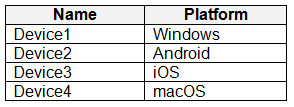
Determines which devices in a mixed environment can have their OS updates managed via Microsoft Intune, covering Windows, Android, iOS, and macOS.
Common mistake: Selecting only Windows devices (Device1) because older study materials or outdated knowledge suggested Intune could not manage mobile or Mac OS updates.
Expert Analysis
Why the Answer Is Correct
Microsoft Intune supports managing OS updates for a wide range of operating systems, including Windows 10/11, Android, iOS/iPadOS, and macOS. Device1 (Windows), Device2 (Android), Device3 (iOS), and Device4 (macOS) are all enrolled in Intune and fall within the supported scope for update policies. Therefore, updates can be configured for all four device types.
Why the Other Options Are Wrong
Options restricting management to only Windows (A, B, C) or excluding specific mobile/Mac devices (D) are incorrect because they reflect outdated information. Prior to certain updates, Intune's ability to manage Android and iOS updates was limited or required specific configurations, but current documentation confirms support for all these platforms. Excluding any of these valid platforms leads to an incomplete answer.
Community Comment Notes
The community heavily voted for option E, reflecting the consensus that Intune manages updates for all listed OS types. Users cited official Microsoft documentation confirming Android update management and general cross-platform support. Some confusion arose from older exam versions or deprecated methods (like e-FOTA for Samsung), but the current standard supports all options.
Exam Strategy
Always assume Intune supports update management for Windows, Android, iOS, and macOS unless the question specifies a legacy constraint. Look for keywords like 'enrolled' to confirm the device is managed.
Frequently Asked Questions
Does Intune manage iOS updates?
Can I manage Android updates in Intune?
Community Votes
100% of anonymous learners picked answer E. Votes are pick records left by other test-takers — they are not the verified answer.
Discussion 10 contributions
Compiled from public community threads and reader submissions, lightly edited for clarity. Handles and vote tallies are shown as recorded, and comments reflect the views of individual contributors.
From public community threads 10
-
Merrybob 👍 5 Answered EE. Device1, Device2, Device3, and Device4
-
Krayzr 👍 3 Answered EAndroid can be managed https://techcommunity.microsoft.com/t5/intune-customer-success/managing-system-updates-on-microsoft-intune-managed-android/ba-p/3887929
-
ckmay 👍 2I am torn because according to this article from 08/08/2023, https://learn.microsoft.com/en-us/mem/intune/protect/software-updates-guide-android, you CAN manage Android updates but... was that the case before? If it wasn't is does this test question take that into account since it was release around the same time as this article saying you can update Android. Devices 1, 3, & 4 was the correct answer in the past but now it seems Devices 1-4 is now correct, but the correct answer depends entirely on what was true at the time the question was written or the test released.
-
MaxSoullard 👍 2 Answered ABased on the types of devices listed and their compatibility with Intune for update management, the correct answer is: A. Device1 only Here's why: Windows devices (Device1) can have updates managed through Intune. Intune supports managing updates on Windows devices, but does not currently support managing OS updates for Android, iOS, or macOS devices (Device2, Device3, and Device4). However, Intune can manage other configurations and policies for Android, iOS, and macOS devices, but not OS updates specifically.
-
MR_Eliot 👍 2 Answered EAnswer should be E. You can configure updates by adding a new device restriction policy for Android Devices. The phone should support this function, but it is passible.
Show 5 more comments
-
mp34 👍 2Intune supports devices using Windows, Android, iOS/iPadOS, macOS, linux and Chrome OS so it should be all devices
-
d82eae7 👍 1Reponse D car il n'existe plus de connecteur e-fota pour samsung, juste pour zebra
-
Pasado 👍 2ChatGPT answer is E
-
krzysiek321 👍 2E - all devices
-
IcE 👍 2 Answered EShould be all
Reader comments & corrections
No reader corrections yet — spotted an error or have a note? Share it below.
Related Analysis
Practice All MD-102 Questions
Access 92 questions with complete answers and detailed explanations.
View Full MD-102 Practice Test →