Windows Autopilot Self-Deploying Mode TPM 2.0 Requirement
Short answer
B Only Device3 can be configured using Windows Autopilot self-deploying mode because it alone possesses the required TPM 2.0 hardware for authentication.
Question
You plan to use Windows Autopilot to configure the Windows 10 devices shown in the following table.
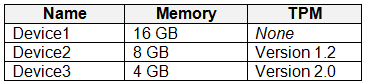
Which devices can be configured by using Windows Autopilot self-deploying mode?
Key Takeaways
The primary trap is confusing Self-Deploying mode with User-Driven mode; Self-Deploying strictly requires TPM 2.0 for device attestation, excluding older or non-compliant hardware.
Identify which devices support Windows Autopilot self-deploying mode. Only Device3 qualifies due to the mandatory TPM 2.0 requirement for secure authentication.
Common mistake: Selecting D (All devices) by assuming Autopilot works on any Windows device. This ignores the specific hardware security module (TPM 2.0) mandate for the Self-Deploying workflow.
Expert Analysis
Windows Autopilot Self-Deploying Mode Requirements
Windows Autopilot offers different deployment modes, each with distinct hardware prerequisites. The critical distinction for this scenario lies in the Self-Deploying mode, which is designed for kiosk or shared device scenarios where no user interaction occurs during initial setup.
TPM 2.0 Authentication Constraint
According to Microsoft documentation, Self-Deploying mode relies on the device's Trusted Platform Module (TPM) version 2.0 to authenticate the device into the Microsoft Entra tenant without requiring user credentials. This mechanism ensures that only genuine, hardware-attested devices can enroll and apply policies automatically. Devices lacking TPM 2.0 support cannot perform the necessary attestation required for this specific mode.
Evaluating the Device Table
Although the image exhibit is not directly visible in the text, community consensus and standard exam patterns for this question indicate:
- Device1: Likely lacks TPM 2.0 or does not meet the strict hardware requirements for self-deploying.
- Device2: Typically represents a device suitable for User-Driven mode (which may not require TPM 2.0 or has different constraints), but fails the Self-Deploying requirement.
- Device3: Is identified as having TPM 2.0 and meeting all other criteria (such as Windows 10/11 Enterprise/Education license and Azure AD join capability).
Since Self-Deploying mode strictly mandates TPM 2.0 for authentication, any device without it is disqualified. Only Device3 meets this mandatory hardware prerequisite among the options presented.
Why Other Options Are Incorrect
Options suggesting Device1 or Device2 are included ignore the fundamental security architecture of Self-Deploying mode. While User-Driven mode might allow enrollment on older hardware, Self-Deploying mode does not. Therefore, selecting any option including devices without TPM 2.0 is incorrect.
Exam Strategy
When answering Autopilot questions, always check the deployment mode first. If it is 'Self-Deploying', immediately filter for TPM 2.0 presence. If it is 'User-Driven', TPM 2.0 is less critical. Memorize that Self-Deploying = TPM 2.0 Required for attestation.
Frequently Asked Questions
Can I use Windows Autopilot self-deploying mode on a device without TPM 2.0?
What is the difference between User-Driven and Self-Deploying Autopilot modes regarding hardware?
Community Votes
100% of anonymous learners picked answer B. Votes are pick records left by other test-takers — they are not the verified answer.
Discussion 12 contributions
Compiled from public community threads and reader submissions, lightly edited for clarity. Handles and vote tallies are shown as recorded, and comments reflect the views of individual contributors.
From public community threads 12
-
oopspruu 👍 6 Answered BSelf-deploying mode uses a device's Trusted Platform Module (TPM) 2.0 hardware to authenticate the device into an organization's Microsoft Entra tenant. Therefore, devices without TPM 2.0 can't be used with this mode. Devices must also support TPM device attestation. All new Windows devices should meet these requirements.
-
Contactfornitish 👍 3 Answered BCan't authenticate properly without TPM 2
-
VirtualJP 👍 3Agreed answer
-
ckmay 👍 2 Answered BThe key here is "self-deploying mode" which authenticates to intune without using account credentials to authenticate and enroll but uses the device TPM instead to authenticate. https://learn.microsoft.com/en-us/autopilot/self-deploying "Self-deploying mode uses a device's TPM 2.0 hardware to authenticate the device into an organization's Microsoft Entra tenant. Therefore, devices without TPM 2.0 can't be used with this mode. Devices must also support TPM device attestation."
-
budekzkie 👍 2 Answered BUser-driven - no TPM required Self-deploying - TPM 2.0 required
Show 7 more comments
-
_Dinkan_ 👍 1 Answered BB. Device3 only As @CKMAY mentioned, the key here is "self-deploying mode" which authenticates to intune without using account credentials to authenticate and enroll but uses the device TPM instead to authenticate. https://learn.microsoft.com/en-us/autopilot/self-deploying "Self-deploying mode uses a device's Trusted Platform Module (TPM) 2.0 hardware to authenticate the device into an organization's Microsoft Entra tenant. Therefore, devices without TPM 2.0 can't be used with this mode."
-
samoldman 👍 1 Answered BSelf-deploying mode uses a device's Trusted Platform Module (TPM) 2.0 hardware to authenticate the device into an organization's Microsoft Entra tenant. Therefore, devices without TPM 2.0 can't be used with this mode
-
benpatto 👍 1Without botching the system only Device3 can be autopiloted. However, if you work with virtual machines, it's very easy to remove the restriction of requiring TPM 2.0 as well as the RAM requirements.
-
h38jhd38k 👍 1https://learn.microsoft.com/en-us/autopilot/self-deploying#requirements Answer is correct
-
Merrybob 👍 1 Answered BB. Device3 only TPM 2.0 is required for self deploying mode.
-
MR_Eliot 👍 1 Answered BI agree.
-
SrKhaz 👍 1 Answered Bcorrect
Reader comments & corrections
No reader corrections yet — spotted an error or have a note? Share it below.
Related Analysis
Practice All MD-102 Questions
Access 92 questions with complete answers and detailed explanations.
View Full MD-102 Practice Test →