Custom Microsoft Defender Exploit Guard Policy in Intune
HOTSPOT
Your network contains an Active Directory domain. Active Directory is synced with Azure AD.
There are 500 Active Directory domain-joined computers that run Windows 10 and are enrolled in Microsoft Intune.
You plan to implement Microsoft Defender Exploit Guard.
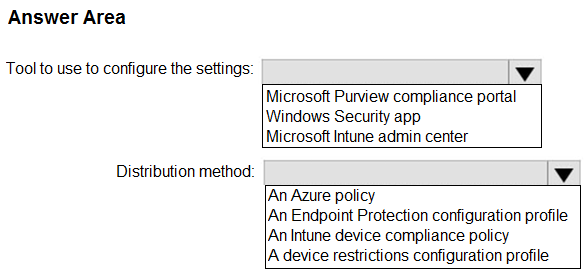
You need to create a custom Microsoft Defender Exploit Guard policy, and then distribute the policy to all the computers.
What should you do? To answer, select the appropriate options in the answer area.
NOTE: Each correct selection is worth one point.
Community Insight
The item tests choosing the correct configuration tool (Microsoft Intune admin center) and the correct profile type (an Endpoint Protection configuration profile) for deploying Exploit Guard; the trap is picking the Windows Security app or an XML import, or a generic template like Windows 10 Desktop instead of the security-focused profile type.
For 500 Windows 10 domain-joined computers already enrolled in Intune, a custom Microsoft Defender Exploit Guard policy is created through the Microsoft Intune admin center using an Endpoint Protection configuration profile, which is then deployed to all devices. This page explains why Intune (not the local Windows Security app or Group Policy) is the tool, and why the Endpoint Protection profile is the correct distribution method for Exploit Guard settings.
Learners often select the Windows Security app or an exploit-protection XML file as the configuration tool. That XML method is a manual, per-device fallback; for centrally managing hundreds of Intune-enrolled devices, the Intune admin center with an Endpoint Protection profile is the required, scalable approach.
Community Discussion (6 comments)
Comments & Corrections
No comments yet — spotted an error or have a note? Share it below.
Expert Analysis
Why the Answer Is Correct
The devices are Intune-enrolled, so the scalable way to deliver Exploit Guard centrally is the Microsoft Intune admin center, not a locally generated file. Within Intune, Microsoft Defender Exploit Guard settings are configured under Endpoint security > Endpoint protection policies, which creates an Endpoint Protection configuration profile; that profile type is explicitly the distribution mechanism for Exploit Guard. Merrybob's reference to the Intune endpoint protection documentation confirms that an Endpoint Protection Config Policy contains the option to create a custom Microsoft Defender Exploit Guard policy. Because the computers are already enrolled, assigning the profile to a device group pushes the policy without any extra onboarding step.Why Other Candidate Answers Are Wrong
Choosing Group Policy or a local exploit-protection XML file ignores that the scenario centers on Intune-managed devices; the XML route (generated from the Windows Security app) is a manual import that must be repeated per device and cannot target 500 machines at once. Selecting a Windows 10 desktop, custom, or kiosk profile type is also wrong, because Exploit Guard settings are not available there — only the Endpoint Protection profile exposes the Exploit Guard nodes. Using an app protection policy is inappropriate, as those govern mobile/app data rather than Windows Exploit Guard configuration.Community Comment Notes
Merrybob confirmed the two selections directly: "An Endpoint Protection Config Policy has the option to create a custom Microsoft Defender Exploit Guard policy," backed by the Microsoft Learn endpoint-protection-windows-10 references. _Dinkan_ restated the same verdict, listing the "Tool to use to configure the settings: Microsoft Intune admin center" and "Distribution Method: An Endpoint Protection configuration profile." ThomasE raised a reasonable doubt, asking "How are you using Intune Admin Center to configure the settings?" and noting his environment wanted an XML import — but that XML import path is the manual exception, not the correct answer for a centrally distributed Intune policy. cpaljchc4 and theptr both concurred the selections are correct, the latter noting "Correct have done this" in practice.Official Reference
Exam Strategy
When an item pairs a 'tool' with a 'distribution method' for Intune-enrolled devices, expect the Intune admin center plus a security-focused profile type such as Endpoint Protection. Read both selections together — a correct tool with the wrong profile type (or vice versa) still loses the points.
Frequently Asked Questions
Why use an Endpoint Protection profile instead of importing an exploit-protection XML file?
The XML file generated by the Windows Security app is applied manually per device. An Endpoint Protection profile in Intune deploys the same Exploit Guard settings to all 500 enrolled computers centrally and keeps them enforced.
Do I need to onboard the domain-joined computers before assigning the Exploit Guard profile?
No extra onboarding is required if the devices are already enrolled in Intune; you simply assign the Endpoint Protection profile to a device group containing those computers.
Related Analysis
Practice All MD-102 Questions
Access 92 questions with complete answers and detailed explanations.
View Full MD-102 Practice Test →