iOS App Protection Policy: Access Requirements and PIN Reset
HOTSPOT
You have a Microsoft 365 subscription.
You use Microsoft Intune Suite to manage devices.
You have the iOS app protection policy shown in the following exhibit.
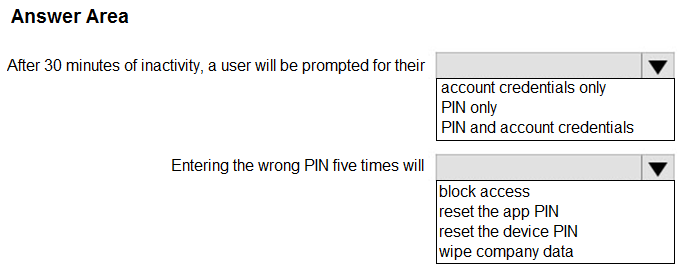
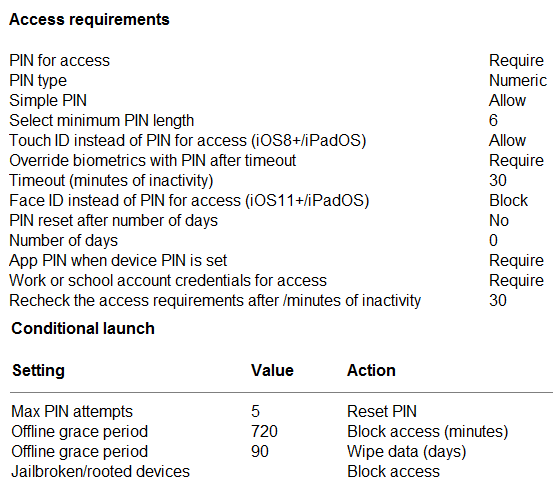 Use the drop-down menus to select the answer choice that completes each statement based on the information presented in the graphic.
NOTE: Each correct selection is worth one point.
Use the drop-down menus to select the answer choice that completes each statement based on the information presented in the graphic.
NOTE: Each correct selection is worth one point.
Community Insight
The item tests whether you distinguish an app-level protection policy (app PIN, account credentials) from device management, where the trap is answering 'reset the device PIN.'
This MD-102 hotspot checks how an Intune iOS app protection policy's access requirement settings behave: when 'PIN and account credentials' is required, opening the app demands both the work or school account sign-in and the app PIN, and admins can reset only the app PIN — never the device PIN.
Selecting 'device PIN' for the reset statement, because app protection policies never touch the hardware PIN — the policy governs only the managed app, which is unmanaged-device friendly by design.
Community Discussion (28 comments)
Comments & Corrections
No comments yet — spotted an error or have a note? Share it below.
Expert Analysis
Why the Answer Is Correct
Because the iOS app protection policy's access requirement is set so that the work or school account credentials are required, opening the protected app triggers both a corporate credential check and the app PIN (or biometric) prompt. Since app protection policies target the app rather than the hardware, the only credential an administrator can clear from the Intune console is the app PIN. That matches the two drop-down selections: 'PIN and account credentials' for the access prompt, and 'reset the app PIN' for the remediation action.Why Other Candidate Answers Are Wrong
A device PIN reset would require a device-management action (such as remote actions on a managed, Entra-registered device), and an unmanaged or personally owned iOS device under app protection is precisely what the policy is designed to protect without enrolling it. Choosing only the PIN, or only the account credentials, is wrong because the 'Require' setting forces both prompts during access checks. Likewise, selecting a device-level or Intune device-restart style action confuses app-level data protection with endpoint device management.Community Comment Notes
Community consensus lines up with this verdict: krzysztofbr stresses "reset app pin NOT device pin", and letters1234 explains that "Credential and PIN (or Biometrics if configured) will be required when re-check is done." Rewound pushes back rhetorically with "How would iOS APP protection policy reset DEVICE PIN?" while NoursBear openly corrects an earlier misreading to "App PIN..." — all confirming that the reset scope is app-level only.Official Reference
Exam Strategy
On hotspot items, read each drop-down against the policy scope: anything about prompts under an access requirement points to credentials plus app PIN, while any 'reset' action under app protection can only ever be the app PIN. Never import device-management actions into an app-protection scenario.
Frequently Asked Questions
Why can't an admin reset the device PIN from an iOS app protection policy?
App protection policies manage the app, not the hardware. Resetting a device PIN requires device management on an enrolled, managed device.
What happens when work or school account credentials are required by an app protection policy?
The user must supply corporate account credentials plus the app PIN or biometric prompt before the protected app grants access.
Related Analysis
Practice All MD-102 Questions
Access 92 questions with complete answers and detailed explanations.
View Full MD-102 Practice Test →