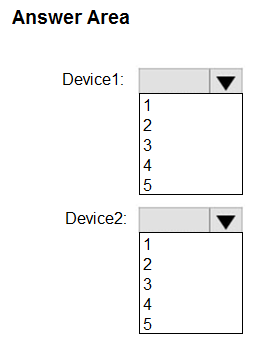
How many VPN connections does User1 get on Device1 and Device2?
HOTSPOT
Case study
Overview
ADatum Corporation is a consulting company that has a main office in Montreal and branch offices in Seattle and New York.
ADatum has a Microsoft 365 E5 subscription.
Environment
Network Environment
The network contains an on-premises Active Directory domain named adatum.com. The domain contains the servers shown in the following table.
 ADatum has a hybrid Azure AD tenant named adatum.com.
Users and Groups
The adatum.com tenant contains the users shown in the following table.
ADatum has a hybrid Azure AD tenant named adatum.com.
Users and Groups
The adatum.com tenant contains the users shown in the following table.
 All users are assigned a Microsoft Office 365 license and an Enterprise Mobility + Security E3 license.
Enterprise State Roaming is enabled for Group1 and GroupA.
Group1 and Group2 have a Membership type of Assigned.
Devices
ADatum has the Windows 10 devices shown in the following table.
All users are assigned a Microsoft Office 365 license and an Enterprise Mobility + Security E3 license.
Enterprise State Roaming is enabled for Group1 and GroupA.
Group1 and Group2 have a Membership type of Assigned.
Devices
ADatum has the Windows 10 devices shown in the following table.
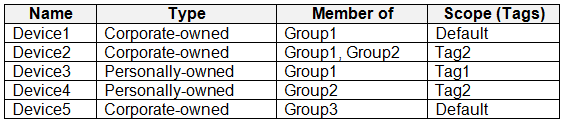 The Windows 10 devices are joined to Azure AD and enrolled in Microsoft Intune.
The Windows 10 devices are configured as shown in the following table.
The Windows 10 devices are joined to Azure AD and enrolled in Microsoft Intune.
The Windows 10 devices are configured as shown in the following table.
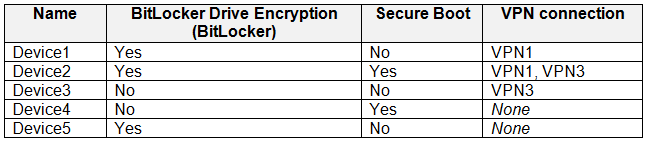 All the Azure AD joined devices have an executable file named C:\AppA.exe and a folder named D:\Folder1.
Microsoft Intune Configuration
Microsoft Intune has the compliance policies shown in the following table.
All the Azure AD joined devices have an executable file named C:\AppA.exe and a folder named D:\Folder1.
Microsoft Intune Configuration
Microsoft Intune has the compliance policies shown in the following table.

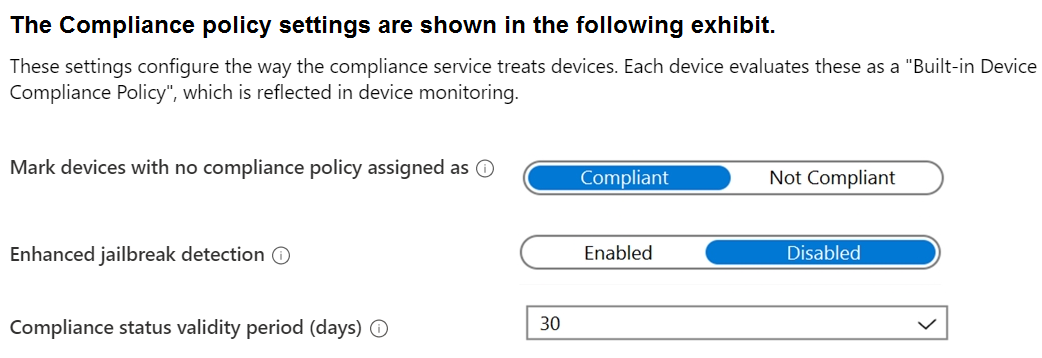 The Automatic Enrollment settings have the following configurations:
• MDM user scope: GroupA
• MAM user scope: GroupB
You have an Endpoint protection configuration profile that has the following Controlled folder access settings:
• Name: Protection1
• Folder protection: Enable
• List of apps that have access to protected folders: C:\*\AppA.exe
• List of additional folders that need to be protected: D:\Folder1
• Assignments:
The Automatic Enrollment settings have the following configurations:
• MDM user scope: GroupA
• MAM user scope: GroupB
You have an Endpoint protection configuration profile that has the following Controlled folder access settings:
• Name: Protection1
• Folder protection: Enable
• List of apps that have access to protected folders: C:\*\AppA.exe
• List of additional folders that need to be protected: D:\Folder1
• Assignments:
- Included groups: Group2, GroupB
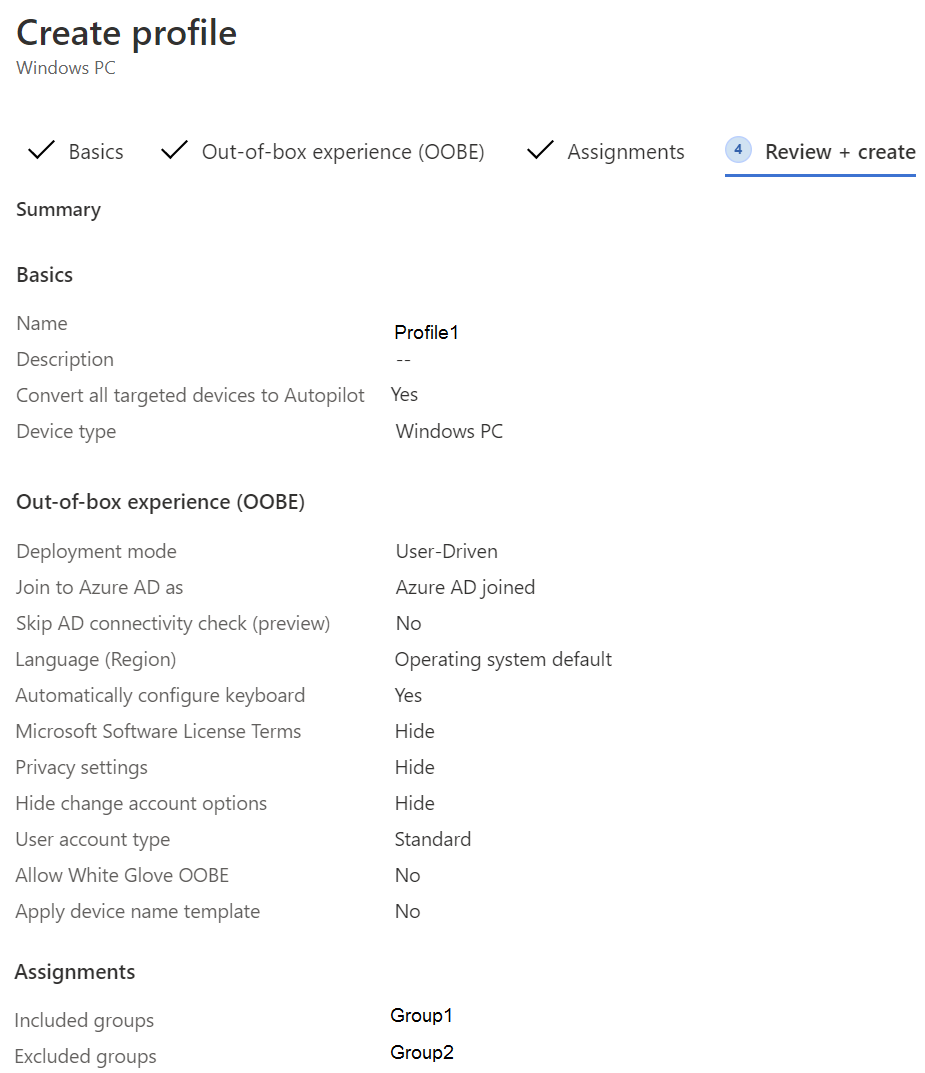 Currently, there are no devices deployed by using Windows Autopilot.
The Intune connector for Active Directory is installed on Server1.
Requirements
Planned Changes
ADatum plans to implement the following changes:
• Purchase a new Windows 10 device named Device6 and enroll the device in Intune
• New computers will be deployed by using Windows Autopilot and will be hybrid Azure AD joined.
• Deployed a network boundary configuration profile that will have the following settings:
Currently, there are no devices deployed by using Windows Autopilot.
The Intune connector for Active Directory is installed on Server1.
Requirements
Planned Changes
ADatum plans to implement the following changes:
• Purchase a new Windows 10 device named Device6 and enroll the device in Intune
• New computers will be deployed by using Windows Autopilot and will be hybrid Azure AD joined.
• Deployed a network boundary configuration profile that will have the following settings:
- Name: Boundary1
- Network boundary: 192.168.1.0/24
- Scope tags: Tag1
- Assignments:
- Included groups: Group1, Group2
- Name: Connection1
- Connection name: VPN1
- Connection type: L2TP
- Assignments:
- Included groups: Group1, Group2, GroupA
- Excluded groups: --
- Name: Connection2
- Connection name: VPN2
- Connection type: IKEv2
- Assignments:
- Included groups: GroupA
- Excluded groups: GroupB
Community Insight
The question tests how device-scoped and user-scoped VPN profiles combine with pre-existing connections, and the trap is counting configuration profile objects instead of the actual VPN connection names presented to the user.
In Microsoft Intune, a VPN configuration profile's administrative name (Connection1, Connection2) is not what the user sees; the connection name inside the profile (VPN1, VPN2) is. Because Connection1 defines the connection name VPN1 that already exists on Device1 and Device2, and Connection2 adds VPN2 to User1 through GroupA, User1 ends up with 2 VPN connections on Device1 and 3 on Device2.
Counting Connection1 and Connection2 as two brand-new connections on top of the existing ones (3 and 4). Intune profiles are labeled separately in the console, but a profile whose connection name matches an existing VPN1 does not create a duplicate, so the correct count is lower.
Community Discussion (18 comments)
Comments & Corrections
No comments yet — spotted an error or have a note? Share it below.
Expert Analysis
Why the Answer Is Correct
Device1 already has the preconfigured VPN1, and Connection1 (connection name VPN1) is assigned to Group1, Group2 and GroupA, so Device1 receives it — but because the connection name is identical to the existing VPN1, it resolves to a single VPN1 entry. Connection2 carries connection name VPN2 and is assigned to GroupA, and User1 is a member of GroupA, so the user-scoped profile adds VPN2 to Device1. That yields exactly two visible connections for User1 on Device1: VPN1 and VPN2. Device2 already carries VPN1 and VPN3, so adding the GroupA-delivered VPN2 produces VPN1, VPN2 and VPN3 — three connections.Official Reference
Exam Strategy
Before adding anything up, write down each device's preconfigured connection names and each new profile's connection name side by side. Then only add the connection names that are genuinely new for that user-device pair, since matching names collapse into one entry.
Frequently Asked Questions
Do two Intune VPN profiles with the same connection name create duplicate connections?
No. If a profile's connection name matches a connection already provisioned on the device, the user still sees a single VPN1 entry rather than two separate ones.
Why does User1 receive the Connection2 VPN on Device1 if the profile targets GroupA?
GroupA is a user group, so Connection2 applies per user: User1's GroupA membership adds the VPN2 connection on every enrolled device the user signs in to.
Related Analysis
Practice All MD-102 Questions
Access 92 questions with complete answers and detailed explanations.
View Full MD-102 Practice Test →