Which Intune Compliance Settings Enforce BitLocker and Minimum OS Version?
DRAG DROP
You have a Microsoft 365 subscription. The subscription contains computers that run Windows 11 and are enrolled in Microsoft Intune.
You need to create a compliance policy that meets the following requirements:
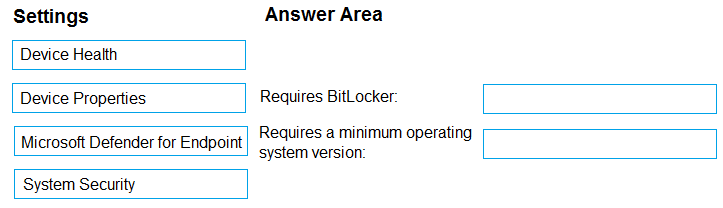
Requires BitLocker Drive Encryption (BitLocker) on each device
Requires a minimum operating system version
Which setting of the compliance policy should you configure for each requirement? To answer, drag the appropriate settings to the correct requirements. Each setting may be used once, more than once, or not at all. You may need to drag the split bar between panes or scroll to view content.
NOTE: Each correct selection is worth one point.
Community Insight
The item tests Intune Windows compliance policy category placement, and the trap is selecting System Security for BitLocker instead of the attestation-based Device Health setting.
In Microsoft Intune, the Windows compliance policy enforces BitLocker through Device Health and minimum OS version through Device Properties. This page confirms the drag-and-drop mapping for the MD-102 scenario.
Candidates often drag System Security for BitLocker because encryption appears there in other policy contexts, but this exhibit expects Device Health for the BitLocker rule and Device Properties for the OS version.
Community Discussion (16 comments)
Comments & Corrections
No comments yet — spotted an error or have a note? Share it below.
Expert Analysis
Why the Answer Is Correct
The BitLocker requirement maps to Device Health because that section contains the Windows Health Attestation rule that requires BitLocker to be enabled on the device. The minimum OS version requirement maps to Device Properties because that section exposes OS version and build fields, including Minimum OS version. In the drag-and-drop item, selecting Device Health for BitLocker and Device Properties for the OS version is therefore the expected pairing.Why Other Candidate Answers Are Wrong
Dragging Device Properties onto BitLocker fails because Device Properties reports OS and build information, not encryption state. Dragging System Security onto the minimum OS requirement fails because System Security focuses on password, firewall, Defender, and related security controls, not the OS version floor. Although some Intune documentation also exposes BitLocker-related encryption settings under System Security, this MD-102 item is keyed to the Device Health attestation rule for BitLocker.Community Comment Notes
krzysztofbr linked the Microsoft Windows compliance policy article and said the "answers are correct". TylerSivis summarized the expected pairing as Device Health for the first requirement and Device Properties for the second. RomanV explained that Device Health relies on Microsoft device attestation, while Device Properties exposes build versions, which supports the same mapping. ThomasE noted that "BitLocker can be either Device Health or System Security" and favored Device Health for TPM-attestation-first policies.Official Reference
- https://learn.microsoft.com/en-us/mem/intune/protect/compliance-policy-create-windows
- https://learn.microsoft.com/en-us/intune/intune-service/protect/compliance-policy-create-windows#windows-health-attestation-service-evaluation-rules
- https://learn.microsoft.com/en-us/intune/intune-service/protect/compliance-policy-create-windows#operating-system-version
Exam Strategy
Memorize the Intune Windows compliance policy sections: Device Health holds attestation checks such as BitLocker, Secure Boot, and TPM, while Device Properties holds OS version and build limits. If a drag item mentions an OS version floor, target Device Properties immediately.
Frequently Asked Questions
Why does BitLocker map to Device Health in this Intune compliance item?
Device Health uses Windows Health Attestation rules, including BitLocker, Secure Boot, and TPM checks; System Security also has encryption controls, but this exhibit expects Device Health.
Where is Minimum OS version configured in an Intune Windows compliance policy?
Under Device Properties, which contains OS version and build fields such as Minimum OS version and Maximum OS version.
Related Analysis
Practice All MD-102 Questions
Access 92 questions with complete answers and detailed explanations.
View Full MD-102 Practice Test →