Do Intune Scope Tags Limit Compliance Policy Assignment?
Short answer
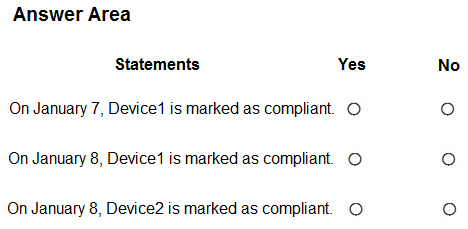
Statement 1: No. Statement 2: No. Statement 3: Yes — scope tags do not limit assignment, so Device1 fails Policy2 immediately while Device2 stays compliant until January 10.
Question
You have a Microsoft Intune subscription that has the following device compliance policy settings:
• Mark devices with no compliance policy assigned as: Compliant
• Compliance status validity period (days): 14
On January1, you enroll Windows 10 devices in Intune as shown in the following table.

On January 4, you create the following two device compliance policies:
• Name: Policy1
• Platform: Windows 10 and later
• Require BitLocker: Require
• Mark device noncompliant: 5 days after noncompliance
• Scope (Tags): Tag1
• Name: Policy2
• Platform: Windows 10 and later
• Firewall: Require
• Mark device noncompliant: Immediately
• Scope (Tags): Tag2
On January 5, you assign Policy1 and Policy2 to Group1.
For each of the following statements, select Yes if the statement is true. Otherwise, select No.
NOTE: Each correct selection is worth one point.
Key Takeaways
The question tests whether scope tags filter policy assignment; the trap is assuming Tag1 restricts Policy1 to Device1 and Tag2 restricts Policy2 to Device2, which flips every verdict.
This MD-102 hotspot tests how Intune device compliance policies behave when two Windows 10 policies are assigned to Group1 and scoped with different tags. Scope tags only control admin visibility, so both Policy1 and Policy2 apply to every device in Group1, producing No, No, Yes across the three statements.
Common mistake: Treating Scope (Tags) as an assignment filter so each device only gets one policy. Scope tags govern which admins can see objects in the console, not which devices a policy targets — so Device1 is judged by both policies at once.
Expert Analysis
Why the Answer Is Correct
Both Policy1 and Policy2 are assigned to Group1, and scope tags do not filter assignment, so both policies evaluate every Windows 10 device in that group on January 5. Device1 has Firewall off, which Policy2 requires with "Mark device noncompliant: Immediately," so it becomes noncompliant on January 5 and is therefore still noncompliant on January 7 and January 8 — giving No, No. Device2 fails Policy1's BitLocker requirement, but Policy1 uses "5 days after noncompliance," so from January 5 the state changes on January 10; on January 8 Device2 remains compliant, giving Yes.Why Other Candidate Answers Are Wrong
An YYY verdict depends on treating Tag1/Tag2 as assignment scoping, which is a documented misconception: scope tags are an RBAC visibility filter, not a targeting mechanism. It also relies on the 14-day compliance validity period grace to keep devices compliant, but once a policy explicitly marks a device noncompliant (immediately for Device2's firewall failure under Policy2), the validity period does not override that state. The NNN reading is wrong only because it ignores the 5-day grace on Policy1, which genuinely keeps Device2 compliant through January 8.Community Comment Notes
Several learners converged on the same verdict: MR_Eliot wrote "NNY for sure," and ZaFletch explained that "Scope tags are irrelevant to policy deployment." JayHall added that Device2 "IS compliant on Jan 8th but it will go into non-compliant statis on Jan 10th," matching the 5-day grace. Dissenting voices such as mhmyz argued YYY on the basis that "Device1=Tag1 Policy1 only apply," while oopspruu and 2c57d1c countered that tags "have no purpose when it comes to assignment," which is the vendor-correct position.Official Reference
- https://learn.microsoft.com/en-us/mem/intune/protect/create-compliance-policy
- https://learn.microsoft.com/en-us/mem/intune/fundamentals/scope-tags
These links open the official vendor documentation in a new tab.
Exam Strategy
When a compliance question includes scope tags, immediately mark them as a distractor and evaluate every assigned policy against every device in the target group. Then apply each policy's own "Mark device noncompliant" grace period to the assignment date before deciding a Yes/No verdict.
Frequently Asked Questions
Do scope tags in Intune limit which devices a compliance policy applies to?
Why is Device2 still compliant on January 8 in this scenario?
Discussion 41 contributions
Compiled from public community threads and reader submissions, lightly edited for clarity. Handles and vote tallies are shown as recorded, and comments reflect the views of individual contributors.
From public community threads 30 of 41
-
HawkieEyes 👍 27N - no firewall, policy 2 marks it non compliant immediately N - see above Y - will be set to not compliant on the 10th
-
mhmyz 👍 15I think YYY Y - Device1=Tag1 Policy1 only apply Y - Device1=Tag1 Policy1 only apply Y - Device2=Tag2 Policy2 only apply Scope Tag: https://learn.microsoft.com/en-us/mem/intune/protect/create-compliance-policy
-
Fortind1974 👍 8Policy1 & Policy2 are both assigned to Group1. Scope (Tags) are used to determine which objects admins can see. 1: Policy2 marks the device noncompliant immediately 2: Policy2 still marks the device noncompliant immediately 3: Policy1 marks device noncompliant after 5 days
-
Besxp 👍 7Y,Y,Y! ➡ Device1: Matches Policy1 (Tag1) BitLocker: Enabled → meets requirement No noncompliance → still compliant ➡ No Policy2 applies → Device1 has no Tag2 ✅ Device1 is compliant → YES ➡ Same as above: Still meets Policy1 requirement (BitLocker enabled) No firewall requirement (Policy2 doesn’t apply because no Tag2) ✅ Device1 is compliant → YES ➡ Device2: Matches Policy2 (Tag2) Firewall: On → meets Policy2 requirement Policy1 doesn’t apply (no Tag1) ✅ Device2 is compliant → YES Many commenters assumed: ❌ Both policies apply to both devices (ignores scope tags). ❌ Device1 fails because its firewall is off (but no applicable policy requires firewall). ❌ Device2 fails because BitLocker is disabled (but no applicable policy requires BitLocker).
-
reapernam 👍 5The answer could be YYY. Devices are already compliant before having the policies assigned to them. So when the newly added compliancy policies take effect, the devices are still compliant. 1. Yes- Device is still within its 14 day validity of initial compliance, and with 5-day rule, will only be labeled as non-compliant after 5 days, meaning its still compliant. 2. Same as above. 3. Yes, Look at cserra answer
Show 25 more comments
-
JayHall 👍 51 N) - Device 1 is NOT compliant on Jan 7th because the firewall is off and immediately becomes non-compliant. 2 N) - Device 1 is NOT compliant on Jan 8th because the firewall is still off. 3 Y) - Although firewall is off, Device 2 IS compliant on Jan 8th but it will go into non-compliant statis on Jan 10th (due to firewall being off, 5 days after non-compliance)
-
ZaFletch 👍 5Scope tags are irrelevant to policy deployment. So both policies apply to both machines on 4th. Policy 2 marks non-compliance immediately so device 1 is marked non-compliant immediately as it fails the criteria. Device 2 passes but it will fail on Policy 2. However it's not marked non-compliant until the 9th. So on the 8th it will remain compliant. NNY
-
reapernam 👍 4On Second thought, its N N Y. Like ExamKiller020 says, the Scope Tags have no relevance in Policy or Group assignments. So both Policies are being applied.
-
oopspruu 👍 4Scope Tags are just to throw you off and confuse you. They have no purpose when it comes to assignment. Given answers are correct.
-
2c57d1c 👍 4Assignment of Groups is how these are assigned...Scope tags mean nothing in this case.
-
BJS78 👍 4Tag is for RBAC. No relevance in configuration implementation.
-
MR_Eliot 👍 4NNY for sure.
-
jzmirus2 👍 3Policy Assignment for Device1: Policy1 applies (because it is assigned to Group1 and has Scope Tag1). Policy2 does NOT apply (Device1 does not have Scope Tag2). Policy1 requires BitLocker enabled → Device1 meets this requirement ✅. Policy1 does not enforce firewall settings (so, the firewall being off does not make it noncompliant). Policy1 marks a device noncompliant after 5 days of noncompliance, but Device1 is already compliant. ➡️ Device1 remains compliant throughout. On January 7, Device1 is marked as compliant? ✅ Yes On January 8, Device1 is marked as compliant? ✅ Yes
-
fiskaba 👍 3Remember, the policies are assigned on Jan 5th. For this scenario, the device compliance policy settings are irrelevant because all devices have a policy assigned: 1 N) - Device 1 is NOT compliant on Jan 7th because the firewall is off and immediately becomes non-compliant. 2 N) - Device 1 is NOT compliant on Jan 8th because the firewall is still off. 3 Y) - Device 2 IS compliant on Jan 8th because the firewall is on, AND Policy1 does not go non-compliant until Jan 10th (5 days after non-compliance).
-
cserra 👍 3I think the answer is YYY Initialy, all devices are compliant. 1) On jan 7, Policy1 don't mark yet as not compliant because need pass 5 days to apply the "noncompliant". Policy2 dont apply because Device1 is out of his scope (Tag2). Then, is it compliant? YES 2) On jan 8, the case is the same than before. Then YES 3) To Device2, only the Policy2 is applicable (Tag2). The device has the firewall activated. Then, is it compliant? YES
-
batang_aratan 👍 3Answers are correct No - because the firewall rule applies immediately No - for the same reason, firewall rule Yes - because although BitLocker is disabled on Device 2, Policy1 hasn't kicked in yet. On January 10, Device 2 will be non-compliant.
-
AleFCI1908 👍 3N no firewall, policy2 marks it non compl immediately N no firewall, policy2 marks it non compl immediately Y will be not compliant on the Jan 10th
-
jzmirus2 👍 2Device2: BitLocker is disabled ❌ (Fails Policy1 requirement) Firewall is on ✅ (Meets Policy2 requirement) Scope Tag: Tag2 (Matches Policy2, but not Policy1) Group Membership: Group2 Policy Assignment for Device2: Policy1 does NOT apply (not in Group1 or Scope Tag1). Policy2 does NOT apply (only assigned to Group1, but Device2 is in Group2). Since no compliance policy is assigned to Device2, and the setting "Mark devices with no compliance policy assigned as: Compliant" is enabled, Device2 is automatically considered compliant. ➡️ On January 9, Device2 is marked as compliant? ✅ Yes
-
02dc19c 👍 2the answers are YYY: Scope tags act as a filter, ensuring that only devices with the designated tags are impacted by the policy. This provides a way to refine and control the assignment of policies within broader groups. This means that Device 1 is only subject to the first policy and is compliant immediately regardless of grace period, and Device 2 is only subject to the 2nd policy and again, is compliant immediately. Hence, YYY
-
PXAbstraction 👍 2There is a lot of debate on this, but I've just spent a half hours reading up on it and am confident in saying that scope tags do NOT have any impacts on how policies are applied to devices, only what users can view them for administrator. Which means that the given answers are in fact correct.
-
_Dinkan_ 👍 2Scope Tags are used for RBAC. Only an admin with both these tags assigned (or Intune administrator role) can assign a Tag1 policy to Tag2 device. But once applied, they will just work, hence we don't haver to consider about them when evaluating the policies. Just ignore them.
-
Faceless_Void 👍 2January 1, devices onboarded with 14 days. Modified to 5 days. Device1 Tag1 Jan7 - NO - 5days validity from onboarding. Device1 Tag1 Jan8 - NO - 5days validity from onboarding. Device 2 TAG2 Jan8 - YES - Requirements MET - Firewall Enabled.
-
RabbitB 👍 2Isn't the answer NNN?? Both devices are assigned a compliance policy, which means they don't mark them as "compliant". Regardless of the day and devices, all are not marked as "compliant". Am I wrong?
-
Manojkl1206 👍 2ITs NNN Because: as both policy are applied Policy2 says move the device immediately to Non compliant it will not wait for 5 days hence the 3rd answer should be N
-
AdamRachel 👍 2Device is compliant for policy 2 but is not compliant for policy 1 where device will be mark non-compliant after 5 days which is 9 Jan.
-
Darkfire 👍 2I think NNN Because both policies will mark devices as non-compliant. Eventhough some variables pass the criteria.
-
Oekoe 👍 2Please ignore my comment. Grace period is the same as the compliant. Tag is what the device sees. YYY
-
Krayzr 👍 2But it will not be marked "compliant", it will have "evaluating" or something like that till 10th.
-
ExamKiller020 👍 2Just remember: Scope (Tags) are used to determine which objects admins can see. N,N,Y
-
Grg433 👍 2can someone please explaing why N,N,Y ?
Reader comments & corrections
No reader corrections yet — spotted an error or have a note? Share it below.
Related Analysis
Practice All MD-102 Questions
Access 92 questions with complete answers and detailed explanations.
View Full MD-102 Practice Test →