Applying No. Series Design Pattern in Business Central OnInsert Trigger
Short answer
Apply the No. Series design pattern by checking if the No. field is empty, retrieving the setup record, testing the Vendor Nos. field, initializing the series, and assigning the new number.
Question
You develop a table named Contoso Setup and a page.
You plan to use No. Series to automatically assign a unique number to data entries. You set up No. Series on the Vendor Nos. field of the Contoso Setup table.
You need to apply the No. Series Design Pattern to the trigger OnInsert().
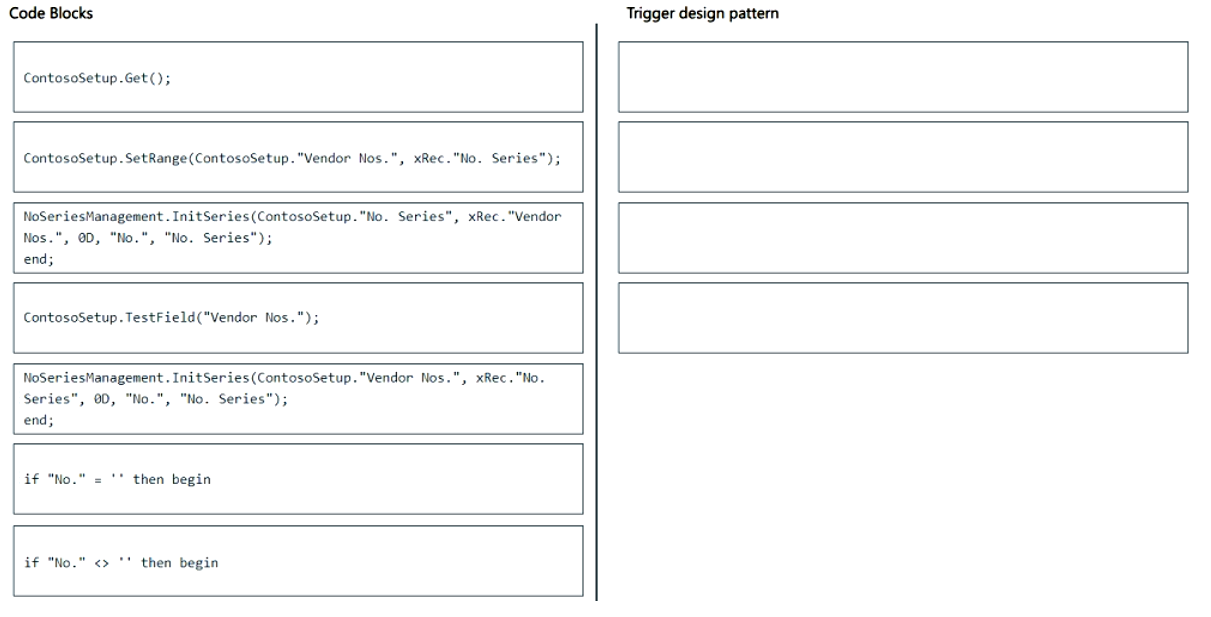
Which four code segments should you use to develop the solution? To answer, move the appropriate code segments from the list of code segments to the answer area and arrange them in the correct order.
Key Takeaways
The core concept is the standard No. Series implementation flow: check if empty, get setup record, test field, init series, and assign value. The common trap is missing the 'begin' block or incorrect ordering of Get() and TestField().
This question tests the correct sequence for implementing the No. Series design pattern in an AL OnInsert trigger. It establishes that you must initialize the series only if the number is empty and ensure the setup table is retrieved before accessing fields.
Common mistake: Learners often place `ContosoSetup.Get()` before checking if the No. field is empty, or forget to wrap the logic in a `begin...end` block, leading to syntax errors or logical flaws where the series is initialized unnecessarily.
Expert Analysis
Why the Answer Is Correct
The correct implementation of the No. Series design pattern in an OnInsert trigger follows a specific sequence to ensure data integrity. First, you check if the No. field is empty (If "No." = '' then begin). Second, you retrieve the setup record using Get (e.g., ContosoSetup.Get). Third, you verify the setup field is populated using TestField("Vendor Nos."). Fourth, you initialize the series using NoSeriesManagement.InitSeries. Finally, you assign the generated number to the current record's No. field. This sequence ensures the series is only initialized when necessary and uses the correct setup configuration.
Why the Other Options Are Wrong
Incorrect options typically violate this logical flow. Placing Get before the empty check might cause unnecessary database calls or errors if the setup isn't handled conditionally. Omitting the begin...end block after the if statement causes syntax errors because multiple statements follow the condition. Assigning the number before initializing the series results in an empty or invalid number being saved.
Community Comment Notes
Community feedback highlights that the answer can be tricky due to the drag-and-drop format. One user noted that the sequence requires a 'begin' block after the if statement for the subsequent lines to make sense logically. Another comment emphasized that while the question doesn't explicitly demand strict sequencing in the UI, the code must follow the standard AL pattern: Check Empty -> Get Setup -> Test Field -> Init Series -> Assign Value.
Exam Strategy
Memorize the standard boilerplate code for No. Series initialization in AL. Always start with the 'If No. = '' then begin' check, followed by getting the setup record, testing the field, initializing the series, and finally assigning the value.
Frequently Asked Questions
Why is ContosoSetup.Get() placed after the empty check?
What happens if I omit TestField('Vendor Nos.')?
Discussion 2 contributions
Compiled from public community threads and reader submissions, lightly edited for clarity. Handles and vote tallies are shown as recorded, and comments reflect the views of individual contributors.
From public community threads 2
-
Fennek1893 👍 14Answer is horrendous: 6 - if "No." = '' then begin [we need the 'begin', otherwise the 'end;' in 5 doesn't make sense] 1 - ContosoSetup.Get(); [Even tho setup-tables dont have to be singletons we would need a "FindFirst" or "FindSet" to use a setup then] 4 - ContosoSetup.TestField("Vendor Nos."); [Tests if field in setup-table is filled and throws an Error if ist empty] 5 - NoSeriesManagement.InitSeries(ContosoSetup."Vendor Nos.", xRec."No. Series", 0D, "No.", "No. Series"); end; [Field in ContosoSetup is Called "Vendor Nos." not "No. Series"] you can rearrange it potentially to 1-4-6-5, but then we would need begin and end and the setup-table would be called everytime even tho its not needed everytime (perfomance would be "worse")
-
SpotSquare 👍 1The answer doesn't make sense in its entirety. It also doesn't follow the standard way of utilizing the "No. Series". Although the question does not require the answers to be in sequence, the correct answer should be: 1. If "No." = '' then begin 2. ContosoSetup.Get(); 3. ContosoSetup.TestField("Vendor Nos.") 4. NoSeriesManagement.InitSeries ...
Reader comments & corrections
No reader corrections yet — spotted an error or have a note? Share it below.