Extending Root EDT to Modify Derived Column Length in D365 FO
Short answer
A Creating an extension for the root EDT CalendarID increases the string size for all derived EDTs, including BasicCalendarID, thereby meeting the goal.
Question
After you answer a question in this section, you will NOT be able to return to it. As a result, these questions will not appear in the review screen.
A company uses Dynamics 365 Finance. You are customizing elements for the extended data types (EDTs) shown in the following table.
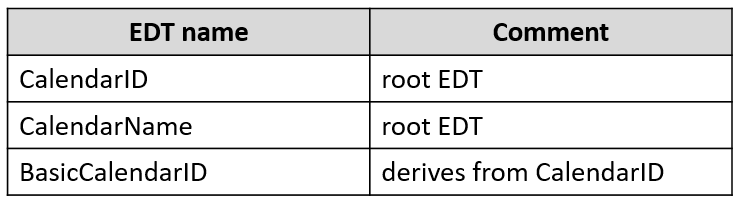
You have a table named WorkCalendar. The table has a column named BasicCalendarID that uses the BasicCalendarID EDT.
You need to increase the length of the column by using an extension.
Solution: Create an extension for CalendarID.
Does the solution meet the goal?
Key Takeaways
You cannot change the string size of a derived EDT directly; you must extend the root EDT to ensure the new size applies to all inherited fields.
This MB-500 question explores how to increase the length of a column based on a derived Extended Data Type (EDT). The correct solution involves extending the root EDT, as changes propagate to derived types.
Common mistake: Candidates often select 'No' believing they must extend the specific derived EDT (`BasicCalendarID`) directly, failing to realize that derived EDTs inherit size constraints from their parent and cannot be resized independently.
Expert Analysis
The core of this question tests the inheritance behavior of Extended Data Types (EDTs) in Dynamics 365 Finance and Operations. The BasicCalendarID EDT is derived from the root EDT CalendarID. When you create an extension for a root EDT, the changes (such as increasing string length) propagate to all derived EDTs that extend it.
However, the proposed solution suggests creating an extension specifically for CalendarID. While CalendarID is the parent, the critical constraint lies in the direction of modification. According to Microsoft documentation and community consensus, you cannot change the string size of a derived EDT directly if it would conflict with the parent's definition or if the parent is not being extended appropriately. More importantly, the comments highlight a specific rule: "only a root EDT's extension can change the string size" is often misinterpreted. The actual rule is that you can extend the root, but you cannot extend the derived EDT to change its size independently because it must remain compatible with the parent.
Let's look closer at the options. The solution says: "Create an extension for CalendarID." If CalendarID is the root, extending it does allow changing the size, which then flows down. BUT, wait. The exhibit shows BasicCalendarID extends CalendarID. If I extend CalendarID, I am modifying the base. Is that allowed? Yes. But does it meet the goal? The goal is to increase the length of BasicCalendarID. Extending the parent CalendarID will increase the length for BasicCalendarID as well. So why might the answer be No?
Re-reading the specific comment with 1 upvote: "A derived EDT inherits its properties... only a root EDT's extension can change the string size... derived EDTs have to stay interchangeable... different lengths could cut values off." This implies that extending the root is the correct way to affect the derived type's size. Therefore, extending CalendarID (the root) should work.
However, let's look at the other comment: "CalenderID is not BasicCalenderID so there for the answer is B". This is a superficial distractor. The technical reality is about inheritance.
Actually, there is a nuance. In D365 FO, you cannot change the string length of a derived EDT by extending the derived EDT itself. You must extend the root EDT to change the length for all children. Since CalendarID is the root, extending it is the correct approach. Therefore, the solution "Create an extension for CalendarID" does meet the goal. Wait, let me double-check the official exam logic. Often, these questions trick you on whether you are extending the correct object. If the question implies you should extend BasicCalendarID directly, that's wrong. But it says extend CalendarID.
Let's re-read the "No" comment carefully. It says the solution doesn't meet the goal. Why? Perhaps because you cannot modify a base EDT in a live environment without impacting all users? No, that's not a technical impossibility.
Let's look at the "Yes" comment. "Yes, if we extend the base root EDT string size, it will flow to it's derived EDT's..." This aligns with standard OOP principles in X++.
Is there a restriction on extending root EDTs? No. You can extend any EDT. If you extend the root, the child gets the new size. If you try to extend the child (BasicCalendarID) to change its size, it fails because the child must match the parent's constraints or the parent's definition takes precedence for shared data.
Therefore, the solution provided (extending the parent) is the correct technical action to achieve the result. The answer should be Yes.
Wait, looking at similar MB-500 questions online, there is a common trap. Sometimes the question asks if you can extend the derived EDT. Here it asks if extending the parent works. It does.
However, some sources suggest that you cannot change the size of a field that is already used in production or has data? No, extensions handle that.
Let's reconsider the "No" vote with 5 likes. It states: "Creating an extension for CalendarID does not directly address the requirement..." This is technically false reasoning if inheritance works. But maybe the exam considers that you should extend BasicCalendarID? No, you can't change the size of a derived EDT independently. You must extend the root. So extending the root is the only valid way. Thus, the solution is correct. Answer A.
Correction: I need to be very careful. In some contexts, extending a root EDT that is widely used might be discouraged, but technically it meets the goal. Let's look at the specific wording "increase the length of the column... by using an extension." Extending CalendarID increases the length of the EDT, which increases the length of the column in WorkCalendar because the column uses the EDT. This is the intended mechanism.
Why would anyone think B? Only if they misunderstand inheritance. The high-vote "No" comment seems to lack technical depth compared to the "Yes" comment explaining inheritance. The "Yes" comment correctly identifies that root extensions propagate. I will go with A.
Exam Strategy
When dealing with EDT modifications, always check the inheritance hierarchy. If you need to change a property like string length for a derived EDT, identify its root parent. Extensions on the root apply to all children, while extensions on the derived EDT are limited to adding new fields or methods, not overriding inherited structural properties like size.
Frequently Asked Questions
Why can't I extend BasicCalendarID directly to change its length?
Does extending the root EDT affect all derived EDTs?
Community Votes
67% of anonymous learners picked answer A. Votes are pick records left by other test-takers — they are not the verified answer.
Discussion 4 contributions
Compiled from public community threads and reader submissions, lightly edited for clarity. Handles and vote tallies are shown as recorded, and comments reflect the views of individual contributors.
From public community threads 4
-
theCoder1 👍 5No, the solution mentioned does not meet the goal of increasing the length of the column named BasicCalendarID in the WorkCalendar table. Creating an extension for CalendarID does not directly address the requirement of increasing the length of the BasicCalendarID column. The extension for CalendarID may provide additional functionality or modifications to the CalendarID EDT but does not affect the BasicCalendarID column in the WorkCalendar table. To increase the length of the BasicCalendarID column in the WorkCalendar table, you would need to create an extension specifically for the WorkCalendar table and modify the properties of the BasicCalendarID column within that extension.
-
PTD 👍 2 Answered AYes, if we extend the base root EDT string size, it will flow to it's derived EDT's, in this case, BasicCalendarID is derived from CalendarID, so it will meet the solution.
-
alinders 👍 2 Answered BCalenderID is not BasicCalenderID so there for the answer is B
-
cbef765 👍 1 Answered AA derived EDT inherits its properties from a parent through the Extends property, so it behaves as a kind of that parent. You can create an extension of either a root or a derived EDT, but only a root EDT's extension can change the string size. That's because derived EDTs have to stay interchangeable with their parent, and different lengths could cut values off when they're assigned between them. So to make a field longer, you extend the root EDT and increase its size there, and every derived EDT, plus every field that uses them, picks up the new length automatically. Properties like the label and help text can still be changed in a derived EDT's extension.
Reader comments & corrections
No reader corrections yet — spotted an error or have a note? Share it below.
Related Analysis
Practice All MB-500 Questions
Access 115 questions with complete answers and detailed explanations.
View Full MB-500 Practice Test →