Dynamics 365 Finance Accrual Scheme Configuration
Short answer
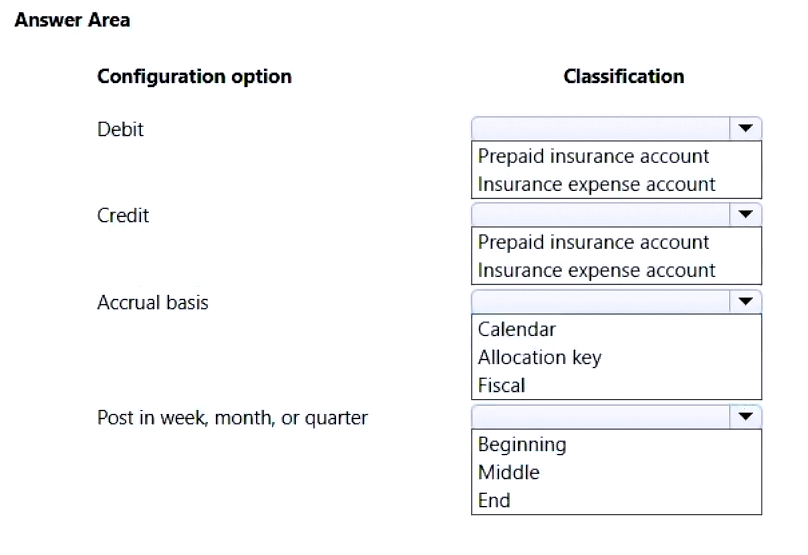
Debit: Insurance expense account; Credit: Prepaid insurance account; Accrual basis: Calendar; Post in week, month, or quarter: Month
Question
A company uses Dynamics 365 Finance.
The company has prepaid insurance expenses at the beginning of the calendar year that cover the entire year. The company must expense the prepaid insurance automatically and equally during a month-end process.
You need to configure the accrual scheme.
How should you configure the accrual scheme? To answer, select the appropriate options in the answer area.
NOTE: Each correct answer is worth one point.
Key Takeaways
The main trap is reversing the debit/credit accounts or selecting an incorrect posting frequency that doesn't match the required 'month-end' automation.
Configure accrual schemes in D365 Finance by debiting the expense account and crediting the prepaid asset account using a monthly calendar-based posting schedule.
Common mistake: Selecting Prepaid Insurance as the Debit account, which incorrectly increases the asset instead of recognizing the expense.
Expert Analysis
The scenario requires configuring an Accrual Scheme in Dynamics 365 Finance to automatically expense prepaid insurance equally over the calendar year. The core mechanism is a recurring journal that transfers value from an asset to an expense.
- Debit Account: To recognize the expense, you must debit the Insurance expense account. This increases the expense on the Profit & Loss statement.
- Credit Account: To reduce the asset balance, you must credit the Prepaid insurance account. This decreases the asset on the Balance Sheet as the coverage period passes.
- Accrual Basis: Since the coverage is for the "entire year" and needs to be expensed "equally during a month-end process," the basis should be the Calendar. This ensures equal distribution across months.
- Posting Frequency: The requirement specifies a "month-end process." Therefore, the posting frequency must be set to Month. The system will post at the end of each month.
Comments correctly identify that Debiting Prepaid Insurance (an asset) would incorrectly increase the asset rather than expense it. The correct flow is Dr Expense, Cr Prepaid Insurance.
Exam Strategy
When configuring accruals, always verify the direction of the entry: Debit the P&L account to increase expense, Credit the Balance Sheet asset to decrease it. Match the posting frequency strictly to the prompt's time unit (e.g., 'month-end' means 'Month').
Frequently Asked Questions
Why do we debit the expense account?
What happens if I select 'Quarter' instead of 'Month'?
Discussion 6 contributions
Compiled from public community threads and reader submissions, lightly edited for clarity. Handles and vote tallies are shown as recorded, and comments reflect the views of individual contributors.
From public community threads 6
-
python123 👍 8Debit: Insurance expense account - increase the expense Credit: Prepaid insurance account - decrease the asset account Accrual basis : Calendar Post in week, month, or quarter: by end of every month
-
Flo2021 👍 2Debit: Prepaid insurance account (will replace the expense account ) Credit: either of the two
-
Mukhtartij 👍 11. Debit & Credit Accounts: When you set up an accrual scheme for prepaid expenses, the initial prepayment is recorded as an asset (Prepaid insurance). The purpose of the scheme is to gradually recognize that asset as an expense over time. Therefore, the recurring monthly journal entry will Debit the Insurance expense account (to recognize the expense) and Credit the Prepaid insurance account (to reduce the asset balance). 2. Accrual basis: Calendar The scenario states the insurance covers the calendar year. In Dynamics 365 Finance, selecting Calendar as the accrual basis means the system will divide the total amount equally across the periods defined in the calendar (e.g., 12 months for a full year). 3. Post in week, month, or quarter: End The requirement specifies this must happen during a month-end process. The End option ensures that the automated posting for the expense occurs on the last day of each period (month), aligning perfectly with month-end closing procedures.
-
globeearth 👍 11 (Debit): B. Insurance expense account 2 (Credit): A. Prepaid insurance account 3 (Accrual basis): A. Calendar 4 (Post in week, month, or quarter): C. End accrual scheme’s Debit field is for the expense account(PL Account, insurance) in the monthly entries, The Prepaid insurance account(Asset account) is correctly used as the Credit account to reduce the asset.
-
achokler 👍 1The answer is wrong. Debit expense, credit prepai,d calendar at the end of the month
Show 1 more comment
-
Warlock1 👍 1Debit - Insurance expense account Credit - Prepaid insurance account
Reader comments & corrections
No reader corrections yet — spotted an error or have a note? Share it below.
Related Analysis
Practice All MB-310 Questions
Access 100 questions with complete answers and detailed explanations.
View Full MB-310 Practice Test →