Managing Module Access in Closed Periods via Ledger Calendar
Short answer
D Use a ledger calendar to update module access to block sales orders while allowing accounts payable postings in the restricted period.
Question
This is a case study. Case studies are not timed separately. You can use as much exam time as you would like to complete each case. However, there may be additional case studies and sections on this exam. You must manage your time to ensure that you are able to complete all questions included on this exam in the time provided.
To answer the questions included in a case study, you will need to reference information that is provided in the case study. Case studies might contain exhibits and other resources that provide more information about the scenario that is described in the case study. Each question is independent of the other questions in this case study.
At the end of this case study, a review screen will appear. This screen allows you to review your answers and to make changes before you move to the next section of the exam. After you begin a new section, you cannot return to this section.
To start the case study
To display the first question in this case study, click the Next button. Use the buttons in the left pane to explore the content of the case study before you answer the questions. Clicking these buttons displays information such as business requirements, existing environment, and problem statements. If the case study has an All Information tab, note that the information displayed is identical to the information displayed on the subsequent tabs. When you are ready to answer a question, click the Question button to return to the question.
Background
First Up Consultants is a global engineering and consulting organization based in Atlanta. The organization assists customers with various implementation projects. The organization provides both consulting services and custom software development.
First Up Consultants was recently acquired by a Canadian engineering firm that uses Dynamics 365 Finance. The firm requires First Up Consultants to transition to the solution by 2022.
First Up Consultants employs consultants that travel globally, which requires extensive expense management capabilities. First Up Consultants offers software as a service (SaaS) products to customers by using monthly and quarterly subscriptions.
Current environment. Travel and expense
The company is currently in Phase 2 of their Dynamics 365 Finance implementation.
• Consultants submit all travel receipts by using inter-office mail to the team admin for processing, but First Up Consultants wants to modernize this experience.
• Expense reports are manually approved and signed by the employee’s manager.
Current environment. Finance
• First Up Consultants operates on a 4-5-4 calendar.
• Accounting for revenue has been difficult with the SaaS offerings. This has led to implementing Dynamics 365 Finance Revenue recognition.
• Revenue recognition has been live for 3 months.
• Adatum Corporation pays quarterly for use of the First Up Consultants web design application, starting from the day of use.
• Fourth Coffee pays monthly for use of the First Up Consultants photograph editing application with a contract starting August 1 and payment starting September 1.
• Adventure Works Cycles pays per use of the First Up Consultant video platform.
• A blocking rule is set up to prevent a sales order from processing if a customer exceeds a credit limit.
• Customer credit is set up at the account level for VanArsdel, Ltd.
• Tailspin Toys is owned by Wingtip Toys. The companies have a credit limit of $60.000 and $100,000, respectively.
Current environment. Revenue allocation
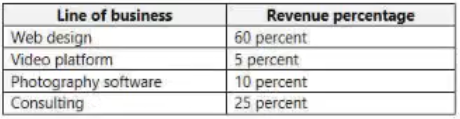
The company reports the following revenue allocation percentages:
Current environment. Tax
VAT tax recovery is required for eligible international business trip expenses. Bank reconciliation is manual and performed by using monthly mailed account statements.
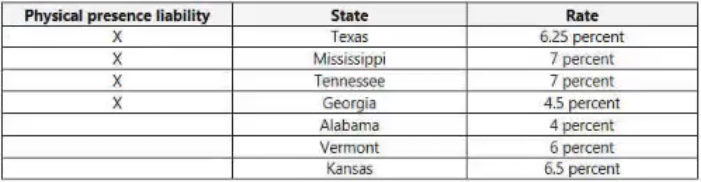
The company collects sales taxes from the following states:
Requirements
Travel and expense
• First Up Consultants requires that employees start using corporate cards for all travel expenses.
• All expenses over $50 require a receipt.
• Beer cannot be expensed.
• Employees may use the corporate card for personal expenses during work travel, but expenses must be categorized correctly.
• Client entertainment expenses totaling more than $250 must be audited.
• Employees require a mobile expense experience.
• Expense report entries must be validated when a transaction line is entered.
• Employees require the ability to capture receipts by using a mobile device.
• First Up Consultants requires the ability to reimburse employees in their paychecks for expenses incurred on personal cards.
Financials
• A virtual thirteenth month is required for year-end transactions.
• Each day, a validation file must go to First Up Consultants bank detailing all vendor checks paid.
• Except fees, all matched transactions must clear automatically during bank reconciliation.
• The accounts payable team must verify expense reports prior to posting.
• Only payables are allowed to be posted to a prior period up to seven days into the new period.
Issues
• User1 installed the Expense Management Service add-in and implemented the auto-match and create expense from receipt features, but the receipt images do not match the corporate card transactions.
• Employee1 submits an expense report for a business trip to Europe, but the report is not visible on the expense tax recovery page.
• Employees provided feedback that the system lets them know of an expense report policy violation only after the entire expense report is submitted.
• Members of the finance department observe sales orders that posted into a closed period.
• The finance team observed that for sales order invoice 1234, the price incorrectly posts to a revenue account when it should be deferring.
• Employee2 purchased supplies for a holiday party and needs to be reimbursed.
• A customer orders software licenses for the offices in Tennessee and Alabama.
• Expense reports for unapproved items are posting.
• VanArsdel, Ltd. exceeded its credit limit but the sales order was processed.
• Tailspin Toys purchases $70,000 in custom software development.
You need to address the posting of sales orders to a closed period.
What should you do?
Key Takeaways
The question tests the distinction between closing a period globally versus restricting specific modules; selective module access is required when multiple modules have different posting permissions.
Learn how to use the ledger calendar to update module access in Dynamics 365 Finance MB-310, preventing sales orders from posting to closed periods while allowing accounts payable.
Common mistake: Selecting Option B (update period status) is incorrect because it closes the period for all modules, which would violate the rule allowing accounts payable to post for seven days.
Expert Analysis
The core issue is that sales orders are posting into a closed period, violating the requirement that only payables may post to a prior period for up to seven days. To prevent sales (accounts receivable) from posting while keeping accounts payable open, you must restrict module-specific access during that period.
Option B (Use a ledger calendar to update period status) sets the period status to 'On hold' or 'Closed'. This blocks all modules from posting to that period. Since the business rule explicitly allows AP to post for seven days, closing the entire period would incorrectly block valid AP transactions. Thus, B is too broad.
Option D (Use a ledger calendar to update module access) allows you to set specific modules (like Accounts Receivable/Sales) to 'Hold' or 'No Access' for that period, while leaving Accounts Payable in 'Open' status. This precisely satisfies the constraint: blocking sales orders while permitting AP postings. This is the granular control required by Dynamics 365 Finance for mixed-period posting rules.
The common trap is selecting Option B because it sounds like a general 'close period' fix. However, exam questions often test the difference between global period closure and module-level access control. The key phrase 'only payables are allowed' signals that other modules must be selectively blocked, not the entire period.
Official Reference
This link opens the official vendor documentation in a new tab.
Exam Strategy
When a question involves posting restrictions in a period, always check if the restriction applies to all modules or specific ones. If specific modules are mentioned (e.g., 'only payables'), look for options that allow granular control like 'module access'. Avoid 'close period' options unless the question states no modules can post.
Frequently Asked Questions
What is the difference between updating period status and module access?
Why can't I just close the period for sales?
Community Votes
75% of anonymous learners picked answer B. Votes are pick records left by other test-takers — they are not the verified answer.
Discussion 7 contributions
Compiled from public community threads and reader submissions, lightly edited for clarity. Handles and vote tallies are shown as recorded, and comments reflect the views of individual contributors.
From public community threads 7
-
b35ea31 👍 3With a Ledger calendar, you can update a Period status to On hold. The correct answer should be B.
-
Mukhtartij 👍 1 Answered DAnswer: D. Use a ledger calendar to update module access. The case study requirement is that only payables are allowed to be posted to a prior period for seven days into the new period. That is the standing rule, and the issue is that sales orders are posting into the closed period. The fix has to shut Accounts receivable and sales out of the period and still leave Accounts payable open. The ledger calendar lets you do that by module: module access control on the ledger calendar lets you close a period for one module while leaving another open. Microsoft’s own wording is that you pick a value in the Access level field to indicate which users can post to the module for the period: all users, no users, or only users in a specific user group. You would set the sales and receivables modules to None and leave payables on All. It is not {B. Use a ledger calendar to update period status} because Period status is for the whole period. Microsoft says if the period status is On hold, Closed, or Year closed, no users can post to that period. That would also block the payables postings the company needs. It is not also A and C because permanently close the period or the fiscal year. Both block every module, again including payables, and the change can’t be reversed. The case study also says a virtual thirteenth month is needed for year-end transactions, so closing the year permanently would get in the way. It is not E because dividing a period changes the calendar’s structure and doesn’t control who can post.
-
NatKae 👍 1 Answered Bfunction "Update module access" is for limit the user group and module type that can post to that period when status is Open. so to allow posting must update module status from hold to Open >>> B https://learn.microsoft.com/en-us/dynamics365/finance/general-ledger/tasks/mass-financial-period-close
-
globeearth 👍 1 Answered Bwhy not D.Only payables are allowed to be posted to a prior period up to seven days into the new period? It is talking about AP not a sales order. the question is addressing the sales order. The answer B is more appropriate
-
NatKae 👍 1Sorry, from the case study "Only payables are allowed to be posted to a prior period up to seven days into the new period." To add authorize for posting sales order, option D might be correct.
Show 2 more comments
-
tarekff 👍 1 Answered B"Members of the finance department observe sales orders that posted into a closed period"
-
JASEEM0712 👍 1Correct answer is B
Reader comments & corrections
No reader corrections yet — spotted an error or have a note? Share it below.
Related Analysis
Practice All MB-310 Questions
Access 100 questions with complete answers and detailed explanations.
View Full MB-310 Practice Test →