Huawei Storage Quick Maintenance Operation Sequence
Short answer
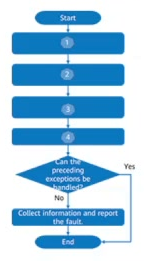
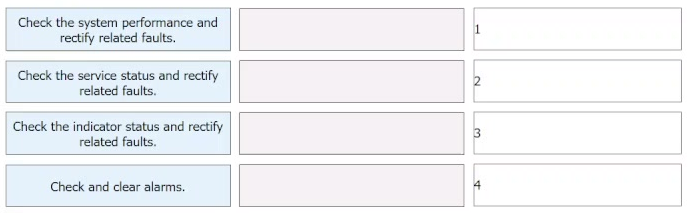
The correct mapping is: Position 1 matches 'Check the indicator status and handle related exceptions', Position 2 matches 'Check the service status and handle related exceptions', Position 3 matches 'Check the system performance and handle related exceptions', and Position 4 matches 'Check and clear alarms'.
Question
Storage engineers can perform operations according to the quick maintenance process to quickly view the working status of core storage devices in the service system. Match the quick maintenance operations with corresponding positions in the figure.
Key Takeaways
Tests the ability to follow the standard bottom-up troubleshooting hierarchy in Huawei storage systems, moving from physical indicators to logical services, then performance, and finally alarms.
Learn the correct sequence for Huawei storage quick maintenance operations: checking indicators, service status, system performance, and clearing alarms to efficiently monitor core devices.
Common mistake: Learners often confuse the order between checking service status and system performance, or placing alarm checks before performance analysis. The correct approach prioritizes physical hardware (indicators) first, then logical state (service), then quantitative metrics (performance), and concludes with event handling (alarms).
Expert Analysis
The question requires matching specific quick maintenance operations to their corresponding positions in a Huawei storage system management interface. The core concept is the standard operational workflow for monitoring and troubleshooting Huawei OceanStor or similar intelligent storage arrays.
The logical flow of a quick maintenance check follows a bottom-up approach, starting from physical hardware status up to system-level performance and alarms.
- Check the indicator status: This is the first step, verifying the physical health of components (disks, controllers, fans) via LED indicators. This corresponds to the position related to hardware status.
- Check the service status: Next, engineers verify if the storage services are running correctly, ensuring logical volumes and paths are active. This maps to the service/operation status position.
- Check system performance: Engineers then review metrics like IOPS, latency, and throughput to ensure the system is meeting performance SLAs. This aligns with the performance monitoring position.
- Check and clear alarms: Finally, any remaining alerts or errors displayed in the alarm list are reviewed and cleared after resolution. This matches the alarm management position.
The comments provided by learners confirm this sequence: "1.- Check the indicator status... 2.- Check the service status... 3.- Check the system performance... 4.- Check and clear alarms." This order represents the standard diagnostic hierarchy in Huawei storage O&M.
Official Reference
https://support.huawei.com/enterprise/en/doc/EDOC1100280575
This link opens the official vendor documentation in a new tab.
Exam Strategy
When facing drag-and-drop questions on operational procedures, always look for a logical progression. In IT infrastructure, this is typically Physical -> Logical -> Performance -> Events. For Huawei storage, remember the mnemonic 'I-S-P-A': Indicators, Service, Performance, Alarms. Apply this hierarchy to map the steps to the diagram positions systematically rather than guessing based on visual similarity.
Frequently Asked Questions
Why is checking indicator status done before checking service status?
Can alarms be checked before performance metrics?
Discussion 2 contributions
Compiled from public community threads and reader submissions, lightly edited for clarity. Handles and vote tallies are shown as recorded, and comments reflect the views of individual contributors.
From public community threads 2
-
magufr 👍 11.- Check the indicator status and handle related exceptions. 2.- Check the service status and handle related exceptions. 3.- Check the system performance and handle related exceptions. 4.- Check and clear alarms.
-
10c5cfe 👍 1check indicator check service check performans check and clear alarms
Reader comments & corrections
No reader corrections yet — spotted an error or have a note? Share it below.