HDD Component Identification: Cylinder, Sector, Track, Head
Short answer
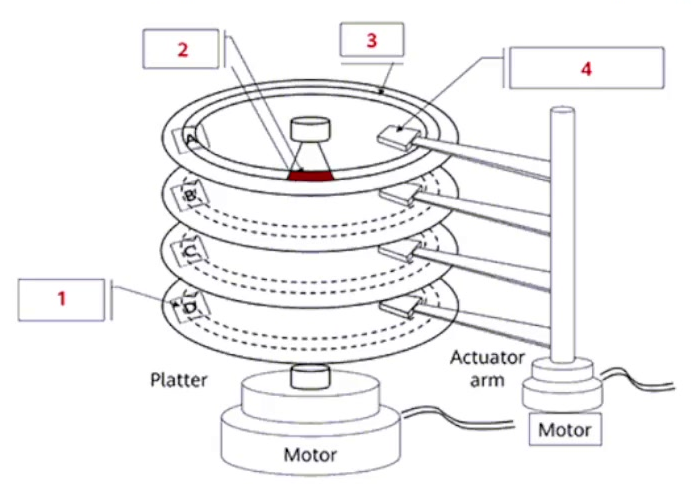
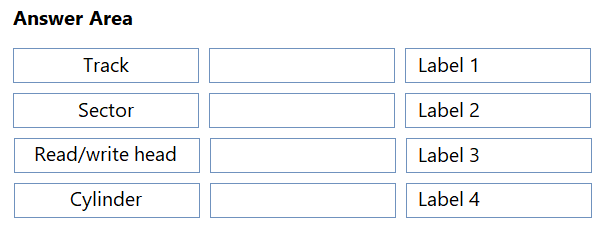
Label 1 matches Cylinder, Label 2 matches Sector, Label 3 matches Track, and Label 4 matches Read/write head.
Question
The following figure shows the structure of an HDD. Key components have been labeled. Match the labels with corresponding component names.
Key Takeaways
Distinguish between horizontal (track), radial (sector), vertical (cylinder), and mechanical (head) components in HDD diagrams.
Identify HDD structural components by matching labels to Cylinder, Sector, Track, and Read/write head based on their physical locations and functions.
Common mistake: Confusing track and sector positions or misidentifying the cylinder as a physical part rather than a logical grouping of tracks across platters.
Expert Analysis
The question requires identifying the four labeled components of a Hard Disk Drive (HDD) structure. Based on standard HDD architecture and the provided solution, the correct mapping is: Label 1 is the Cylinder, Label 2 is the Sector, Label 3 is the Track, and Label 4 is the Read/Write Head.
To understand this matching, one must visualize the physical geometry of an HDD. A Track is a concentric circle on a single platter surface; it represents the basic unit of data storage along the radius. A Sector is a subdivision of a track, representing the smallest addressable unit of data on the disk. A Cylinder is a conceptual grouping of tracks that are at the same distance from the spindle across all platters in the drive stack; this concept allows for efficient head movement without switching between different platter surfaces. The Read/Write Head is the mechanical component mounted on the actuator arm that physically moves over the platters to read or write data to specific sectors on tracks.
The provided comment confirms this mapping: "Label 1 - cylinder, Label 2 - sector, Label 3 - track, Label 4 - Read/write head." This aligns with typical diagrams where the cylinder spans multiple platters vertically, the track is a ring on one platter, the sector is a slice of that ring, and the head is the external mechanism accessing them.
Exam Strategy
When facing drag-and-drop hardware labeling questions, first identify the most distinct physical feature (like the head arm) to anchor your answer. Then differentiate between planar (track vs. sector) and volumetric (cylinder) concepts by recalling their definitions relative to the spindle axis.
Frequently Asked Questions
What is a cylinder in HDD structure?
How do sectors differ from tracks?
Discussion 2 contributions
Compiled from public community threads and reader submissions, lightly edited for clarity. Handles and vote tallies are shown as recorded, and comments reflect the views of individual contributors.
From public community threads 2
-
magufr 👍 1Label 1 - cylinder Label 2 - sector Label 3 - track Label 4 - Read/write head
-
10c5cfe 👍 11 - cylinder 2- sector 3- track 4- head
Reader comments & corrections
No reader corrections yet — spotted an error or have a note? Share it below.