Huawei Firewall Default Security Zone Priorities
Short answer
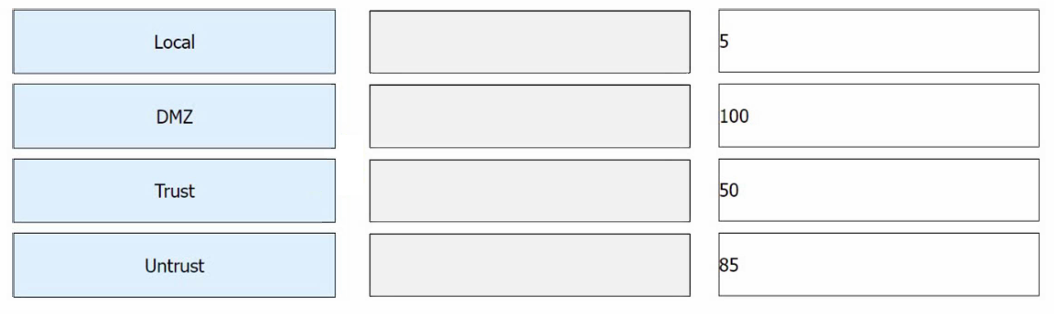
Match Local with Priority 100, Trust with Priority 85, DMZ with Priority 50, and Untrust with Priority 5.
Question
On Huawei firewalls, the priority of the default security zone cannot be changed. Match the following zones on Huawei firewalls with the default security priorities.
Key Takeaways
Higher priority numbers mean higher security; Local is always 100, while Untrust is the lowest at 5.
Learn the default security zone priorities on Huawei firewalls: Local (100), Trust (85), DMZ (50), and Untrust (5).
Common mistake: Confusing the priority of Trust and DMZ zones, often assuming Untrust has a higher priority than DMZ.
Expert Analysis
This question tests the fundamental security architecture of Huawei firewalls, specifically the default priority assignments for built-in zones. Understanding these priorities is critical because they dictate the implicit trust relationship between interfaces and determine whether traffic is allowed or denied by default.
The core concept to grasp is the hierarchy of trust: higher numerical values indicate higher security levels. The local zone (Local) represents the firewall itself and must have the highest possible priority to ensure that management traffic is protected. The trust zone (Trust) connects to internal, trusted networks and receives a high priority but lower than Local. The untrust zone (Untrust) faces the external internet and has the lowest priority. The DMZ zone sits in between, offering moderate protection for public-facing servers.
Based on Huawei's official documentation and exam doctrine:
- Local: Priority 100. This is the maximum value, ensuring the device itself is the most secure entity.
- Trust: Priority 85. Internal users are trusted more than external ones but less than the device itself.
- DMZ: Priority 50. A balanced level for semi-trusted networks hosting public services.
- Untrust: Priority 5. External networks are considered the least trustworthy.
Learners often confuse the positions of Trust and DMZ or assume Untrust has a higher priority due to its importance in routing. Remembering the sequence from highest to lowest as Local (100), Trust (85), DMZ (50), and Untrust (5) provides a clear mental model for this configuration.
Official Reference
https://support.huawei.com/enterprise/en/doc/EDOC1100269234
This link opens the official vendor documentation in a new tab.
Exam Strategy
Memorize the descending order of zone priorities as a single sequence: 100, 85, 50, 5. When facing drag-and-drop questions, place Local at the top (highest number) and Untrust at the bottom (lowest number) first, then fill in Trust and DMZ based on their relative trust levels. This anchors your answer and prevents swapping intermediate zones.
Frequently Asked Questions
Why does the Local zone have the highest priority?
Can I change the priority of the Untrust zone?
Discussion 1 contributions
Compiled from public community threads and reader submissions, lightly edited for clarity. Handles and vote tallies are shown as recorded, and comments reflect the views of individual contributors.
From public community threads 1
-
HCIP Resolutor 👍 1Untrust >> Prioridad 5 Local >> Prioridad 100 DMZ >> Prioridad 50 Trust >> Prioridad 85
Reader comments & corrections
No reader corrections yet — spotted an error or have a note? Share it below.
Related Analysis
Practice All H12-821 Questions
Access 168 questions with complete answers and detailed explanations.
View Full H12-821 Practice Test →