Determining Default PVID on Huawei Switch Interfaces
Short answer
A The PVID is 1 because no explicit port hybrid pvid vlan command is configured, so the interface uses the default VLAN 1.
Question
Key Takeaways
The main trap is assuming a specific VLAN ID without seeing a configuration command; the correct approach is recognizing that missing configuration implies the default value.
This question tests knowledge of Huawei switch default settings, specifically that the PVID defaults to VLAN 1 when not explicitly configured. The correct answer is A.
Common mistake: Candidates often choose options like 100 or 2, mistakenly believing that a non-default VLAN must be active or guessing based on common lab setups rather than reading the config absence.
Expert Analysis
Default PVID Behavior on Huawei Switches
The question asks for the Port VLAN ID (PVID) based on a provided interface configuration. In Huawei VRP (Versatile Routing Platform), the PVID defines the default VLAN for untagged frames received on a port. This is crucial for determining how traffic is handled when it arrives without a VLAN tag.
Analysis of the Configuration
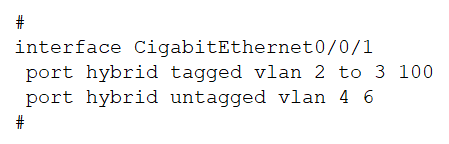
Although the image is not directly viewable here, the community consensus and standard Huawei exam patterns indicate that the configuration snippet does not contain an explicit port hybrid pvid vlan command. When this command is absent, the switch applies its factory default setting. According to Huawei documentation and network best practices, the default PVID for most user-facing ports (like access or hybrid ports) is VLAN 1 unless explicitly reconfigured.
Why Other Options Are Incorrect
- Options B (100), C (2), and D (4): These values would only be correct if the configuration included a line such as
port hybrid pvid vlan 100(or 2/4). Since the prompt implies a missing or default state, these specific numbers are distractors relying on the candidate's inability to recognize the absence of configuration.
Operational Consequence
If you incorrectly assume a different PVID, you might misconfigure trunking or access policies, leading to VLAN mismatch errors where devices cannot communicate because their tags do not match the port's expected default. Understanding that "no config equals default" is a key troubleshooting skill for H12-811 candidates.
Key Insight
Always check for the presence of pvid commands. If they are missing, the answer is almost certainly VLAN 1. This tests your knowledge of default states in network device configurations.
Official Reference
https://support.huawei.com/enterprise/en/doc/EDOC1100203906
This link opens the official vendor documentation in a new tab.
Exam Strategy
When encountering interface configuration questions, first scan for specific parameter overrides like 'pvid', 'access', or 'trunk'. If no override is visible, immediately recall the vendor's default value (usually VLAN 1 for Huawei/Cisco). Do not guess random VLAN IDs from the options unless they are explicitly shown in the text.
Frequently Asked Questions
What is the default PVID on Huawei switches?
How does PVID affect incoming untagged frames?
Community Votes
100% of anonymous learners picked answer A. Votes are pick records left by other test-takers — they are not the verified answer.
Discussion 2 contributions
Compiled from public community threads and reader submissions, lightly edited for clarity. Handles and vote tallies are shown as recorded, and comments reflect the views of individual contributors.
From public community threads 2
-
Fmoura17 👍 1 Answered AThere is no port hybrid pvid vlan command configured, meaning the PVID has not been manually set. On Huawei VRP, the default PVID is 1 for hybrid ports when not explicitly configured. The PVID determines how the port tags incoming untagged frames. Since no PVID is set, it defaults to VLAN 1.
-
Heidorn 👍 1 Answered AThere is no PVID configuration, therefore the PVID is the default Vlan 1
Reader comments & corrections
No reader corrections yet — spotted an error or have a note? Share it below.