Deleting an Eth-Trunk With Member Interfaces
Short answer
A Remove both GigabitEthernet 0/0/1 and GigabitEthernet 0/0/2 from Eth-Trunk 1 first, then delete the now-empty Eth-Trunk 1.
Question
Key Takeaways
It tests VRP's rule that an Eth-Trunk with member interfaces cannot be deleted, and the trap is picking the direct
undo interface Eth-Trunk 1syntax without emptying the trunk first.
This H12-811 question tests deleting an Eth-Trunk on a Huawei switch that still has member interfaces; the correct choice is A, which removes both GigabitEthernet 0/0/1 and 0/0/2 before the trunk can be deleted.
Common mistake: C (`undo interface Eth-Trunk 1`) — it looks like the exact delete command, but VRP rejects it because Eth-Trunk 1 still holds GigabitEthernet 0/0/1 and 0/0/2; B and D also fail by removing only one member.
Expert Analysis
The key constraint in the exhibit
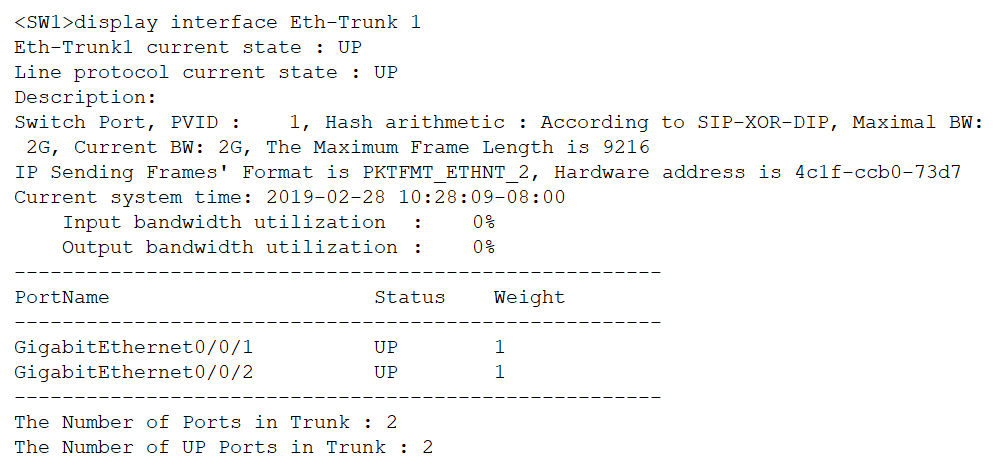
The display interface Eth-Trunk 1 output shows that Eth-Trunk 1 currently has two member interfaces — GigabitEthernet 0/0/1 and GigabitEthernet 0/0/2. On Huawei VRP, an Eth-Trunk cannot be deleted while it still has member interfaces, so any correct option must first detach both members.
Why C is the trap
Option C, undo interface Eth-Trunk 1, is the most attractive answer because it looks exactly like the standard "delete the object" syntax. It satisfies the goal of removing Eth-Trunk 1, but it stops being correct at one point: VRP rejects the command because the trunk still holds two members, returning an error that the interface has ports and cannot be deleted. It is the command you would use only after the trunk is empty.
Why B and D fall short Options B and D (the image-based commands) each remove only a single member interface. That leaves one member still bound to Eth-Trunk 1, so the trunk still exists and still cannot be deleted — the deletion goal is unmet.
Why A is correct Option A (the image-based command set) removes both GigabitEthernet 0/0/1 and GigabitEthernet 0/0/2 from the trunk. Once the Eth-Trunk has no member interfaces, the trunk can be deleted. The community comments agree with this reasoning: "each interface must be deleted from eth-trunk before deleting eth-trunk," and B/D "remove only one member each → the trunk still has a member and cannot be deleted." So the correct choice is A.
Exam Strategy
On configuration-equality questions, always read the display output first and list every prerequisite state it reveals — here, the two member interfaces. Reject any option that acts on only part of that state, and treat a single direct undo interface X as a trap whenever the object still has dependencies attached; sequence questions usually reward the option that clears all prerequisites.
Frequently Asked Questions
Why can't `undo interface Eth-Trunk 1` delete the trunk directly?
How do I remove a member interface from an Eth-Trunk on a Huawei switch?
display interface Eth-Trunk 1. Only when no members remain can you run undo interface Eth-Trunk 1.What does `display interface Eth-Trunk 1` tell me before deletion?
Community Votes
100% of anonymous learners picked answer A. Votes are pick records left by other test-takers — they are not the verified answer.
Discussion 4 contributions
Compiled from public community threads and reader submissions, lightly edited for clarity. Handles and vote tallies are shown as recorded, and comments reflect the views of individual contributors.
From public community threads 4
-
e9b92a4 👍 1 Answered ATo delete Eth-Trunk 1 on a Huawei switch, you must first remove all member interfaces from the trunk, then delete the trunk: B, D remove only one member each → the trunk still has a member and cannot be deleted. C tries to delete the trunk while it still has members → operation is rejected.
-
Fmoura17 👍 1 Answered AA. The correct answer is A. Explanation From the display interface Eth-Trunk 1 output, we can see that Eth-Trunk 1 has two member interfaces: GigabitEthernet 0/0/1 GigabitEthernet 0/0/2
-
ButcherCapybara 👍 1 Answered Aeach interface must be deleted from eth-trunk before deleting eth-trunk.
-
Heidorn 👍 1 Answered AAll interfaces must be deleted firstly
Reader comments & corrections
No reader corrections yet — spotted an error or have a note? Share it below.