Ingesting CSV to Managed Delta Table with COPY INTO
Short answer
Use COPY INTO to ingest data from the external storage location into the managed Delta table, ensuring the table is defined without a LOCATION clause to maintain its managed status.
Question
You have an Azure Databricks workspace that is enabled for Unity Catalog.
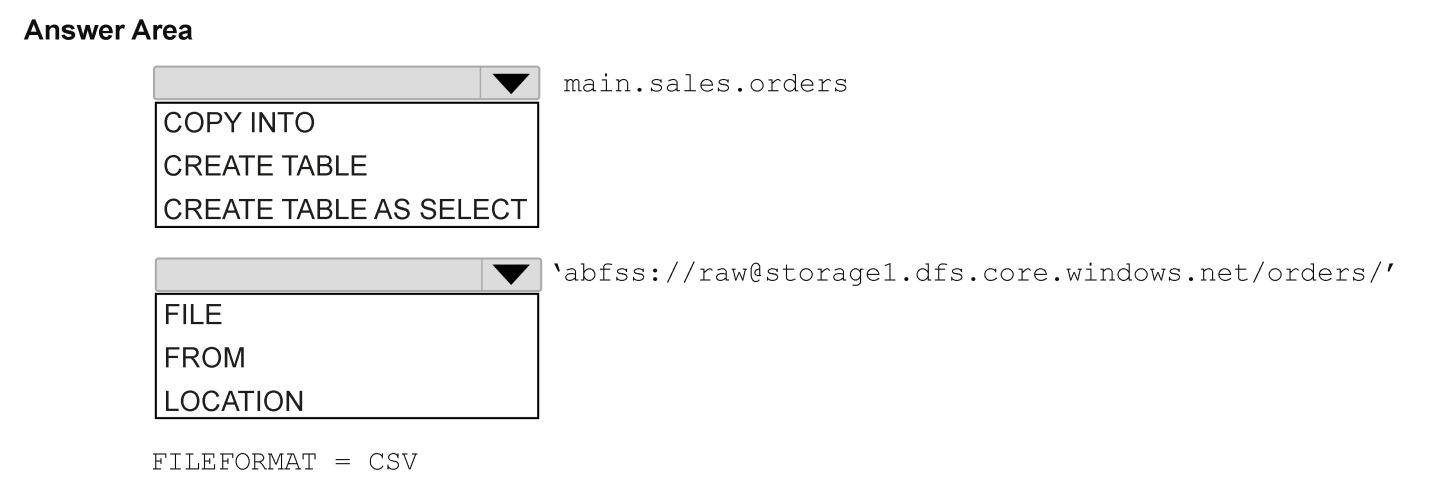
You need to ingest data from the CSV files stored in an external Azure Data Lake Storage Gen2 container into a managed Delta table. The solution must meet the following requirements:
Load data incrementally as new files arrive.
Minimize custom code and operational effort.
How should you complete the SQL statement? To answer, select the appropriate options in the answer area.
NOTE: Each correct selection is worth one point.
Key Takeaways
The trap is confusing managed and external tables; managed tables cannot have an explicit LOCATION clause, so COPY INTO is required instead of CREATE TABLE ... LOCATION.
Learn how to ingest CSV data from Azure Data Lake Storage into a managed Unity Catalog Delta table using COPY INTO for incremental loads with minimal code.
Common mistake: Learners often select CREATE TABLE ... LOCATION, which creates an external table where the user manages the data lifecycle, contradicting the requirement for a managed table.
Expert Analysis
The question requires ingesting CSV data from external Azure Data Lake Storage Gen2 into a managed Delta table in Unity Catalog, with requirements for incremental loading and minimal code. The key constraint is the table type: "managed".
- Managed vs. External Tables: In Databricks/Spark SQL, a managed table means the warehouse (Unity Catalog) controls both the metadata and the underlying data files. When the table is dropped, the data is deleted. Therefore, you cannot use
LOCATIONto point to an external path during creation, as that defines an external table. A comment correctly notes this distinction: "the key word was managed table, so target table couldn't be at external location." Thus, any option involvingCREATE TABLE... LOCATIONis incorrect for a managed table. - Incremental Loading & Minimal Code: To load data incrementally with minimal code, the standard approach is using
COPY INTO. This command automatically handles file discovery, schema inference (if needed), and idempotency (skipping already loaded files). It is specifically designed for ingesting data from cloud storage locations into tables. - SQL Statement Structure:
- First Blank: Must be
COPY INTO. This is the command that performs the ingestion. - * Second Blank: Must be the table name (e.g.,
my_managed_table). Since it's a managed table, noLOCATIONclause is specified in theCOPY INTOstatement itself; the data lands in the default location for that managed table.
Third Blank: Must be FROM followed by the external storage path (e.g., FROM 'abfss://...@.../.csv').
Therefore, the solution involves selecting COPY INTO as the operation, specifying the target managed table name, and using FROM to define the source external URI. Options suggesting CREATE TABLE... LOCATION are traps because they create external tables, violating the "managed" requirement.
Exam Strategy
Always check the table type keyword ('managed' vs 'external') before selecting SQL commands. For managed tables, never use LOCATION clauses. Use COPY INTO for efficient, low-code incremental ingestion from cloud storage.
Frequently Asked Questions
Why can't I use LOCATION for a managed table?
Does COPY INTO support incremental loading?
Discussion 1 contributions
Compiled from public community threads and reader submissions, lightly edited for clarity. Handles and vote tallies are shown as recorded, and comments reflect the views of individual contributors.
From public community threads 1
-
mtc9 👍 1I was thinking about - create table - location - because that could permanently define the files at storage as table content, but the key word was managed table, so target table couldn't be at external location, so copy - from.
Reader comments & corrections
No reader corrections yet — spotted an error or have a note? Share it below.