Deploying MLflow Models to Azure Online Endpoints
Note: This question is part of a series of questions that present the same scenario. Each question in the series contains a unique solution that might meet the stated goals. Some question sets might have more than one correct solution, while others might not have a correct solution. After you answer a question in this section, you will NOT be able to return to it. As a result, these questions will not appear in the review screen. You have an Azure Machine Learning workspace named Workspace1. Workspace1 has a registered MLflow model named model1 with PyFunc flavor. You plan to deploy model1 to an online endpoint named endpoint1 without egress connectivity by using Azure Machine Learning Python SDK v2. You have the following code: You need to add a parameter to the ManagedOnlineDeployment object to ensure the model deploys successfully. Solution: Add the environment parameter. Does the solution meet the goal? - 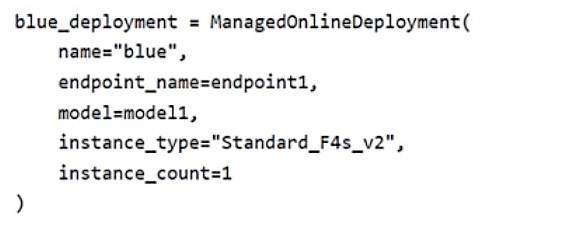
Community Votes
100% of anonymous learners picked answer B. Votes are pick records left by other test-takers — they are not the verified answer.
Community Insight
Tests understanding of MLflow model deployment requirements, specifically the trap of assuming environment alone suffices without code configuration.
Deploying MLflow models with PyFunc flavor requires specific configuration for no-code deployment. Community consensus indicates that adding only the environment parameter is insufficient.
Community Discussion (4 comments)
Comments & Corrections
No comments yet — spotted an error or have a note? Share it below.
Expert Analysis
Why the Answer Is Correct
The solution fails because deploying an MLflow model with PyFunc flavor typically requires more than just an environment definition when using the Python SDK v2 ManagedOnlineDeployment object. While MLflow supports 'no-code' deployment scenarios, PyFunc models often require explicit handling or specific packaging flags if egress connectivity is restricted, as noted in community comments regarding--with-package. The ManagedOnlineDeployment constructor generally requires a model reference and often a code_configuration or explicit environment setup that matches the runtime needs, not just the environment variable alone.Why the Other Options Are Wrong
Option A is incorrect because simply adding theenvironment parameter does not guarantee successful deployment for a PyFunc model, especially under restricted network conditions. Without proper code configuration or model packaging instructions, the deployment will likely fail due to missing runtime context or scoring logic dependencies.Community Comment Notes
Comment [1] highlights that standard MLflow deployments can sometimes skip scoring scripts/environments via no-code features, but this is context-dependent. Comment [3] emphasizes the need for--with-package flag for secure/no-egress environments, suggesting that simple parameter addition isn't enough. Comment [4] lists required parameters for ManagedOnlineDeployment, implying complexity beyond a single parameter fix. Official Reference
Exam Strategy
Always verify if the model flavor (e.g., PyFunc) has special deployment prerequisites like packaging or code configuration, especially in secure/no-egress scenarios.