Deploy MLflow Model to Endpoint Without Egress Connectivity
Note: This question is part of a series of questions that present the same scenario. Each question in the series contains a unique solution that might meet the stated goals. Some question sets might have more than one correct solution, while others might not have a correct solution. After you answer a question in this section, you will NOT be able to return to it. As a result, these questions will not appear in the review screen. You have an Azure Machine Learning workspace named Workspace1. Workspace1 has a registered MLflow model named model1 with PyFunc flavor. You plan to deploy model1 to an online endpoint named endpoint1 without egress connectivity by using Azure Machine Learning Python SDK v2. You have the following code: You need to add a parameter to the ManagedOnlineDeployment object to ensure the model deploys successfully. Solution: Add the with_package parameter. Does the solution meet the goal? - 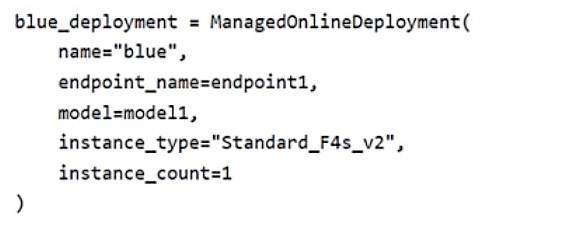
Community Votes
67% of anonymous learners picked answer A. Votes are pick records left by other test-takers — they are not the verified answer.
Community Insight
The exam tests knowledge of deploying MLflow models in air-gapped or restricted environments; the trap is assuming standard deployment works without explicit packaging configuration.
This question tests the configuration of Azure Machine Learning online endpoints for workspaces with restricted network access. The community consensus confirms that using the with_package parameter is the correct solution to enable model packaging for offline deployment.
Candidates often select 'No' because they are unaware of the `with_package` parameter or believe a scoring script is mandatory, leading them to reject the solution incorrectly.
Community Discussion (7 comments)
Comments & Corrections
No comments yet — spotted an error or have a note? Share it below.
Expert Analysis
Why the Answer Is Correct
Thewith_package parameter in the ManagedOnlineDeployment object instructs Azure Machine Learning to bundle all necessary dependencies with the model artifact. This is essential when the workspace lacks egress connectivity, as it prevents the service from attempting to download packages from the internet during deployment.Why the Other Options Are Wrong
Selecting 'No' would imply that another parameter is required or that this approach fails. While some candidates argue for a scoring script, documentation confirms it is optional for many model types if the environment handles inference correctly. Therefore, rejecting thewith_package solution is incorrect.Community Comment Notes
Comment [4] provides the official Microsoft documentation context, explaining that model packaging avoids the need for an internet connection. Comment [5] offers a code snippet demonstrating the correct usage ofwith_package=True. Comment [3] incorrectly claims a scoring script is required, which contradicts current SDK behavior for PyFunc models. Official Reference
Exam Strategy
Memorize specific parameters for edge-case scenarios like air-gapped deployments. When you see 'no egress connectivity' or 'no public network access', immediately look for options related to 'packaging' or 'bundling' dependencies.