Real-Time IoT Pipeline Architecture: Ingestion, Analysis, and Action
Short answer
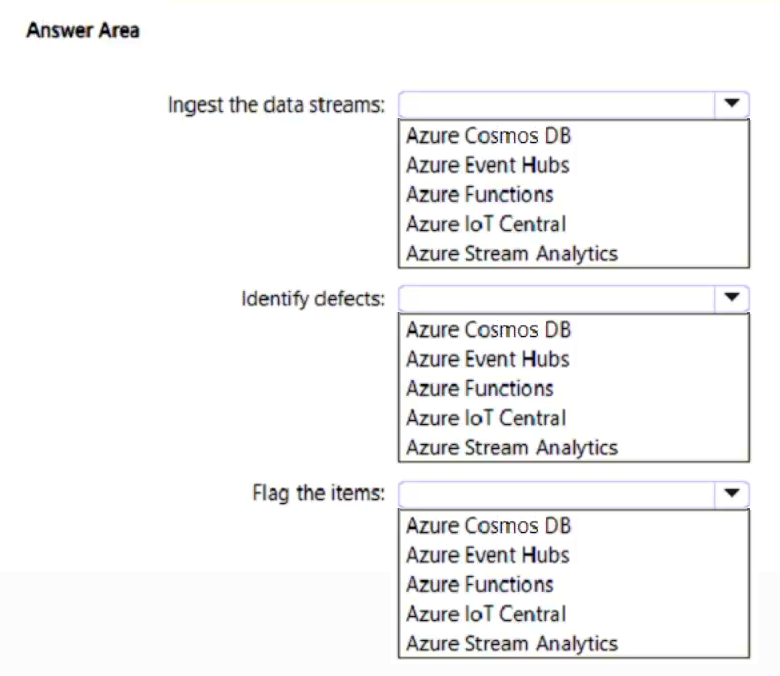
Ingest data streams with Azure Event Hubs, identify defects using Azure Stream Analytics, and flag items for removal via Azure Functions.
Question
You have a production line that is monitored by using IoT devices.
You are building a project that will process data streams from the IoT devices.
You need to recommend a pipeline solution that will perform the following activities:
• Ingest the data streams from the IoT devices.
• Analyze the data and identify manufacturing defects among items on the production line.
• When a manufacturing defect is identified, flag the item for removal from the production line.
What should you include in the recommendation for each activity? To answer, select the appropriate options in the answer area.
NOTE: Each correct selection is worth one point.
Key Takeaways
The main trap is confusing the ingestion service (Event Hubs) with the compute service (Functions); remember that ingestion buffers the stream, while functions execute the final action.
Learn how to design a real-time IoT pipeline using Azure Event Hubs for ingestion, Stream Analytics for defect detection, and Azure Functions for automated flagging.
Common mistake: Learners often select Azure Logic Apps for the analysis step because they are familiar with workflow automation. However, Logic Apps are not optimized for high-throughput real-time stream analysis like Stream Analytics is.
Expert Analysis
The scenario requires a real-time stream processing architecture for IoT telemetry. The three activities map to specific Azure services based on their functional boundaries.
Ingestion Layer: Azure Event Hubs is the correct choice. It is designed as a highly scalable data streaming platform and event ingestion service. It handles millions of events per second from IoT devices, acting as the buffer between the source (devices) and the consumer.
Analysis Layer: Azure Stream Analytics is the appropriate engine. It provides a SQL-like language for querying and analyzing real-time streams. It is optimized for pattern matching, anomaly detection, and identifying defects in continuous data flows without requiring custom code development.
Action/Flagging Layer: Azure Functions is the ideal compute solution for the reactive step. As a serverless function, it triggers immediately upon receiving an event or signal from the analytics layer. It executes lightweight logic to flag the item for removal, adhering to the event-driven paradigm required for immediate physical intervention.
This distinction is critical: Event Hubs brings data in, Stream Analytics processes it, and Functions reacts to the result.
Official Reference
- https://learn.microsoft.com/en-us/azure/event-hubs/
- https://learn.microsoft.com/en-us/azure/stream-analytics/
- https://learn.microsoft.com/en-us/azure/functions/
These links open the official vendor documentation in a new tab.
Exam Strategy
When designing stream pipelines, always separate the concerns into three distinct layers: Ingestion (high-volume buffering), Processing (pattern matching/aggregation), and Reaction (stateless execution). Use Event Hubs for the first, Stream Analytics for the second, and Functions for the third to ensure scalability and low latency.
Frequently Asked Questions
Why not use Azure IoT Hub for ingestion?
Can Azure Functions perform the analysis?
Discussion 1 contributions
Compiled from public community threads and reader submissions, lightly edited for clarity. Handles and vote tallies are shown as recorded, and comments reflect the views of individual contributors.
From public community threads 1
-
gpais 👍 1• Ingest the data streams: Azure Event Hubs • Identify defects: Azure Stream Analytics • Flag the items: Azure Functions
Reader comments & corrections
No reader corrections yet — spotted an error or have a note? Share it below.
Related Analysis
Practice All AZ-305 Questions
Access 95 questions with complete answers and detailed explanations.
View Full AZ-305 Practice Test →