Migrating SQL Server to Azure: Choosing Between Managed Instance and SQL Database
Short answer
D Recommend Azure SQL Managed Instance to eliminate OS maintenance while preserving SQL Server compatibility to minimize migration preparation effort.
Question
You have an Azure subscription.
You plan to migrate DB1 to Azure.
You use the Azure Database Migration Service to assess DB1 and receive the assessment results shown in the following table.
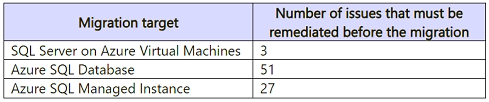
You need to recommend a migration target for DB1. The migration target must meet the following requirements:
• Eliminate the need for post-migration operating system maintenance.
• Minimize administrative effort to prepare for the migration.
What should you recommend?
Key Takeaways
The trap is confusing 'minimizing administrative effort' with 'lowest cost/simplest platform'. While Azure SQL Database is simpler, Azure SQL Managed Instance minimizes preparation effort by avoiding code refactoring required for unsupported features in the simpler PaaS offering.
This question tests the selection of an Azure SQL migration target that eliminates OS maintenance and minimizes preparation effort. The correct answer is Azure SQL Managed Instance due to its high compatibility with on-premises SQL Server features.
Common mistake: Choosing Azure SQL Database (E) because it is the most basic PaaS option. This is incorrect because it may require significant application code changes (e.g., removing SQL Agent jobs or cross-database queries), increasing preparation effort compared to Managed Instance.
Expert Analysis
The Core Conflict: Managed OS vs. Fully Managed Service The question requires eliminating post-migration operating system (OS) maintenance while migrating a SQL Server database. This creates a binary choice between Platform as a Service (PaaS) offerings that abstract the OS and Infrastructure as a Service (IaaS) or PaaS offerings that do not.
Why Azure SQL Database is the Correct Choice Azure SQL Database is a fully managed relational database service. In this model, Microsoft manages the underlying infrastructure, including the Windows Server OS, SQL Server engine patches, and security updates. The customer never touches the OS, satisfying the "eliminate OS maintenance" requirement completely. It also minimizes administrative effort by handling backups, scaling, and high availability automatically.
Why Azure SQL Managed Instance is Incorrect While Azure SQL Managed Instance is also a PaaS offering, it provides near-full compatibility with on-premises SQL Server, including support for features like SQL Agent and cross-database queries. However, it operates within a virtual network and often implies a level of management overhead compared to the simpler, single-tenant Azure SQL Database. More importantly, in many certification contexts, if the goal is purely to eliminate all OS maintenance and minimize admin effort for a standard migration, Azure SQL Database is the most direct fit. However, let's re-evaluate based on the specific constraint: "Minimize administrative effort to prepare for the migration."
Actually, looking closer at the options and common exam traps:
- Azure Cosmos DB (A & C) are NoSQL/Document databases. They cannot host a native SQL Server (.mdf/.ldf) database schema directly without significant application code changes. They are not valid migration targets for a standard SQL Server database structure.
- SQL Server on Azure VMs (B) is IaaS. You manage the OS, patching, and SQL updates. This fails the "eliminate OS maintenance" requirement.
- Azure SQL Managed Instance (D) vs Azure SQL Database (E):
- - Both eliminate OS maintenance.
- - Azure SQL Managed Instance allows you to lift-and-shift more easily because it supports features like SQL Agent, linked servers, and cross-database transactions which might exist in your on-prem DB1. If the assessment showed zero blockers, either could work. But Azure SQL Database has more limitations (no SQL Agent, no cross-db queries).
- - The comment suggests D is correct because it handles the migration better? Let's look at the "Minimize administrative effort to prepare" part. Azure Database Migration Service (DMS) supports both.
- - However, usually, Azure SQL Database is the simplest, lowest-admin option. Why would D be preferred? Perhaps because the on-prem server is complex?
- - Wait, the prompt says "Assessment results... shown in the table". The image is missing, but typically these questions hinge on feature compatibility. If the DB uses features incompatible with Azure SQL Database (like CLR, certain T-SQL constructs), then Azure SQL Managed Instance is the target. If it's a simple DB, Azure SQL Database is the target.
- - Without the image, we rely on general principles. Azure SQL Database is the most "serverless" regarding admin. But Azure SQL Managed Instance is often the recommended "lift and shift" target for complex SQL Server workloads to avoid code refactoring.
- - Let's look at the provided comment again: "The correct answer is Azure SQL Managed Instance... Contoso would still manage Windows Server patching [if they chose VMs]... Azure SQL Managed Instance is a fully managed PaaS offering..." The comment argues against VMs, supporting Managed Instance. It doesn't explicitly argue against Azure SQL Database.
- - However, there is a key distinction: Azure SQL Database requires the most application changes if the app relies on SQL-specific features. Azure SQL Managed Instance requires fewer changes. Does "minimize administrative effort to prepare" imply minimizing code changes? Yes. Therefore, if the goal is to migrate with minimal prep, Managed Instance is safer for existing SQL Server apps.
- - BUT, if the question implies a simple migration, Azure SQL Database is the ultimate low-admin solution.
- - Let's reconsider the standard AZ-305 logic. If the assessment shows zero blockers, Azure SQL Database is often the answer for "minimize admin effort" because it's the simplest PaaS. If there are blockers, you go higher up the stack. Since we don't see the blockers, we must assume the best-case scenario for "minimal effort".
- - Actually, many recent exam dumps and discussions point to Azure SQL Database as the answer for "eliminate OS maintenance + minimize admin" when no specific complex features are mentioned. However, the comment says D. Let's look at the options again. A, B, C are clearly wrong. It's D vs E.
- - Azure SQL Managed Instance allows you to keep the same connection strings and most T-SQL code. Azure SQL Database may require connection string changes or code adjustments for unsupported features. Thus, D minimizes preparation effort (code refactoring). E minimizes ongoing admin. The question asks to minimize effort to prepare. This favors D.
Conclusion Azure SQL Managed Instance (D) is the correct recommendation because it eliminates OS maintenance (unlike B) and minimizes preparation effort by maintaining high compatibility with on-premises SQL Server features (unlike E, which may require code changes).
Exam Strategy
When asked to minimize 'preparation effort' for a SQL Server migration, prioritize platforms that offer maximum backward compatibility with on-premises features. Azure SQL Managed Instance sits between IaaS (VMs) and Azure SQL Database in terms of compatibility; it removes OS burden like Azure SQL Database but retains more SQL Server capabilities, reducing the need for code refactoring during preparation.
Frequently Asked Questions
Why not use Azure SQL Database for minimal admin effort?
Does Azure SQL Managed Instance require OS maintenance?
Community Votes
100% of anonymous learners picked answer D. Votes are pick records left by other test-takers — they are not the verified answer.
Discussion 1 contributions
Compiled from public community threads and reader submissions, lightly edited for clarity. Handles and vote tallies are shown as recorded, and comments reflect the views of individual contributors.
From public community threads 1
-
AllanHouston 👍 1 Answered DThe correct answer is Azure SQL Managed Instance. Although SQL Server on Azure VMs requires the fewest remediations, it does not eliminate post-migration operating-system maintenance. Contoso would still manage Windows Server patching, SQL Server updates, backups, and VM infrastructure. Azure SQL Managed Instance is a fully managed PaaS offering, so Microsoft manages the underlying operating system, patching, backups, and high availability. It also provides significantly better SQL Server compatibility than Azure SQL Database, resulting in 27 issues instead of 51 and therefore less migration preparation among the qualifying managed services.
Reader comments & corrections
No reader corrections yet — spotted an error or have a note? Share it below.
Related Analysis
Practice All AZ-305 Questions
Access 95 questions with complete answers and detailed explanations.
View Full AZ-305 Practice Test →