Migrating Key-Value Apps to Azure Cosmos DB
Short answer
Azure Cosmos DB
Question
You have an on-premises app named App1 that reads data from a table named Table1, writes new data to Table1, and scans Table1 for aggregate statistics. App1 uses hard-coded partition keys for all read and write operations.
You plan to migrate App1 to a new platform in Azure.
You need to recommend a solution that meets the following requirements:
• Provides the highest scalability and performance
• Minimizes development effort
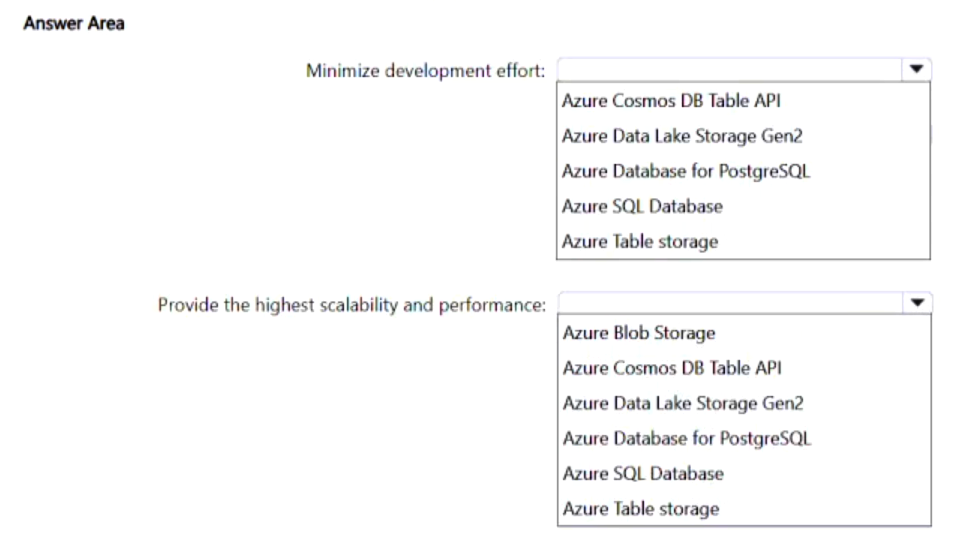
What should you include in the recommendation for each requirement? To answer, select the appropriate options in the answer area.
NOTE: Each correct selection is worth one point.
Key Takeaways
The question tests the ability to identify Azure Cosmos DB as the optimal target for high-scale key-value workloads that require low-refactoring migration paths.
To migrate an app with hard-coded partition keys while maximizing scalability and minimizing code changes, use Azure Cosmos DB.
Common mistake: Selecting Azure Table Storage is a common error; while it fits the schema, it fails the 'highest scalability' requirement due to its lack of global distribution and advanced performance guarantees found in Cosmos DB.
Expert Analysis
The scenario involves migrating an on-premises application that relies on a simple key-value structure with hard-coded partition keys. The primary constraints are achieving the highest scalability and performance while minimizing development effort.
Azure Cosmos DB is the superior choice for this migration. It offers multiple API models, including the Table API (formerly DocumentDB). By using the Table API, the existing codebase—which already uses partition keys—can be migrated with minimal changes because the data model is compatible. This directly satisfies the requirement to minimize development effort.
Furthermore, Azure Cosmos DB provides built-in global distribution, automatic indexing, and predictable single-digit millisecond latency. This architecture ensures the highest possible scalability and performance compared to legacy services like Azure Table Storage, which lacks global replication and advanced tuning options. Therefore, selecting Azure Cosmos DB addresses both the performance and development constraints effectively.
Exam Strategy
When faced with migration scenarios requiring high scale and low code changes, prioritize managed NoSQL services over legacy storage. Specifically, look for compatibility between the existing data model (like partition keys) and the service's API (like the Table API) to justify the selection.
Frequently Asked Questions
Why not use Azure Table Storage?
How does the Table API help with development effort?
Discussion 1 contributions
Compiled from public community threads and reader submissions, lightly edited for clarity. Handles and vote tallies are shown as recorded, and comments reflect the views of individual contributors.
From public community threads 1
-
AllanHouston 👍 1• Azure Table Storage is chosen for minimizing development effort because it maps exactly to the simple, low-cost partition-key pattern without adding unnecessary tiering or throughput configuration complexities. • Azure Cosmos DB for Table is the correct choice for maximum scalability and performance because it brings enterprise-grade global replication, single-digit millisecond latency guarantees, and elastic scale capabilities that standard storage accounts cannot match.
Reader comments & corrections
No reader corrections yet — spotted an error or have a note? Share it below.
Related Analysis
Practice All AZ-305 Questions
Access 95 questions with complete answers and detailed explanations.
View Full AZ-305 Practice Test →