Workday Provisioning: How Many Apps and Agents Are Needed?
HOTSPOT
Your on-premises network contains an Active Directory Domain Services (AD DS) forest. The forest contains a top-level domain, three child domains, and an on-premises server named Server1.
You have a Microsoft Entra tenant. Server1 uses Microsoft Entra Connect Sync to replicate all the user objects from the three child domains to the tenant.
New contractors and employees are onboarded manually by using the Workday cloud-based human resources (HR) application.
You plan to automatically provision accounts for new users in one of the on-premises child domains and the Microsoft Entra tenant. The provisioning logic for the employees will be distinct from the provisioning logic for the contractors.
You need to identify the following:
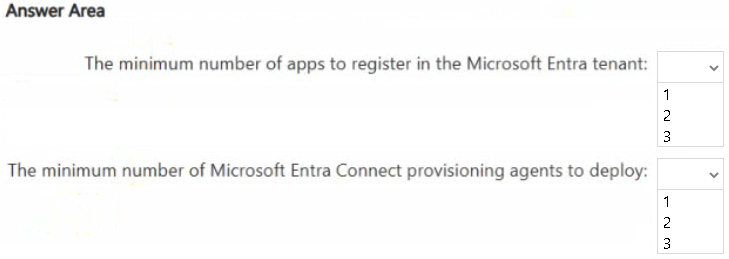
• The minimum number of apps to register in the Microsoft Entra tenant
• The minimum number of Microsoft Entra Connect provisioning agents to deploy
The solution must minimize implementation effort.
What should you identify? To answer, select the appropriate options in the answer area.
NOTE: Each correct selection is worth one point.
Community Insight
The question tests separating cloud-only Workday-to-Entra provisioning from agent-based Workday-to-AD writeback, and recognizing that one agent can serve the one child domain being targeted.
Workday-to-AD and Workday-to-Entra provisioning require two Microsoft Entra gallery apps, while only the AD connector needs an on-premises provisioning agent. The minimum is two app registrations and one Microsoft Entra Connect provisioning agent for the single targeted child domain.
Learners often add an agent for the cloud-only Workday-to-Entra app or multiply agents across all three child domains, even though only one child domain receives new accounts.
Community Discussion (1 comments)
Comments & Corrections
No comments yet — spotted an error or have a note? Share it below.
Expert Analysis
Why the Answer Is Correct
Two registrations cover the two targets: the Workday to Active Directory User Provisioning gallery app writes to the chosen child domain, and the Workday to Microsoft Entra User Provisioning gallery app creates cloud accounts. The employee-versus-contractor distinction changes scoping and attribute mappings, not the number of destination connectors; those rules can be expressed within each app using scoping filters and conditional mappings. Only the AD-targeted app needs an on-premises ECMA/provisioning agent, and because writeback is limited to one child domain, a single agent deployed in that domain is enough. Existing Entra Connect Sync continues to replicate the three child domains inbound and does not add a provisioning agent requirement.Why Other Candidate Answers Are Wrong
Answering 4 apps wrongly assumes employees and contractors each need a dedicated registration for every destination, but the question asks for the minimum and the prebuilt Workday apps support scoped logic. Choosing 3 apps often mistakenly adds a registration for Entra Connect Sync, which is a synchronization engine, not a tenant app for this provisioning design. Deploying 2 or 3 agents wrongly treats every child domain as a writeback target even though only one child domain receives new accounts. Deploying 0 agents is invalid because Workday-to-AD provisioning cannot write into on-premises AD without an Entra Connect provisioning agent.Community Comment Notes
gpais summarized the destination logic by noting that you must "provision users to two distinct destinations" and pointed to the prebuilt Workday gallery apps for AD and Entra. That reasoning supports two apps rather than one, because a single provisioning job cannot target both AD and Entra. The remaining design nuance is whether distinct employee/contractor logic forces extra apps; the minimum-effort interpretation handles that logic through scoping and mappings while still using one agent for the single target child domain.Official Reference
Exam Strategy
Count destination systems, not worker types: one gallery app per target system, plus one provisioning agent for the AD connector. Remember that Entra Connect Sync is already in place and is not the same component as the Entra Connect provisioning agent.
Frequently Asked Questions
Why is only one provisioning agent needed when the forest has three child domains?
Only one child domain is targeted for writeback. Entra Connect Sync already handles inbound synchronization from all three child domains, so it does not require extra provisioning agents.
Can one Workday app handle both employees and contractors with different logic?
Yes. Scoping filters and conditional attribute mappings can separate employee and contractor logic within the same destination app, keeping the app count at two.
Related Analysis
Practice All AZ-305 Questions
Access 95 questions with complete answers and detailed explanations.
View Full AZ-305 Practice Test →