How to replicate DFS file shares to Azure VMs and map drives?
Short answer
Use Azure File Sync to replicate the on-premises file shares to the Azure Windows Server VMs, and have the Windows 11 devices access the shares over SMB (TCP port 445) through the P2S VPN.
Question
Your on-premises network contains an Active Directory Domain Services (AD DS) forest. The forest contains servers that run Windows Server. The servers contain file shares that replicate by using Distributed File System (DFS) Replication.
You have multiple remote Windows 11 devices that connect to the on-premises network by using Point-to-Site (P2S) VPN and access the file shares by using drive mappings.
You have an Azure subscription. The subscription contains virtual machines that run Windows Server and are configured as domain controllers. The virtual machines replicate to the on-premises forest. The forest syncs with a Microsoft Entra tenant that is linked to the Azure subscription.
You plan to migrate the on-premises file shares to the Azure virtual machines.
You need to recommend a solution for replicating the file shares to Azure and providing the Windows 11 devices with access to the shares. The solution must ensure that the devices can access the shares by using mapped drive letters via TCP port 445.
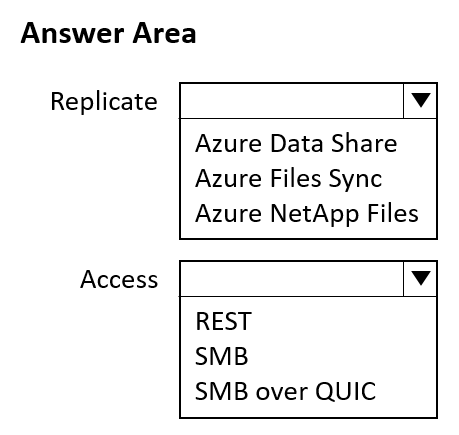
What should you use to replicate the shares, and what should the devices use to the access the shares? To answer, select the appropriate options in the answer area.
NOTE: Each correct selection is worth one point.
Key Takeaways
The item tests whether you pick Microsoft's native hybrid file-replication service (Azure File Sync) and the one share protocol that mapped drive letters plus TCP 445 imply (SMB), while the trap is reusing DFS Replication or selecting NFS/FTP for client access.
Migrating on-premises DFS-Replicated file shares to Azure Windows Server VMs requires Azure File Sync as the replication mechanism and SMB on TCP port 445 so the remote Windows 11 devices can keep their mapped drive letters over the P2S VPN. This page confirms both hotspot selections and explains why DFS Replication and non-SMB protocols fail the requirement.
Common mistake: Extending the existing DFS Replication topology over the VPN to the Azure VMs, or choosing a non-SMB protocol for client access, ignoring that port 445 and drive-letter mappings are SMB-only requirements and that Azure File Sync is the supported hybrid replication service.
Expert Analysis
Why the Answer Is Correct
Azure File Sync is Microsoft's hybrid service that keeps Windows Server file shares — including content currently replicated with DFS Replication — synchronized with an Azure file share and with other registered Windows Server endpoints, so the on-premises shares can be replicated onto the Azure VMs that already run Windows Server in the synced forest. Because the requirement is drive letters over TCP port 445, the client protocol must be SMB: both Windows Server shares and Azure Files expose SMB on 445, and the P2S VPN gives the remote Windows 11 devices a private path to that endpoint. Azure File Sync also preserves the familiar NTFS/ACL and DFS namespace experience, so existing drive mappings continue to work after the cutover. The two dropdowns therefore resolve to Azure File Sync for replication and SMB for access.
Why Other Candidate Answers Are Wrong
DFSR would simply stretch the on-premises multi-master topology across the VPN to Azure VMs, which is neither the supported hybrid replication approach nor something Microsoft recommends for migration to Azure, and it adds no cloud tiering or Azure-side management. NFS is disqualified twice over: Windows 11 clients cannot map drive letters to an NFS export without extra client software, and NFS does not listen on TCP 445. FTP, HTTPS/WebDAV and Azure File Sync's own REST/SMB APIs are not mapped-drive protocols for Windows clients. Selecting Azure Files with no sync service fails because nothing then replicates the DFS source data, and tools such as AzCopy or Storage Explorer perform one-time copies rather than continuous replication.
Community Comment Notes
As gpais summarizes, Azure File Sync is "the designated Microsoft tool for centralizing and replicating" on-premises Windows Server file shares up to Azure, while SMB satisfies the mapped drive-letter access requirement. That matches the two-part hotspot structure exactly: one selection for the replication mechanism, one for the client access protocol. The question's explicit emphasis on TCP port 445 is effectively the hint that the access answer is SMB, since 445 is SMB's well-known port. No dissenting comment appears, so the observed consensus (Azure File Sync + SMB) aligns with the documented behavior.
Official Reference
- https://learn.microsoft.com/en-us/azure/storage/files/storage-sync-files-planning
- https://learn.microsoft.com/en-us/azure/storage/files/files-smb-protocol
These links open the official vendor documentation in a new tab.
Exam Strategy
Break hotspot items into their stated constraints: here 'replicate the shares' points to a hybrid replication service (Azure File Sync), while 'mapped drive letters via TCP port 445' points to SMB. Answer each dropdown independently against one requirement instead of letting the VPN detail push you toward DFS Replication or a network-service answer.
Frequently Asked Questions
Can DFS Replication be used to copy the on-premises shares to the Azure VMs?
Why must the Windows 11 devices access the shares by using SMB instead of NFS or FTP?
Discussion 1 contributions
Compiled from public community threads and reader submissions, lightly edited for clarity. Handles and vote tallies are shown as recorded, and comments reflect the views of individual contributors.
From public community threads 1
-
gpais 👍 11. Replicate (Azure Files Sync): Azure File Sync is the designated Microsoft tool for centralizing and replicating on-premises Windows Server file shares into the cloud. It naturally replaces or extends on-premises Distributed File System Replication (DFSR) setup to synchronize files directly with Windows Server instances running as Azure Virtual Machines or Azure Files. 2. Access (SMB): The requirement explicitly dictates that the remote Windows 11 devices must connect over their established Point-to-Site (P2S) VPN to access the shares via mapped drive letters over TCP port 445. This is the standard, native port and transport layer for the traditional Server Message Block (SMB) protocol. o Why not SMB over QUIC? While SMB over QUIC is used for Windows 11 clients, it operates exclusively over UDP port 443 to bypass port blocks, which directly contradicts the requirement to connect via TCP port 445.
Reader comments & corrections
No reader corrections yet — spotted an error or have a note? Share it below.
Related Analysis
Practice All AZ-305 Questions
Access 95 questions with complete answers and detailed explanations.
View Full AZ-305 Practice Test →