Which Azure compute solution fits each of the three projects?
Short answer
Recommend Azure Batch for Project1, Azure Functions for Project2, and Azure Virtual Machines for Project3, because the legacy PDF app cannot be repackaged into containers.
Question
You have the following projects:
• Project1: The development of an app that processes scanned images stored in an Azure Blob Storage account
• Project2: The migration of an on-premises app that processes log files as they arrive in an SMB file share
• Project3: The migration of an on-premises app that processes PDF documents stored on a local file system
The projects have the requirements shown in the following table.
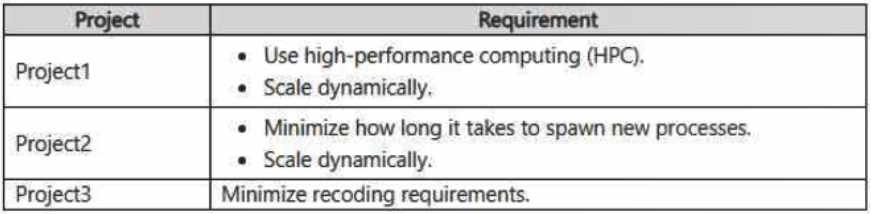
Project3 does NOT support the use of containers.
You need to recommend a compute solution for the projects.
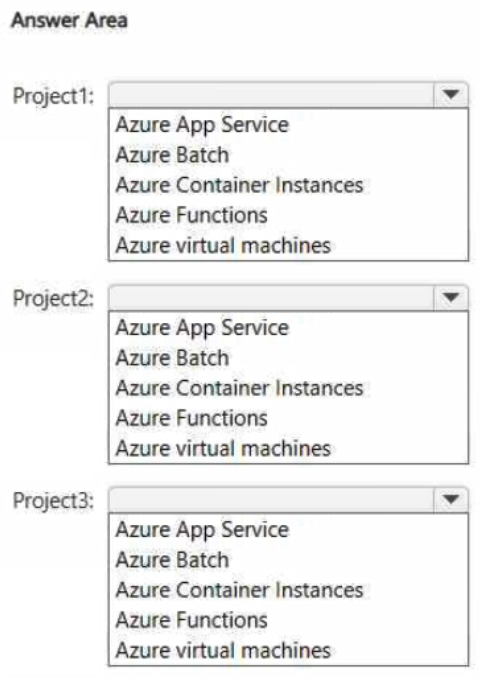
What should you include in the recommendation for each project? To answer, select the appropriate options in the answer area.
NOTE: Each correct selection is worth one point.
Key Takeaways
The item tests whether you can read workload shape (massively parallel HPC vs event-driven vs legacy lift-and-shift) and platform constraints before naming a service; the trap is defaulting every workload to Azure Functions or pushing the no-containers app onto AKS or Container Instances.
This hotspot asks you to map three workloads — scanned-image batch processing, log files arriving in an SMB share, and a legacy PDF app — to the right Azure compute service. The page establishes that Project1 takes Azure Batch, Project2 takes Azure Functions, and Project3 takes Azure Virtual Machines because it cannot be containerized.
Common mistake: The most common wrong approach is treating Azure Functions as a universal answer and assigning it to the image-processing project, or choosing Azure Kubernetes Service / Azure Container Instances for the on-premises PDF application that the question explicitly says does not support containers.
Expert Analysis
Why the Answer Is Correct
Project1 develops an app that processes scanned images already stored in Azure Blob Storage, and its requirement profile is large-scale, parallel, dynamically scaled computation — exactly the Azure Batch model, where a job spins up a pool of compute nodes that auto-scales with the number of tasks. Project2 migrates an on-premises app whose input arrives as files land in an SMB file share; that is a classic event-shaped, bursty, low-administration workload, which is what a serverless Azure Functions app is designed for. Project3 migrates a legacy application that works against a local file system and explicitly does not support containers, so only an IaaS Azure Virtual Machine preserves OS-level and file-system behaviour without repackaging the app. Together the three selections follow AZ-305 compute doctrine: HPC/parallel → Azure Batch, event-driven → Azure Functions, legacy non-containerizable → Azure Virtual Machines.
Why Other Candidate Answers Are Wrong
Azure Functions is the wrong shape for Project1: its consumption model targets short, event-triggered executions, not thousands of parallel, long-running image-processing tasks that need dedicated node pools and job scheduling. Azure Kubernetes Service, Azure Container Instances, and container-based App Service plans are all eliminated for Project3 by the explicit "Project3 does NOT support the use of containers" constraint, no matter how good their scaling story looks. Hosting Project2 on a virtual machine or a Batch pool would technically run, but it forces OS patching, capacity planning, and idle-cost management for a file-arrival workload, which contradicts the low-administration intent of a migration scenario. Conversely, picking a PaaS or serverless target for Project3 fails because the legacy app depends on local file system semantics and cannot be repackaged.
Community Comment Notes
As gpais explains for the first project, the decisive driver is "the requirement for High-Performance Computing (HPC) combined with dynamic scaling" and concludes that Azure Batch is "specifically built to run large-scale parallel and high-performance computing applications" — which matches the verdict given here. The same comment continues that Project2's requirements are addressed by Azure Functions, i.e. the file-arrival trigger rather than a VM-based host. No commenter proposed a container platform for Project3, consistent with the no-containers constraint stated in the question stem. Since only one comment is visible and it is truncated, treat it as supporting evidence rather than the source of the answer — the service mapping is derived from the workload requirements themselves.
Official Reference
- https://learn.microsoft.com/en-us/azure/batch/batch-technical-overview
- https://learn.microsoft.com/en-us/azure/azure-functions/functions-overview
- https://learn.microsoft.com/en-us/azure/virtual-machines/overview
These links open the official vendor documentation in a new tab.
Exam Strategy
Read the requirements table row by row and extract three signals per project: what triggers the work, how it must scale, and any platform restriction. Eliminate container-based options for the project that forbids containers first, then match the remaining projects to Azure Batch (parallel HPC) and Azure Functions (event-driven, minimal administration).
Frequently Asked Questions
Why is Azure Batch recommended for Project1 instead of Azure Functions?
Why can't Project3's PDF application run on Azure Container Instances or AKS?
Discussion 2 contributions
Compiled from public community threads and reader submissions, lightly edited for clarity. Handles and vote tallies are shown as recorded, and comments reflect the views of individual contributors.
From public community threads 2
-
gpais 👍 1• Project1 \(\rightarrow \) Azure Batch: The primary driver here is the requirement for High-Performance Computing (HPC) combined with dynamic scaling to process raw image data. Azure Batch is specifically built to run large-scale parallel and high-performance computing applications without needing to manage infrastructure. • Project2 \(\rightarrow \) Azure Functions: To address the requirement to minimize process spawning times and scale fluidly as files hit an SMB share, a serverless option is needed. Azure Functions provides a lightweight, sub-second activation model (event-driven computing) that instantiates instantly when triggered by file traffic. • Project3 \(\rightarrow \) Azure virtual machines: The app relies directly on a legacy local file system layout, does NOT support containerization, and must minimize any manual recoding requirements. An Infrastructure-as-a-Service (IaaS) Azure Virtual Machine perfectly hosts lift-and-shift legacy apps directly with zero code rewrite overhead.
-
Turnkey 👍 1| Project | Recommended answer | Decisive requirement | |---|---|---| | Project1 | Azure Batch | HPC image processing with dynamic scaling. Batch provides job scheduling and scalable compute pools. | | Project2 | Azure Container Instances | Fast startup of processing instances; containers can start in seconds. | | Project3 | Azure virtual machines | Rehost the existing application and local-file-system dependencies while minimizing recoding. |
Reader comments & corrections
No reader corrections yet — spotted an error or have a note? Share it below.
Related Analysis
Practice All AZ-305 Questions
Access 95 questions with complete answers and detailed explanations.
View Full AZ-305 Practice Test →