Azure Policy Assignments: How Do PA1, PA2, and PA3 Apply?
Short answer
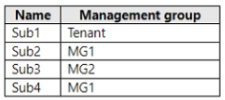
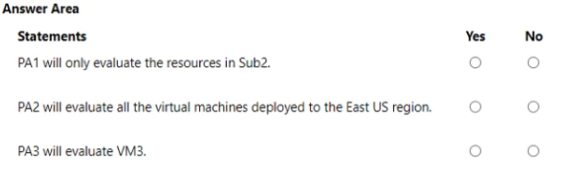
Statement 1 is No: PA1 assigned at MG1 evaluates every subscription under MG1, including Sub2 and Sub4. PA2 now applies only to VMs in East US, and Sub1 is excluded from PA3.
Question
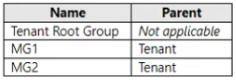
You have the Azure management groups shown in the following table.
You have the Azure subscriptions shown in the following table.
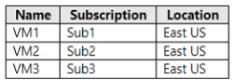
You have the virtual machines shown in the following table.
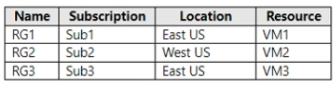
You have the resource groups shown in the following table.
You have the Azure policies shown in the following table.
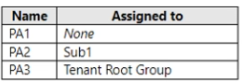
You perform the following actions:
• Assign PA1 to MG1.
• Modify PA2 and configure the resource selector to include only Microsoft.Compute/virtualMachines in the East US Azure region.
• Modify PA3 and add an exclusion for Sub1.
For each of the following statements, select Yes if the statement is true. Otherwise, select No.
NOTE: Each correct selection is worth one point.
Key Takeaways
The scenario tests Azure Policy inheritance and assignment scoping — and the classic trap is reading an assignment made at management group MG1 as if it only evaluated the first subscription listed under that group.
This AZ-305 hotspot scenario tests how Azure Policy assignments behave at management group scope, how an assignment resource selector narrows evaluation by resource type and region, and how an exclusion removes a subscription. It establishes that PA1 inherits to every subscription under MG1, PA2 is limited to VMs in East US, and Sub1 falls outside PA3.
Common mistake: The most common wrong approach is treating the management group assignment (PA1 to MG1) as subscription-scoped, so candidates mark 'PA1 will only evaluate the resources in Sub2' as Yes instead of recognizing that Sub4 is also a child of MG1 and is therefore evaluated too.
Expert Analysis
Why the Answer Is Correct
Azure Policy assignments take effect at their assignment scope and cascade down the entire management group hierarchy, so an assignment made at MG1 reaches every subscription and resource group beneath it — including Sub2 and Sub4 — which makes any statement restricting PA1 to Sub2 alone false. The resource selector added to PA2 is an assignment-level filter of kind Microsoft.Compute/virtualMachines with an East US location condition, so the policy definition itself is unchanged while evaluation is limited to virtual machines in that region; resources of other types or in other regions are skipped. Adding Sub1 as an exclusion to PA3 puts Sub1 in the assignment's excluded scopes, so PA3 still applies everywhere else in its scope but no longer evaluates Sub1 resources. The three actions therefore map one-to-one onto the three statement rows: PA1 broadens beyond Sub2 (No), PA2 becomes East US VM-only (Yes), and PA3 stops applying to Sub1 (Yes).
Why Other Candidate Answers Are Wrong
Answering Yes to the PA1 statement confuses the scope of the assignment with the subscription that happens to host the workloads; the assignment is anchored at MG1, not at Sub2, and inheritance is automatic. Another wrong path treats the resource selector as if it edited the PA2 definition or as if location filtering required a separate 'Allowed locations' policy — a resource selector only narrows which resources the existing assignment evaluates. Candidates also err by assuming an exclusion disables or deletes PA3 outright, or that a subscription cannot be excluded from a management-group-scoped assignment; exclusions are child scopes of the assignment scope, so Sub1 is a valid exclusion for a policy that cascades over it. Finally, some answers assume policy evaluation is manual or requires remediation before taking effect, but audit and deny effects apply at evaluation time, not at remediation time.
Community Comment Notes
The single high-voted comment on this scenario, from gpais, is a correction breakdown rather than a defense of the original selection, and it states that "MG1 is the direct parent container for both Sub2 and Sub4," then justifies the No verdict with "Because Azure Policy evaluations automatically inherit down to all child scopes" — a concise restatement of exactly the inheritance rule the exam is probing. gpais also notes that PA1 assigns at management group MG1, so the assignment "will evaluate resources across both subscriptions, not" just Sub2. There is no meaningful vote distribution to lean on here (votes recorded as n/a), so the verdict rests on documented Azure Policy scope and inheritance behavior rather than on learner consensus.
Exam Strategy
For every policy hotspot, write down the assignment scope, then the selectors, then the exclusions, before judging any statement — most wrong answers come from skipping the scope step. Remember that inherited assignments are evaluated identically at every child scope, so only an explicit exclusion or a non-inherited scope removes a subscription from evaluation.
Official Reference
- https://learn.microsoft.com/en-us/azure/governance/policy/concepts/scope
- https://learn.microsoft.com/en-us/azure/governance/policy/concepts/assignment-structure
- https://learn.microsoft.com/en-us/azure/governance/management-groups/overview
These links open the official vendor documentation in a new tab.
Exam Strategy
Map each of the three actions to exactly one statement row before you answer: the PA1-to-MG1 action tests inheritance, the PA2 resource selector tests assignment-level filtering by type and region, and the PA3 exclusion tests scope removal. If a statement narrows an inherited assignment to a single subscription without an explicit exclusion, it is almost always No.
Frequently Asked Questions
Does assigning PA1 to management group MG1 also evaluate resources in Sub4?
What does the resource selector on PA2 actually change?
Discussion 2 contributions
Compiled from public community threads and reader submissions, lightly edited for clarity. Handles and vote tallies are shown as recorded, and comments reflect the views of individual contributors.
From public community threads 2
-
gpais 👍 2Detailed Correction & Evaluation Breakdown Statement 1: PA1 will only evaluate the resources in Sub2. → NO • Why: PA1 is assigned to the Management Group MG1. According to the Subscriptions table, MG1 is the direct parent container for both Sub2 and Sub4. Because Azure Policy evaluations automatically inherit down to all child scopes, PA1 will evaluate resources across both subscriptions, not only Sub2. Statement 2: PA2 will evaluate all the virtual machines deployed to the East US region. → NO • Why: PA2 is assigned strictly at the Sub1 scope level. Adding a resource selector acts as an internal filter to narrow down what gets evaluated within that specific assignment scope—it cannot expand a policy's reach to other subscriptions. Therefore, PA2 will only evaluate the East US virtual machines residing inside Sub1 (VM1). It will completely ignore VM2 (Sub2) and VM3 (Sub3), even though they are located in the East US region. Statement 3: PA3 will evaluate VM3. → YES • Why: PA3 is assigned to the Tenant Root Group, meaning it evaluates every resource across the entire tenant by default. The modification adds an explicit exclusion for Sub1. Looking closely at the Virtual Machines table, VM3 belongs to Sub3, which means it is completely unaffected by the Sub1 exclusion rule. As a result, PA3 will continue to evaluate VM3.
-
Turnkey 👍 1WRONG PA1 will only evaluate resources in Sub2 — No. MG1 contains both Sub2 and Sub4, so its assignment is not limited to Sub2. PA2 will evaluate all East US virtual machines — No. PA2 remains assigned to Sub1. Its selector includes VM1, but cannot extend the assignment to VM2 or VM3 in other subscriptions. PA3 will evaluate VM3 — Yes. PA3 is assigned at the tenant root. Excluding Sub1 does not exclude VM3, which belongs to Sub3.
Reader comments & corrections
No reader corrections yet — spotted an error or have a note? Share it below.
Related Analysis
Practice All AZ-305 Questions
Access 95 questions with complete answers and detailed explanations.
View Full AZ-305 Practice Test →