How to Host App1 on Azure with Fast Scaling and Region Recovery?
Short answer
Select Azure Virtual Machine Scale Sets in Flexible orchestration mode for compute and Azure Site Recovery for region-failure recovery.
Question
You have an on-premises web server farm that contains 10 servers. The servers run Windows Server 2016 and host a .NET Framework application named App1. The state data for App1 is maintained by using a database named DB1. The usage patterns of App1 vary significantly.
You plan to perform the following actions:
• Migrate App1 to Azure.
• Migrate DB1 to an Azure SQL database.
You need to recommend a virtual machine-based solution to host App1. The solution must meet the following requirements:
• Minimize how long it takes to scale out resources during surges in demand for App1.
• Ensure minimum capacity availability of the virtual machines at all times.
• Ensure that the solution can be recovered if an Azure region fails.
• Minimize compute costs.
What should you include in the recommendation? To answer, select the appropriate options in the answer area.
NOTE: Each correct selection is worth one point.
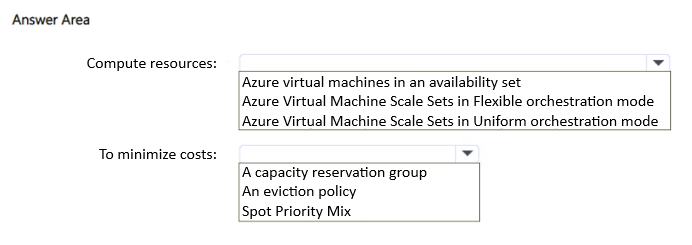
Key Takeaways
This question tests VMSS orchestration mode choice for fast scaling and cost versus Uniform, plus the need for a separate region-failure recovery service like Azure Site Recovery.
Migrating a variable-demand .NET app to Azure requires a VM-based compute solution that scales quickly, guarantees minimum capacity, survives region failure, and minimizes cost. The recommended answer is Azure Virtual Machine Scale Sets in Flexible orchestration mode paired with Azure Site Recovery.
Common mistake: Choosing Uniform orchestration mode or relying only on Availability Zones, which cannot mix Spot and on-demand VMs for cost savings or recover from a full region failure.
Expert Analysis
Why the Answer Is Correct
Azure Virtual Machine Scale Sets (VMSS) in Flexible orchestration mode provides the automatic, high-speed horizontal scaling required to minimize scale-out times during App1 demand surges. Flexible mode supports a mix of Spot and on-demand VMs within a single scale set, allowing you to maintain a baseline of on-demand VMs for minimum capacity while using lower-cost Spot VMs for burst capacity, directly addressing the cost and availability requirements. For region-failure recovery, VMSS alone is regional, so Azure Site Recovery is needed to replicate the VMs to a secondary Azure region and orchestrate failover. Azure Site Recovery supports VMSS in Flexible orchestration mode, making it the correct companion service. Together, these selections satisfy all four stated requirements.
Why Other Candidate Answers Are Wrong
Uniform orchestration mode does not allow mixing Spot and on-demand VMs in the same scale set, so it cannot simultaneously minimize compute costs and guarantee a minimum on-demand capacity baseline. Availability Sets only protect against hardware failures within a single datacenter and offer no region-level recovery capability. Availability Zones protect against datacenter failure within one region but do not help if the entire Azure region fails. Azure Backup is a data-protection service and does not provide rapid VM failover to another region.
Community Comment Notes
The commenter gpais selected "Azure Virtual Machine Scale Sets in Flexible orchestration mode" as the compute resource, citing VMSS automatic scaling and Flexible mode's support for heterogeneous VMs and advanced disks. The community often debates Availability Zones versus Azure Site Recovery for the region-failure requirement, but the question's wording "recovered if an Azure region fails" makes Azure Site Recovery the clear choice. As gpais noted, Flexible mode is preferred because it provides "full support for heterogeneous virtual machines" and advanced disk configurations.
Official Reference
- https://learn.microsoft.com/en-us/azure/virtual-machine-scale-sets/virtual-machine-scale-sets-orchestration-modes
- https://learn.microsoft.com/en-us/azure/site-recovery/site-recovery-overview
These links open the official vendor documentation in a new tab.
Exam Strategy
Focus on the requirement keywords: 'scale out fast' points to VMSS, 'minimum capacity' and 'minimize cost' point to Flexible mode with mixed Spot/on-demand, and 'region fails' points to Azure Site Recovery rather than Availability Zones.
Frequently Asked Questions
Why is Flexible orchestration mode preferred over Uniform for this App1 scenario?
Does Azure Site Recovery support VMSS in Flexible orchestration mode?
Discussion 1 contributions
Compiled from public community threads and reader submissions, lightly edited for clarity. Handles and vote tallies are shown as recorded, and comments reflect the views of individual contributors.
From public community threads 1
-
gpais 👍 1Compute resources: • Selection: Azure Virtual Machine Scale Sets in Flexible orchestration mode • Reason: Virtual Machine Scale Sets (VMSS) provide the automatic, high-speed horizontal scaling needed to minimize scale-out times during traffic surges. Choosing Flexible orchestration mode provides full support for heterogeneous virtual machines, advanced disk configurations like Ultra Disks, and is the prerequisite hosting architecture needed to implement a dynamic pricing strategy like a Spot Priority Mix. To minimize costs: • Selection: Spot Priority Mix • Reason: A Spot Priority Mix allows you to combine a base layer of regular, non-interruptible standard VMs to ensure minimum capacity availability at all times with lower-cost, interruptible Spot VMs that handle scale-out spikes. This minimizes compute costs while maintaining application reliability.
Reader comments & corrections
No reader corrections yet — spotted an error or have a note? Share it below.
Related Analysis
Practice All AZ-305 Questions
Access 95 questions with complete answers and detailed explanations.
View Full AZ-305 Practice Test →