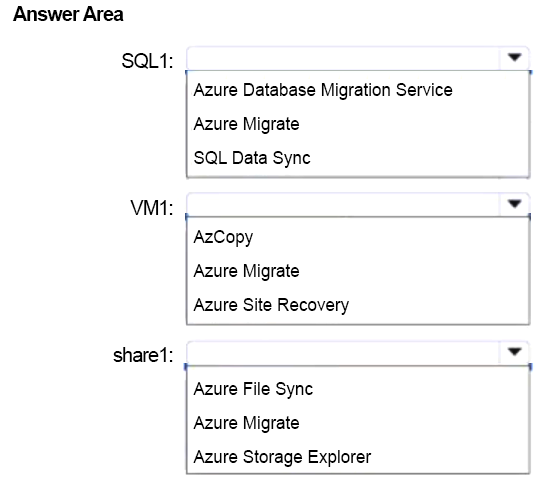
Which services migrate share1, SQL1, and VM1 to Azure?
HOTSPOT
You have an on-premises app named App1 that uses the Hyper-V virtual machines shown in the following table.
 You plan to migrate App1 to Azure.
You need to recommend which services to use for the migrations. The solution must meet the following requirements:
• share1 must be migrated to a premium Azure Files share.
• SQL1 must be migrated to an Azure SQL managed instance.
• The migrations must be completed with minimal downtime and zero data loss.
• VM1 must be migrated to an Azure virtual machine. A sizing assessment must be completed before the migration.
What should you recommend for each virtual machine? To answer, select the appropriate options in the answer area.
NOTE: Each correct selection is worth one point.
You plan to migrate App1 to Azure.
You need to recommend which services to use for the migrations. The solution must meet the following requirements:
• share1 must be migrated to a premium Azure Files share.
• SQL1 must be migrated to an Azure SQL managed instance.
• The migrations must be completed with minimal downtime and zero data loss.
• VM1 must be migrated to an Azure virtual machine. A sizing assessment must be completed before the migration.
What should you recommend for each virtual machine? To answer, select the appropriate options in the answer area.
NOTE: Each correct selection is worth one point.
Community Insight
The item tests selecting workload-specific migration tools; the trap is using Azure Site Recovery for VM1 or DMA for SQL1 because they sound related but do not satisfy the assessment and online-migration requirements.
This AZ-305 hotspot asks you to map App1's Hyper-V workloads to Azure migration services under minimal-downtime and zero-data-loss constraints. The page establishes Azure File Sync for share1, DMS for SQL1, and Azure Migrate for VM1.
A common mistake is choosing one general tool such as Azure Migrate for every row, or picking Azure Site Recovery for VM1; that ignores the premium Azure Files target and the SQL Managed Instance online migration requirement.
Community Discussion (1 comments)
Comments & Corrections
No comments yet — spotted an error or have a note? Share it below.
Expert Analysis
Why the Answer Is Correct
For share1, Azure File Sync is Microsoft's online migration path for SMB shares into Azure Files; it seeds the premium Azure Files share, continuously syncs changes, and allows a short cutover with no data loss. For SQL1, Azure Database Migration Service online migration to Azure SQL Managed Instance replays transaction logs until cutover, meeting the minimal-downtime and zero-data-loss requirement. For VM1, Azure Migrate provides discovery and assessment for sizing before migration, then Server Migration replicates and cuts over the Hyper-V VM. This matches each workload's native tool and the stated constraints.Why Other Candidate Answers Are Wrong
Azure Site Recovery is for disaster recovery replication, not a sizing-assessment-led migration, so VM1 should not use it. Data Migration Assistant assesses SQL Server compatibility and upgrade paths, but it does not perform the online SQL Managed Instance migration; DMS does. Storage Migration Service or Robocopy are file-server copy and cutover tools, but for a premium Azure Files target with continuous sync and minimal downtime, Azure File Sync is the appropriate service. Azure Data Box is an offline transfer option and is unnecessary for these online migrations.Community Comment Notes
The learner comment from gpais aligns with the SQL1 selection, noting that the requirement calls for an "online migration pattern" handled by Azure Database Migration Service. That supports DMS for SQL1. No community comment disputes the Azure File Sync or Azure Migrate selections.Official Reference
Exam Strategy
Map each workload to its native migration tool: file shares to Azure File Sync, SQL Server to DMS online migration, and Hyper-V servers to Azure Migrate for both assessment and migration. When a requirement mentions a sizing assessment, look for Azure Migrate rather than Azure Site Recovery.
Frequently Asked Questions
Why is Azure File Sync recommended for share1 instead of Storage Migration Service?
Azure File Sync continuously syncs the on-premises SMB share to the premium Azure Files share and allows a short cutover, while Storage Migration Service is primarily for Windows file-server-to-file-server migrations.
Does Azure Migrate cover both the VM1 sizing assessment and the Hyper-V migration?
Yes. Azure Migrate Discovery and assessment sizes VM1, and Azure Migrate Server Migration replicates the Hyper-V VM and performs the cutover.
Related Analysis
Practice All AZ-305 Questions
Access 95 questions with complete answers and detailed explanations.
View Full AZ-305 Practice Test →