Which Azure service and trigger sends Teams alerts from App1 webhooks?
Short answer
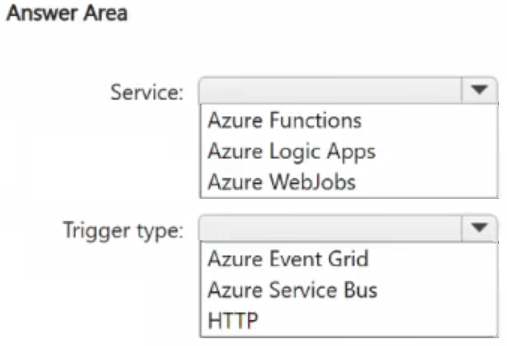
Host App2 in Azure Logic Apps and configure the trigger as When an HTTP request is received (HTTP request/webhook trigger), so App1's webhook calls the workflow and the built-in Teams connector posts the message.
Question
You have an on-premises app named App1 that supports REST calls and webhooks.
You have an Azure subscription.
You plan to develop a new app named App2 that will send a Microsoft Teams message when a new record is added to App1.
You need to recommend a service to host App2 and the type of trigger to use to call App2. The solution must minimize development effort.
What should you recommend? To answer, select the appropriate options in the answer area.
NOTE: Each correct selection is worth one point.
Key Takeaways
The question tests whether you can pair a low-code orchestrator with the trigger that matches an already webhook-capable source — the trap is picking a polling/recurrence trigger or a code-based host such as Azure Functions.
App1 exposes REST calls and webhooks, and every new record must produce a Microsoft Teams message with as little code as possible. This page establishes that an Azure Logic Apps workflow with a Request (HTTP) trigger is the recommended host and trigger pairing for App2.
Common mistake: Choosing Azure Functions or an Event Grid subscription because 'serverless' sounds minimal, then needing custom code for Teams authentication and message formatting, which violates the minimize-development-effort requirement.
Expert Analysis
Why the Answer Is Correct
App1 already supports webhooks, so it can push an HTTP POST to an endpoint the moment a record is created, and Azure Logic Apps exposes exactly that entry point through the built-in Request trigger (When an HTTP request is received). Logic Apps also ships a first-party Microsoft Teams connector with an out-of-the-box Post message in a chat or channel action, so no custom code is needed for authentication, payload shaping, or retry handling. Combining the Request trigger with the Teams action means App2 is pure configuration: register the Logic App's callback URL in App1's webhook, and the workflow completes the Teams notification. That is why Logic Apps plus the HTTP request trigger is the design that satisfies 'minimize development effort' while remaining a fully managed Azure service in the subscription. The same pairing also gives built-in run history, which is useful for verifying that each App1 record actually produced a message.
Why Other Candidate Answers Are Wrong
Azure Functions can receive an HTTP request and post to Teams, but the developer must write code for the Teams payload, the webhook secret, and error handling, which is more effort than the Logic Apps connector path. Power Automate has the same Teams connector, yet the requirement is a service in the Azure subscription hosting App2 for a system-to-system flow, which points to Logic Apps rather than a per-user flow. Azure Event Grid can route the event but has no native Teams message action, so it must hand off to another compute service, adding moving parts without removing code. A recurrence (polling) trigger is the wrong trigger type: App1 already emits webhooks, so polling its REST API adds interval logic, latency, and duplicate-handling code that the push model avoids. An Office 365 Outlook or generic SMTP trigger is also wrong because the target channel is Microsoft Teams, not email.
Community Comment Notes
As gpais noted, Logic Apps is "a no-code/low-code workflow orchestration service" that "features a built-in, out-of-the-box connector for Microsoft Teams," which is precisely the reason it minimizes development effort here. The same comment stresses that no custom code is required to handle authentication or payload delivery to Teams — the exact differentiator against a Function-based host. Because the vote count on the thread is minimal, the verdict should rest on the vendor documentation and the wording of the requirement, not on majority sentiment. Taken together, the comment aligns with the documented Logic Apps Request-trigger plus Teams-action pattern rather than a polling or code-first design.
Official Reference
- https://learn.microsoft.com/en-us/azure/connectors/connectors-native-reqres
- https://learn.microsoft.com/en-us/connectors/teams/
These links open the official vendor documentation in a new tab.
Exam Strategy
When a scenario says the source supports webhooks and you must minimize effort, jump straight to the push-trigger plus low-code-connector combination before evaluating any compute service. On AZ-305 hotspot items, read the two dropdowns as one design decision — the service and the trigger must both fit the same flow, so an HTTP request trigger only makes sense with a host that exposes a public callback endpoint.
Frequently Asked Questions
Why choose the HTTP request trigger for App2 instead of a recurrence trigger?
Could Azure Functions host App2 and still post the Microsoft Teams message?
Discussion 1 contributions
Compiled from public community threads and reader submissions, lightly edited for clarity. Handles and vote tallies are shown as recorded, and comments reflect the views of individual contributors.
From public community threads 1
-
gpais 👍 1Service: Azure Logic Apps Explanation: Azure Logic Apps is a no-code/low-code workflow orchestration service. It features a built-in, out-of-the-box connector for Microsoft Teams (e.g., "Post message in a chat or channel"). Because you don't have to write any custom code to handle authentication or payload delivery to Teams, it completely minimizes development effort compared to writing custom scripts in Azure Functions or WebJobs.
Reader comments & corrections
No reader corrections yet — spotted an error or have a note? Share it below.
Related Analysis
Practice All AZ-305 Questions
Access 95 questions with complete answers and detailed explanations.
View Full AZ-305 Practice Test →