Fabric: How to Reference Dataverse Data and Serve Power BI?
Short answer
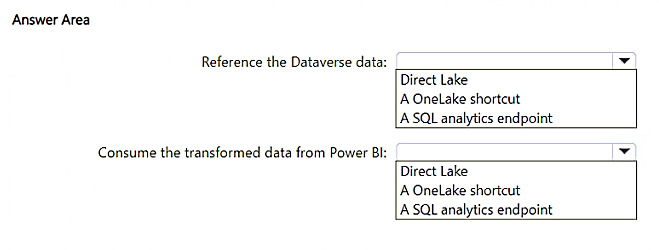
Reference the Dataverse data by using a OneLake shortcut, and consume the transformed data from Power BI by using a Direct Lake semantic model over the Delta tables in OneLake.
Question
You have an Azure subscription that contains an Azure Data Lake Storage Gen2 account named storage1. Storage1 contains semi-structured sales data in Parquet files.
You ingest, transform, analyze, and visualize the sales data daily. During the transformations, the data is referenced against Microsoft Dataverse and consumed by Microsoft Power BI.
You need to deploy a new a data integration and analysis solution in Microsoft Fabric. The solution must meet the following requirements:
• Minimize the duplication of data.
• Minimize how long it takes to generate reports in Power BI.
What should you use to reference the Dataverse data and consume the transformed data from Power BI? To answer, select the appropriate options in the answer area.
NOTE: Each correct selection is worth one point.
Key Takeaways
The question tests mapping Fabric's zero-copy integration features to two separate requirements — OneLake shortcuts for referencing Dataverse without copying, and Direct Lake for Import-like speed over OneLake Delta tables — while the trap is picking Import mode or Dataflows Gen2, which reintroduce duplication or latency.
For the Microsoft Fabric hotspot, you reference Dataverse data with a OneLake shortcut and consume the transformed data from Power BI through a Direct Lake semantic model. This page confirms both selections against the AZ-305 design requirements of minimizing data duplication and minimizing Power BI report generation time.
Common mistake: Choosing Import mode (or a pipeline that copies Dataverse tables into the lakehouse) for the Power BI consumption step, because Import is the familiar default. It satisfies speed but violates the 'minimize duplication of data' requirement, since the transformed data gets physically copied into the semantic model.
Expert Analysis
Why the Answer Is Correct
The question sets two hard constraints: minimize duplication of data and minimize report generation time. A OneLake shortcut is a zero-copy pointer that surfaces Dataverse tables as Delta-Parquet folders inside the Fabric lakehouse, so the Dataverse data is referenced in place rather than extracted and reloaded. For the Power BI side, Direct Lake reads the transformed Delta tables in OneLake directly, giving Import-mode query performance without importing or duplicating the data into the semantic model. Together they satisfy both requirements at once: no redundant copies of Dataverse or of the transformed sales data, and no DirectQuery round-trip penalty when the Power BI report renders.
Why Other Candidate Answers Are Wrong
Import mode would give fast reports but physically copies the transformed data into the semantic model's in-memory store, breaking the low-duplication requirement and adding refresh scheduling. DirectQuery avoids duplication but pushes every visual's query down to the SQL/Delta engine at render time, which conflicts with 'minimize how long it takes to generate reports'. A Dataflow Gen2 or pipeline copy that lands Dataverse rows into storage1 duplicates the Dataverse source and forces extra refresh orchestration before Power BI can see it. Mirroring or a separate Azure SQL layer adds another moving part and another copy of the same data, which the scenario explicitly rules out.
Community Comment Notes
Community input on this item is thin — a single voter recorded the selection pair directly: "Reference the Dataverse data: A OneLake shortcut" and "Consume the transformed data from Power BI: Direct Lake". That aligns with the vendor's documented behavior for OneLake shortcuts and the Direct Lake storage mode, so the recorded selection is consistent with the requirements rather than with a majority vote. Because the sample is one response and votes are anonymous, the verdict here rests on the Fabric documentation and the wording of the requirements, not on the tally.
Official Reference
- https://learn.microsoft.com/en-us/fabric/get-started/direct-lake-overview
- https://learn.microsoft.com/en-us/fabric/onelake/create-dataverse-shortcut
These links open the official vendor documentation in a new tab.
Exam Strategy
Treat each dropdown as its own requirement: scan the wording for 'duplication' and 'time' and match them independently. 'Minimize duplication' points to shortcut/zero-copy options, while 'minimize report time' points to Direct Lake rather than DirectQuery — any single answer that copies data loses the duplication point even if it renders fast.
Frequently Asked Questions
Why can't I just use Import mode in Power BI to consume the transformed sales data?
Does a OneLake shortcut to Dataverse actually copy the Dataverse tables into storage1?
Discussion 1 contributions
Compiled from public community threads and reader submissions, lightly edited for clarity. Handles and vote tallies are shown as recorded, and comments reflect the views of individual contributors.
From public community threads 1
-
gpais 👍 1• Reference the Dataverse data: A OneLake shortcut • Consume the transformed data from Power BI: Direct Lake
Reader comments & corrections
No reader corrections yet — spotted an error or have a note? Share it below.
Related Analysis
Practice All AZ-305 Questions
Access 95 questions with complete answers and detailed explanations.
View Full AZ-305 Practice Test →