Migrating a 500-TB SQL Server DB and On-Prem VMs to Azure
Short answer
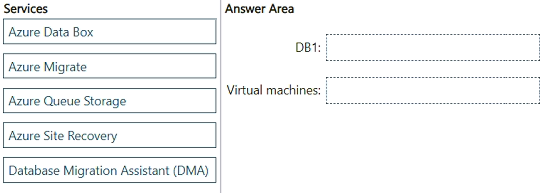
For DB1, use Azure Data Box to ship the 500-TB database offline. For the virtual machines, use Azure Migrate, which replicates with Azure Site Recovery to support a test migration and minimal-downtime cutover.
Question
You have a 500-TB, on premises Microsoft SQL Server database named DB1.
You have an on-premises datacenter that contains virtual machines. The virtual machines host database, web, file and application resources.
You have an Azure subscription.
You need to migrate DB1 and the virtual machines to Azure. The solution must meet the following requirements:
• During the migration of DB1, data cannot be transmitted over the internet, and the impact on the internet must be minimized.
• The migration of the virtual machines must support a test migration before the production migration.
• During the migration of the virtual machines, downtime must be minimized.
What should you use for each migration? To answer, drag the appropriate services to the correct targets. Each service may be used once, more than once, or not at all. You may need to drag the split bar between panes or scroll to view content.
NOTE: Each correct selection is worth one point.
Key Takeaways
The question tests matching each workload to the one Azure migration service that satisfies its explicit constraint — offline bulk transfer for the 500-TB DB1, and test-migration plus low-downtime support for the VMs — and the trap is swapping them or reaching for Azure Site Recovery alone for the database.
Migrating a 500-TB on-premises SQL Server database offline and on-premises VMs to Azure calls for Azure Data Box for the database and Azure Migrate (with Azure Site Recovery replication) for the virtual machines. This page confirms each service-to-target pairing and explains why online transfer and standalone backup tools fail the stated constraints.
Common mistake: Learners often pick Azure Site Recovery for both, or suggest Azure Database Migration Service with an online/DMA path for the 500-TB database, ignoring the explicit 'cannot be transmitted over the internet' requirement that only an offline physical shipment (Azure Data Box) satisfies.
Expert Analysis
Why the Answer Is Correct
The two constraints point to two different tools. DB1 is 500 TB and the data "cannot be transmitted over the internet," which rules out every online replication path — Azure Data Box is a physical appliance Microsoft ships to the datacenter, loaded over the local network, then shipped and uploaded inside Azure's network, so nothing touches the public internet. For the virtual machines, the requirements are explicit: "a test migration before the production migration" and "downtime must be minimized." Azure Migrate provides discovery, assessment and the orchestration layer, and its Server Migration tool uses Azure Site Recovery replication so you can run a non-disruptive test failover first and then cut over during a short final window. Together, Data Box to the database target and Azure Migrate to the virtual machines target is the only pairing that satisfies every stated constraint.
Why Other Candidate Answers Are Wrong
Azure Site Recovery placed in the database slot fails immediately: continuous replication requires network bandwidth and would move 500 TB over the wire, violating the "cannot be transmitted over the internet" and "minimize internet impact" rules. Azure Database Migration Service (online mode) has the same defect, and even its offline mode expects a local backup copied to a network share or storage account, not a 500-TB offline bulk shipment at this scale. Storage Explorer, AzCopy or an Azure Import/Export job in the VM slot fails the test-migration requirement, because Azure Migrate is the service that offers assessment plus a rehearsal failover before production. Azure Data Box in the VM slot would also mean shipping disks and reinstalling workloads rather than replicating live VMs with minimal downtime.
Community Comment Notes
Community consensus converges on exactly this split. gpais explains that "Azure Data Box is a physical appliance sent by Microsoft to copy large volumes of data" and that this "completely satisfies the requirement that data cannot be transmitted over the internet," then assigns Azure Migrate to the virtual machines as "the official service for discovering, assessing, and migra…" (truncated in the source). That reasoning matches the exam's intended doctrine: pick the transport mechanism that obeys the constraint, not the one that is technically capable but network-bound. Note that these are anonymous learner votes and are not themselves proof — the verdict here rests on the constraint wording and Microsoft's documented capabilities of Data Box and Azure Migrate.
Official Reference
- https://learn.microsoft.com/en-us/azure/databox/data-box-overview
- https://learn.microsoft.com/en-us/azure/migrate/migrate-services-overview
These links open the official vendor documentation in a new tab.
Exam Strategy
Read each requirement bullet as a filter rather than background text: "cannot be transmitted over the internet" at 500 TB is the signature of Azure Data Box, while "test migration" plus "minimize downtime" is the signature of Azure Migrate with Site Recovery replication. If a drag-and-drop item lists both a data service and a migration service, assign one per target and do not reuse a service merely because it appears in both stories.
Frequently Asked Questions
Why can't Azure Database Migration Service or Site Recovery handle the 500-TB DB1 migration?
Why is Azure Migrate required for the virtual machines instead of just copying the VHDs?
Discussion 1 contributions
Compiled from public community threads and reader submissions, lightly edited for clarity. Handles and vote tallies are shown as recorded, and comments reflect the views of individual contributors.
From public community threads 1
-
gpais 👍 1• DB1: Azure Data Box o Reason: Azure Data Box is a physical appliance sent by Microsoft to copy large volumes of data (like a 500-TB database) offline and ship it to an Azure datacenter. This completely satisfies the requirement that data cannot be transmitted over the internet. • Virtual machines: Azure Migrate o Reason: Azure Migrate is the official service for discovering, assessing, and migrating on-premises virtual machines to Azure. It natively supports test migrations to validate the process before the final cutover and uses continuous replication to minimize downtime during production migration.
Reader comments & corrections
No reader corrections yet — spotted an error or have a note? Share it below.
Related Analysis
Practice All AZ-305 Questions
Access 95 questions with complete answers and detailed explanations.
View Full AZ-305 Practice Test →