Azure Data Lake Storage Gen2 Settings for Physical Security
Short answer
Enable Hierarchical namespace to create the Gen2 account structure and enable Infrastructure encryption to protect data from physical disk access.
Question
You have an Azure subscription.
You plan to deploy an app that requires an Azure Data Lake Storage Gen2 account.
You need to recommend which settings to modify during the storage account deployment. The solution must ensure that the data in the account is protected if an attacker gains access to the physical disk that stores the data.
Which two settings should you recommend? To answer, select the appropriate settings in the answer area.
NOTE: Each correct selection is worth one point.
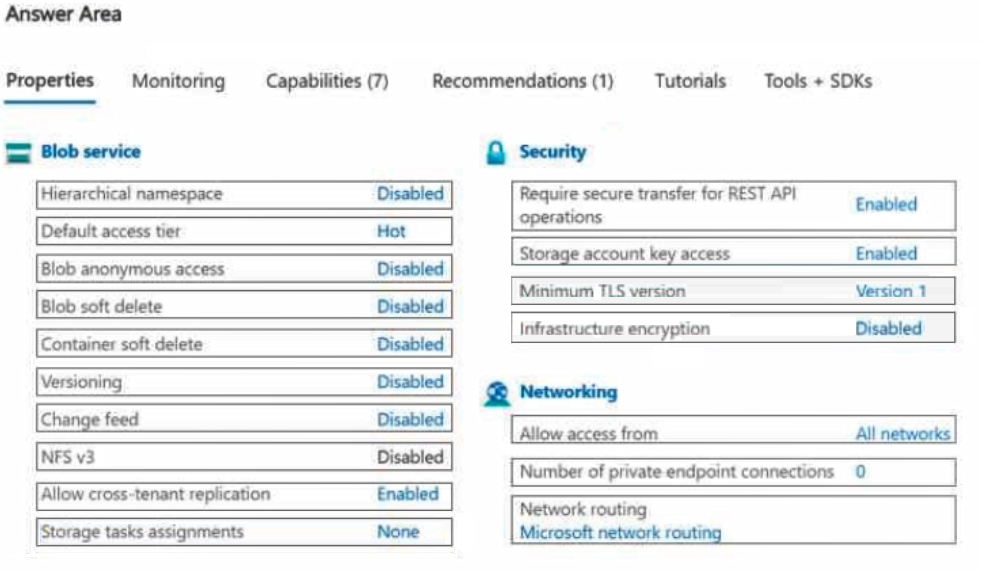
Key Takeaways
Test-takers often confuse network security with physical security; the key is recognizing that 'physical disk' protection maps directly to Infrastructure encryption.
Configure Hierarchical namespace and Infrastructure encryption for Azure Data Lake Storage Gen2 to ensure compatibility and physical disk security.
Common mistake: Selecting Customer-Managed Keys (CMK) instead of Infrastructure encryption. CMK manages key lifecycle but does not inherently solve the 'physical disk' exposure issue as directly as the dual-layer infrastructure encryption does in this context.
Expert Analysis
The scenario requires two specific configurations for an Azure Data Lake Storage Gen2 account to meet distinct requirements: enabling the service itself and protecting data against physical disk compromise.
First, Hierarchical namespace must be enabled. This is not merely a feature choice but a fundamental requirement; Azure Data Lake Storage Gen2 accounts are defined by having this setting turned on during creation. Without it, the storage account functions as standard blob storage and lacks the directory semantics required for big data analytics workloads associated with Data Lakes.
Second, Infrastructure encryption must be confirmed as enabled. By default, Azure encrypts all data at rest using Microsoft-managed keys. Crucially, this includes a second layer of encryption applied by the infrastructure team. As noted in community insights, this provides additional protection if an attacker gains physical access to the underlying hardware, ensuring that raw disk data remains unreadable without the proper keys.
A common trap is selecting "Customer-managed keys" or "Private Link." While customer-managed keys enhance control, the question specifically cites protection against physical disk access, which is the primary value proposition of infrastructure-level encryption. Private Link secures network traffic, not physical media.
Official Reference
- https://learn.microsoft.com/en-us/azure/storage/blobs/data-lake-storage-introduction
- https://learn.microsoft.com/en-us/azure/storage/common/storage-service-encryption
These links open the official vendor documentation in a new tab.
Exam Strategy
When a question mentions 'physical disk' or 'hardware' compromise, immediately filter for Infrastructure Encryption options. Do not default to network-based solutions like Private Endpoints unless explicitly asked about network isolation.
Frequently Asked Questions
Can I enable Hierarchical namespace after creating the storage account?
What is the difference between Infrastructure encryption and Customer-managed keys?
Discussion 1 contributions
Compiled from public community threads and reader submissions, lightly edited for clarity. Handles and vote tallies are shown as recorded, and comments reflect the views of individual contributors.
From public community threads 1
-
AllanHouston 👍 1Hierarchical namespace: Enabled Infrastructure encryption: Enabled Hierarchical namespace must be enabled to create an Azure Data Lake Storage Gen2 account. It adds directory and file-system semantics required by Data Lake Storage workloads. Infrastructure encryption adds a second layer of encryption at the Azure infrastructure level. This provides additional protection if an attacker gains physical access to the underlying storage media.
Reader comments & corrections
No reader corrections yet — spotted an error or have a note? Share it below.
Related Analysis
Practice All AZ-305 Questions
Access 95 questions with complete answers and detailed explanations.
View Full AZ-305 Practice Test →