Azure App Monitoring: Application Insights Selection
Short answer
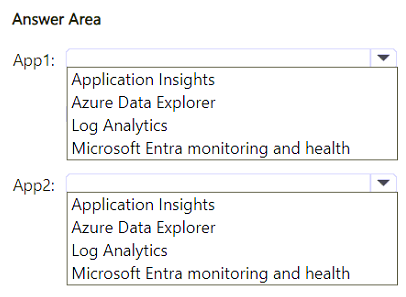
Select Azure Monitor Application Insights for both App1 and App2.
Question
HOTSPOT
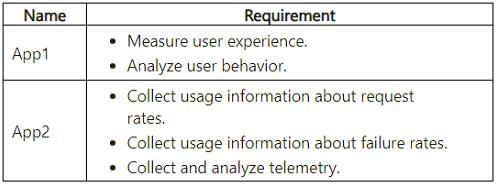
You plan to develop two apps that will be hosted in Azure. The apps must meet the monitoring requirements shown in the following table.
 What should you include in the recommendation for each app? To answer, select the appropriate options in the answer area.
NOTE: Each correct selection is worth one point.
What should you include in the recommendation for each app? To answer, select the appropriate options in the answer area.
NOTE: Each correct selection is worth one point.
Key Takeaways
The scenario requires distinguishing between general monitoring needs and specific capabilities like user flow analysis; Application Insights is the unified service that covers all listed requirements for both apps.
This question tests the selection of Azure monitoring services for application telemetry and user experience analysis. The correct solution involves deploying Azure Monitor Application Insights to both applications, as it natively supports performance monitoring, request tracking, and user behavior analytics.
Common mistake: Learners often hesitate to select the same service for multiple slots or incorrectly choose separate tools (like Log Analytics) when a single integrated tool suffices. They may also overlook that Application Insights handles both technical metrics and user-centric behavioral data.
Expert Analysis
Why the Answer Is Correct
Azure Monitor Application Insights is an Application Performance Management (APM) service designed specifically for monitoring live applications. It automatically detects performance anomalies and includes advanced analytics workflows to help you understand usage patterns and improve user experience.
For App1, which requires measuring user experience through page views, sessions, events, funnels, and user flows, Application Insights provides dedicated User Flow and Funnel analytics features out-of-the-box.
For App2, which requires collecting telemetry, monitoring requests, failures, and performance, Application Insights is the primary mechanism for capturing these operational metrics without complex instrumentation.
Since both sets of requirements are core strengths of Application Insights, selecting it for both options is the most efficient and accurate architectural decision.
Why Other Candidate Answers Are Wrong
Alternative options such as 'Log Analytics Workspace' alone would require significant custom scripting to parse logs into user flows or funnels, which is not a direct feature but rather a derived capability. 'Azure Monitor Alerts' only handle notification logic, not data collection or behavioral analysis. Choosing different services for each app creates unnecessary complexity given that one service satisfies both distinct use cases.
Community Comment Notes
As Turnkey noted in the comments, "App1 Application Insights Measures user experience... App2 Application Insights Collects application telemetry," confirming that the same tool serves both roles effectively. The community consensus strongly supports selecting Application Insights for both slots based on Microsoft's official documentation regarding its dual capability for UX analytics and performance telemetry.
Exam Strategy
When designing monitoring solutions, look for the 'single pane of glass' answer if one Azure service covers all requirements. Do not over-engineer by splitting responsibilities across multiple services unless explicitly required by constraints. Familiarize yourself with Application Insights' specific analytics features like funnels and user flows.
Frequently Asked Questions
Can Application Insights track user flows and funnels?
Yes, Application Insights includes built-in analytics for user flows, funnels, and retention to measure user experience and engagement.
Do I need Log Analytics for Application Insights?
Application Insights uses a Log Analytics workspace under the hood, but you configure it directly via the Application Insights resource blade for most standard monitoring tasks.
Discussion 1 contributions
Compiled from public community threads and reader submissions, lightly edited for clarity. Handles and vote tallies are shown as recorded.
From public community threads 1
-
Turnkey 👍 1App Correct selection Reason App1 Application Insights Measures user experience and analyzes behavior through page views, sessions, events, funnels, and user flows. App2 Application Insights Collects application telemetry and monitors requests, failures, and performance. Microsoft explicitly documents these capabilities. Application Insights usage analysis, Application Insights overview Why change App1 from Log Analytics? Log Analytics queries and analyzes collected logs. Application Insights supplies the application instrumentation and purpose-built user-behavior experiences required here. Log Analytics overview Your App2 selection is correct. Change App1 to Application Insights. DISAGREE remains correct because only App1 differs.
Reader comments & corrections
No reader corrections yet — spotted an error or have a note? Share it below.
Related Analysis
Practice All AZ-305 Questions
Access 95 questions with complete answers and detailed explanations.
View Full AZ-305 Practice Test →