Using Service Health and Support Requests in Microsoft 365 Admin Center
Short answer
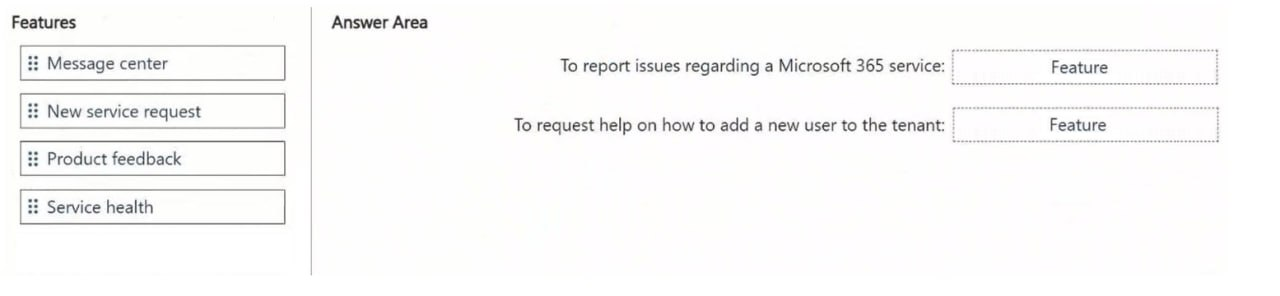
Report a Microsoft 365 service issue using Service health under the Health node; request help for adding a new user by opening a New service request under the Support section.
Question
You have a Microsoft 365 subscription.
You need to meet the following requirements.
Report a Microsoft 365 service issue.
Request help on how to add a new user to a Microsoft Entra tenant.
What should you use in the Microsoft 365 admin center? To answer, drag the appropriate features to the correct requirements. Each feature may be used once, more than once, or not at all. You may need to drag the split bar between panes or scroll to view content.
NOTE: Each correct selection is worth one point.
Key Takeaways
Tests knowledge of the specific navigation paths in the M365 Admin Center: Health > Service health for incidents vs. Support > New service request for tickets.
Learn how to use Service health to report outages and New service request for technical support in the Microsoft 365 admin center for exam AB-650.
Common mistake: Learners often confuse Service health with Support requests, attempting to open a ticket from the Health dashboard or trying to find user management help within the Service health status page.
Expert Analysis
The scenario requires two distinct administrative actions within the Microsoft 365 admin center, each mapping to a specific operational node. To report a service issue, you must navigate to the Health section and select Service health. This area provides visibility into the status of Microsoft 365 services, allowing administrators to view active incidents, maintenance windows, and historical data. It is the designated interface for acknowledging or reporting perceived service disruptions to ensure alignment with Microsoft's official status updates.
To request help regarding user management in Microsoft Entra ID, you must go to the Support section and open a New service request. This feature connects the administrator directly to Microsoft Technical Support engineers. Since adding users involves identity configuration and potential licensing implications, this support channel is required for technical assistance rather than self-service documentation alone. Using Service health for support requests would be incorrect as it is strictly for incident monitoring, not ticket creation for general administration queries.
Exam Strategy
Memorize the left-hand navigation pane of the Microsoft 365 admin center. Associate 'Health' exclusively with service status and incidents, and 'Support' exclusively with creating tickets and getting technical assistance. When asked about 'reporting' an outage, think Health; when asked about 'help' or 'tickets', think Support.
Frequently Asked Questions
Can I create a support ticket from the Service health page?
What is the difference between Service health and Support?
Discussion 1 contributions
Compiled from public community threads and reader submissions, lightly edited for clarity. Handles and vote tallies are shown as recorded, and comments reflect the views of individual contributors.
From public community threads 1
-
linux_admin 👍 2Service health: Located under the Health node in the Microsoft 365 admin center, this tool is used to monitor service status, review ongoing incidents, and report active service disruptions or outages across tenant workloads. New service request: Located under the Support section in the Microsoft 365 admin center, this feature allows administrators to open support tickets and get technical assistance or guidance from Microsoft regarding administrative procedures, such as managing user accounts.
Reader comments & corrections
No reader corrections yet — spotted an error or have a note? Share it below.