Portals for Creating Shared Mailboxes and Assigning Permissions
Short answer
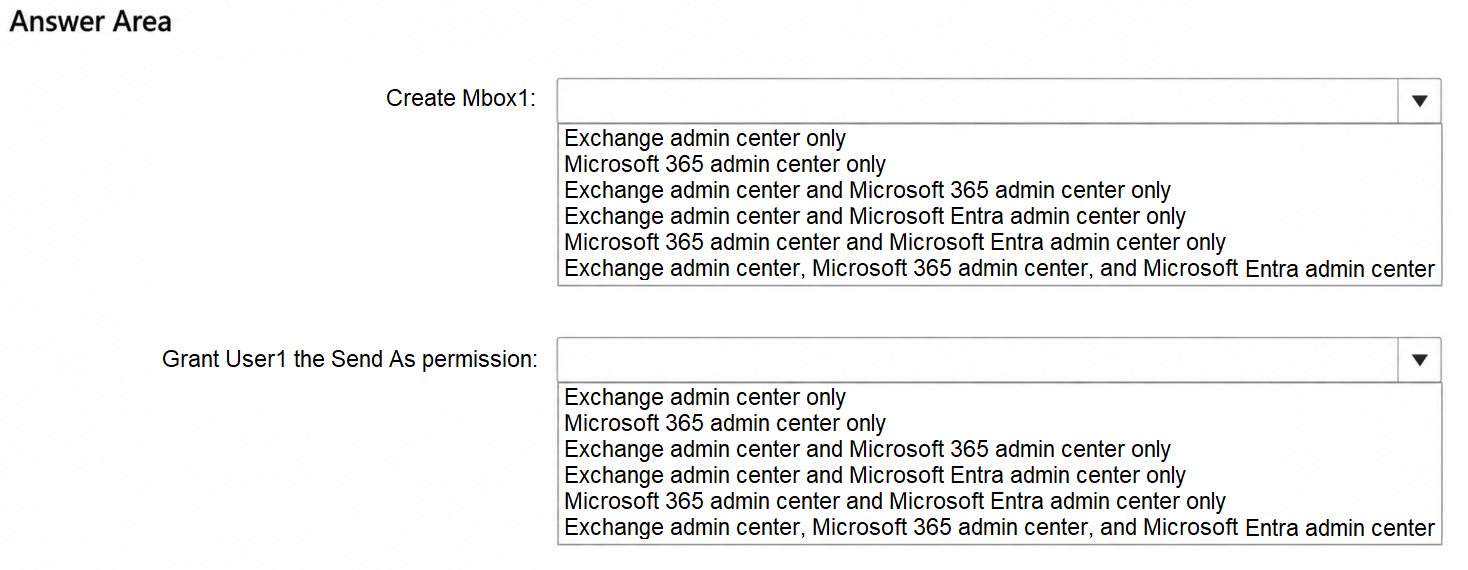
For both creating Mbox1 and granting Send As permission, use the Microsoft 365 Admin Center and the Exchange admin center.
Question
You have a Microsoft 365 E5 subscription that contains a user named User1.
You need to perform the following actions:
Create a shared mailbox named Mbox1 in the subscription.
Grant User1 the Send As permission for Mbox1.
Which Microsoft 365 portals can you use to perform each task? To answer, select the appropriate options in the answer area.
NOTE: Each correct selection is worth one point.
Key Takeaways
The trap is assuming that because Exchange handles mailboxes, only the Exchange admin center works; however, the Microsoft 365 Admin Center also supports these specific mailbox management tasks.
This page explains which Microsoft 365 portals support creating shared mailboxes and assigning Send As permissions, identifying both the Microsoft 365 Admin Center and Exchange admin center as correct options.
Common mistake: Selecting only the Exchange admin center. Learners often overlook the Microsoft 365 Admin Center's ability to manage shared mailboxes and permissions directly, leading them to exclude a valid option.
Expert Analysis
To determine the correct portals, we must analyze the specific administrative capabilities of each Microsoft 365 management interface regarding shared mailboxes and permissions.
Creating the Shared Mailbox The creation of a shared mailbox is a core identity and resource provisioning task. In the modern Microsoft 365 ecosystem, this can be performed via two primary interfaces:
- Microsoft 365 Admin Center: This portal provides a centralized view for tenant-wide administration. Administrators can navigate to Users > Shared mailboxes and click "Add" to create Mbox1. This is the recommended method for most general administrators.
- Exchange Admin Center (EAC): As the specialized tool for Exchange Online, the EAC allows admins to manage all mailbox types, including shared mailboxes. Navigating to Recipients > Shared allows for the creation of Mbox1.
The Microsoft Entra admin center focuses on identity governance, conditional access, and enterprise applications; it does not provide a direct UI for creating Exchange mailboxes.
Granting Send As Permission Once Mbox1 exists, User1 requires "Send As" rights. This permission controls how emails appear when sent on behalf of the mailbox.
- Microsoft 365 Admin Center: After creating the mailbox in the M365 Admin Center, you can select Mbox1 from the list and assign users directly to grant "Full access" or "Send As" permissions without leaving the portal.
- Exchange Admin Center: The EAC remains the most granular tool for this. By selecting Mbox1 under Recipients > Shared, clicking Manage permissions, and configuring the "Send As" tab, an admin can add User1.
While PowerShell (Exchange Online module) is also valid, the question asks for portals. Both the M365 Admin Center and the EAC support both tasks natively through their graphical interfaces. Therefore, both portals are correct selections for both actions.
Exam Strategy
When asked about managing user resources like mailboxes, always consider both the general tenant management portal (M365 Admin Center) and the workload-specific portal (e.g., Exchange Admin Center). Many common tasks have been unified into the M365 Admin Center to reduce context switching, so verify if the general portal offers the feature before defaulting to the specialized one.
Frequently Asked Questions
Can I use PowerShell to create a shared mailbox?
Does the Microsoft Entra admin center manage shared mailboxes?
Discussion 1 contributions
Compiled from public community threads and reader submissions, lightly edited for clarity. Handles and vote tallies are shown as recorded, and comments reflect the views of individual contributors.
From public community threads 1
-
linux_admin 👍 1Exchange admin center and Microsoft 365 admin center for creating Mbox1, and Exchange admin center and Microsoft 365 admin center for granting Send As permission. Explanation: Both the Exchange admin center and the Microsoft 365 admin center allow administrators to create shared mailboxes and assign Send As permissions. The Microsoft Entra admin center does not support creating shared mailboxes or managing Exchange mailbox permissions
Reader comments & corrections
No reader corrections yet — spotted an error or have a note? Share it below.