PIM Activation Requirements for Global Administrator in Microsoft Entra
Short answer
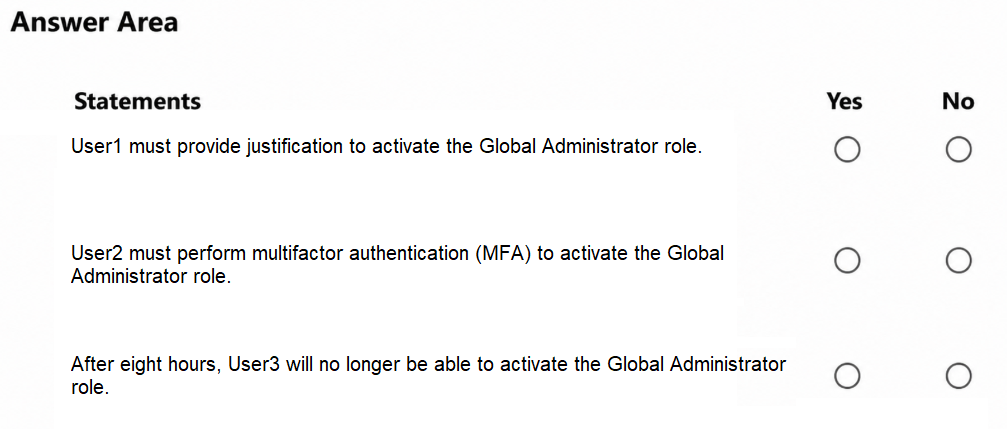
Statement 1: Yes. Statement 2: No. Statement 3: No. User1 has an eligible Global Administrator assignment and PIM requires justification on activation. User2 has an active assignment and does not need to activate. Eligible administrators cannot bypass configured activation requirements.
Question
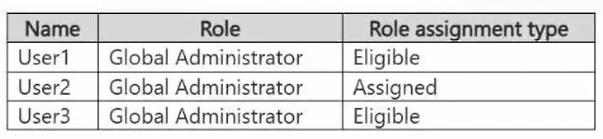
You have a Microsoft 365 subscription that contains the users shown in the following table.
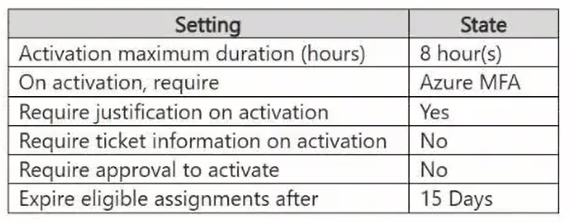
The Global Administrator role has the Privileged Identity Management (PIM) settings shown in the following table.
For each of the following statements, select Yes if the statement is true. Otherwise, select No.
NOTE: Each correct selection is worth one point.
Key Takeaways
This question tests the distinction between eligible and active PIM assignments and whether activation requirements apply to each type.
PIM enforces activation requirements such as justification for eligible role assignments. Users with active assignments bypass activation entirely, while eligible users cannot skip configured requirements.
Common mistake: Assuming that all users assigned to a PIM-managed role must meet activation requirements. Active assignments do not require activation, so activation requirements do not apply to them.
Expert Analysis
PIM Assignment Types and Activation Requirements
Microsoft Entra Privileged Identity Management distinguishes between two assignment types for privileged roles: eligible and active. An eligible assignment means the user can activate the role when needed but must go through the activation process. An active assignment means the role is already active and no activation is required.
Statement 1: User1 and Justification on Activation
User1 holds an eligible assignment for the Global Administrator role. The PIM configuration for this role explicitly requires justification on activation. Because User1 must activate before the role becomes active, the justification requirement applies. The answer is Yes — User1 must provide justification when activating.
Statement 2: User2 and Activation Requirements
User2 has an active assignment to Global Administrator. Since the role is already active, User2 does not need to go through activation. Activation requirements — justification, MFA, ticket information — only apply during the activation process itself. If the statement claims User2 must meet these requirements, the answer is No.
Statement 3: Bypassing Activation Requirements
PIM enforces all configured activation settings for every activation event. No eligible administrator can bypass these requirements, regardless of their role or seniority. If the statement suggests that eligible administrators can skip justification or other activation requirements, the answer is No.
Governing Principle
The key distinction is that activation requirements apply only at activation time. Eligible users trigger activation and must satisfy all configured requirements. Active users never activate, so requirements never apply to them. This principle comes from PIM's design as a just-in-time access system where privileged access is time-bound, audited, and gated by policy.
Official Reference
- https://learn.microsoft.com/en-us/entra/id-governance/privileged-identity-management/pim-configure
- https://learn.microsoft.com/en-us/entra/id-governance/privileged-identity-management/pim-how-to-activate-role
These links open the official vendor documentation in a new tab.
Exam Strategy
For PIM hotspot questions, first identify whether each user has an eligible or active assignment. Eligible assignments require activation, triggering all configured requirements such as justification, MFA, and ticket information. Active assignments mean the role is already active with no activation needed. Then evaluate each statement against this distinction. Remember that no eligible user can bypass configured activation settings.
Discussion 1 contributions
Compiled from public community threads and reader submissions, lightly edited for clarity. Handles and vote tallies are shown as recorded, and comments reflect the views of individual contributors.
From public community threads 1
-
linux_admin 👍 1Yes No No Explanation: Yes is correct for the first statement because User1 has an eligible assignment for the Global Administrator role and the Privileged Identity Management settings explicitly require justification on activation. No is incorrect because eligible administrators cannot bypass configured activation requirements. No is correct for the second statement because User2 has an assigned active role rather than an eligible assignment, meaning the role is permanently or directly active and does not require activation. Yes is incorrect because activation requirements such as multifactor authentication only apply when activating an eligible role. No is correct for the third statement because the eight hour setting governs the maximum duration of an active session after activation, whereas eligible assignments expire after fifteen days. User3 remains eligible to activate the role throughout the fifteen day assignment window. Yes is incorrect because the eight hour threshold does not end eligibility.
Reader comments & corrections
No reader corrections yet — spotted an error or have a note? Share it below.