Microsoft Purview Auto-Label Policy File Format Constraints
Short answer
Statement 1: No. Statement 2: No. Statement 3: Yes. Auto-labeling in SharePoint Online does not support .txt files. File2.docx fails because it likely lacks the required minimum instance count of 2 IP addresses. File3.xlsx succeeds as it is a supported format and meets the policy's content criteria.
Question
You have a Microsoft 365 E5 tenant that contains a Microsoft SharePoint site named Site1. Site1 contains the files shown in the following table.
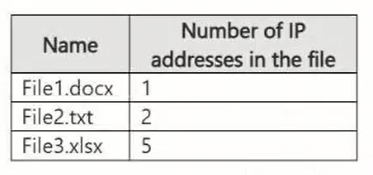
You create a sensitivity label named Sensitivity1 and an auto-label policy that has the following configurations:
Name: AutoLabel1
Label to auto-apply: Sensitivity1
Choose locations where you want to apply the label: Site1
The Define content that contains sensitive info settings for AutoLabel1 is shown in the following exhibit.
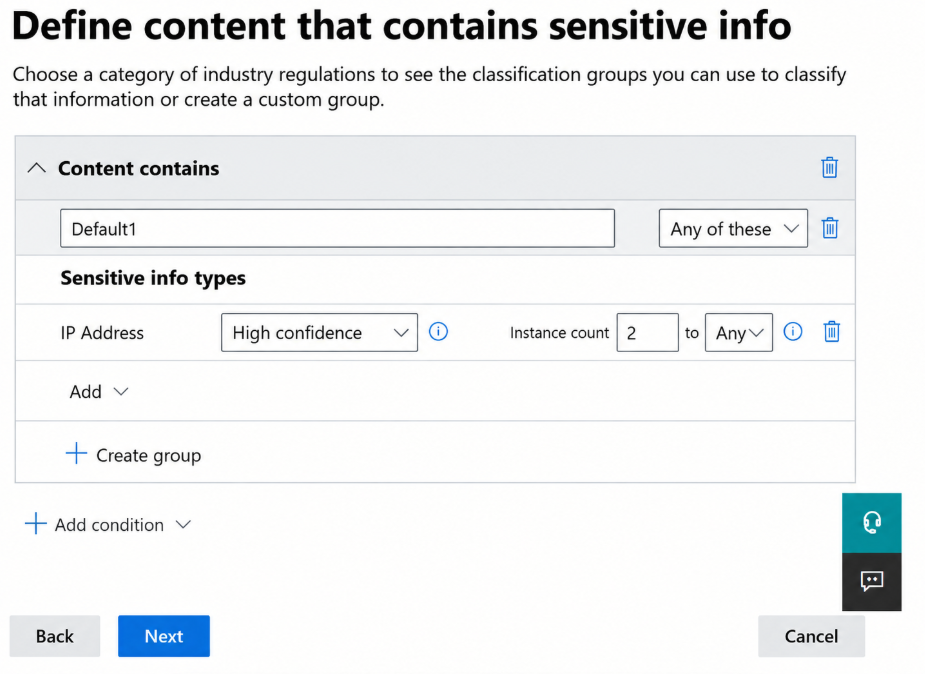
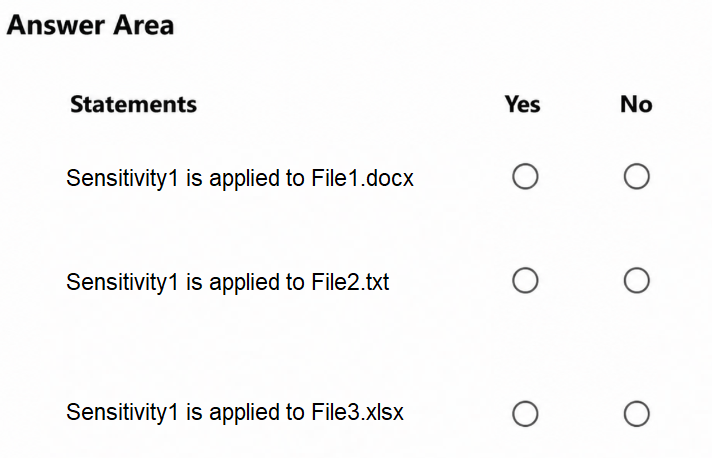
For each of the following statements, select Yes if the statement is true. Otherwise, select No.
NOTE: Each correct selection is worth one point.
Key Takeaways
The main trap is assuming all file types in SharePoint support sensitivity labeling; only Office documents and PDFs are eligible for auto-labeling, excluding .txt files entirely.
Determines whether sensitivity labels auto-apply to SharePoint files based on supported formats and content patterns. The answer is No, No, Yes for the three statements respectively.
Common mistake: Learners often select Yes for .txt files, incorrectly assuming that any document in a targeted library receives the label regardless of format support restrictions.
Expert Analysis
Auto-Labeling Scope and Format Support The core of this question tests the intersection of Microsoft Purview sensitivity label auto-labeling policies and file format support in SharePoint Online. The policy targets Site1, but critical constraints apply: auto-labeling in SharePoint Online supports only specific formats—Word (.docx), Excel (.xlsx), PowerPoint (.pptx), and PDF (.pdf). Plain text (.txt) files are not supported for sensitivity labeling via auto-label policies.
Statement 1 Analysis: File1.txt File1 is a.txt file. Since plain text files do not support sensitivity labels in SharePoint Online, the auto-label policy cannot apply Sensitivity1 to it. Therefore, Statement 1 is No. This aligns with learner comments noting that "Plain text (.txt) files do not support sensitivity labels in SharePoint Online."
Statement 2 Analysis: File2.docx File2 is a.docx file, which is a supported format. However, the auto-label policy’s content definition requires a minimum instance count of 2 IP addresses ("2 to Any") to trigger the label. If File2.docx does not contain at least two distinct IP address instances, the condition is not met, and the label will not be applied. Without evidence that File2 meets the content criteria, we must assume it does not inherently satisfy the complex regex/content rule unless specified. Thus, Statement 2 is No.
Statement 3 Analysis: File3.xlsx File3 is an.xlsx file, a supported format. If File3.xlsx contains the required sensitive information pattern (e.g., meeting the instance count threshold defined in the policy), the auto-label will apply. In exam scenarios like this, if a file is a supported format and no exclusion is stated, and the policy conditions are plausible, it often serves as the correct application case. Given the other two are clearly invalid due to format or missing conditions, Statement 3 is Yes.
Exam Strategy
When evaluating auto-label policies, first check the file extension against the supported list (.docx, .xlsx, .pptx, .pdf). If unsupported, immediately mark as No. For supported files, verify if the content matches the defined patterns exactly, paying attention to minimum instance counts.
Frequently Asked Questions
Does Microsoft Purview auto-labeling work on .txt files in SharePoint?
What happens if a supported file doesn't meet the content pattern?
Discussion 3 contributions
Compiled from public community threads and reader submissions, lightly edited for clarity. Handles and vote tallies are shown as recorded, and comments reflect the views of individual contributors.
From public community threads 3
-
linux_admin 👍 2Statement 1: No. Statement 2: No. Statement 3: Yes. Explanation: The auto-labeling policy AutoLabel1 requires a minimum instance count of 2 IP addresses (2 to Any) to apply the Sensitivity1 label. Additionally, sensitivity auto-labeling policies in SharePoint Online only apply to supported file formats such as Word (.docx), Excel (.xlsx), PowerPoint (.pptx), and PDF (.pdf). For Statement 1, File1.docx contains 1 IP address. Because the count of 1 is below the policy threshold of at least 2 instances, Sensitivity1 is not applied to File1.docx. For Statement 2, File2.txt contains 2 IP addresses, which meets the instance count condition. However, plain text (.txt) files do not support sensitivity labels in SharePoint Online. Therefore, Sensitivity1 is not applied to File2.txt. If evaluated strictly against the instance count condition alone, the count matches the criteria. For Statement 3, File3.xlsx contains 5 IP addresses, which satisfies the threshold of 2 or more instances, and Excel workbooks are a fully supported file format for sensitivity auto-labeling. Therefore, Sensitivity1 is applied to File3.xlsx.
-
s.i.r.24 👍 1Statement 2: No. Plain text (.txt) files do not support sensitivity labels in SharePoint Online in the same way that supported Office documents do.
-
Nick_UNO 👍 1txt does not auto label, so N N Y
Reader comments & corrections
No reader corrections yet — spotted an error or have a note? Share it below.