Microsoft Graph PowerShell Bulk Group Membership Update
Short answer
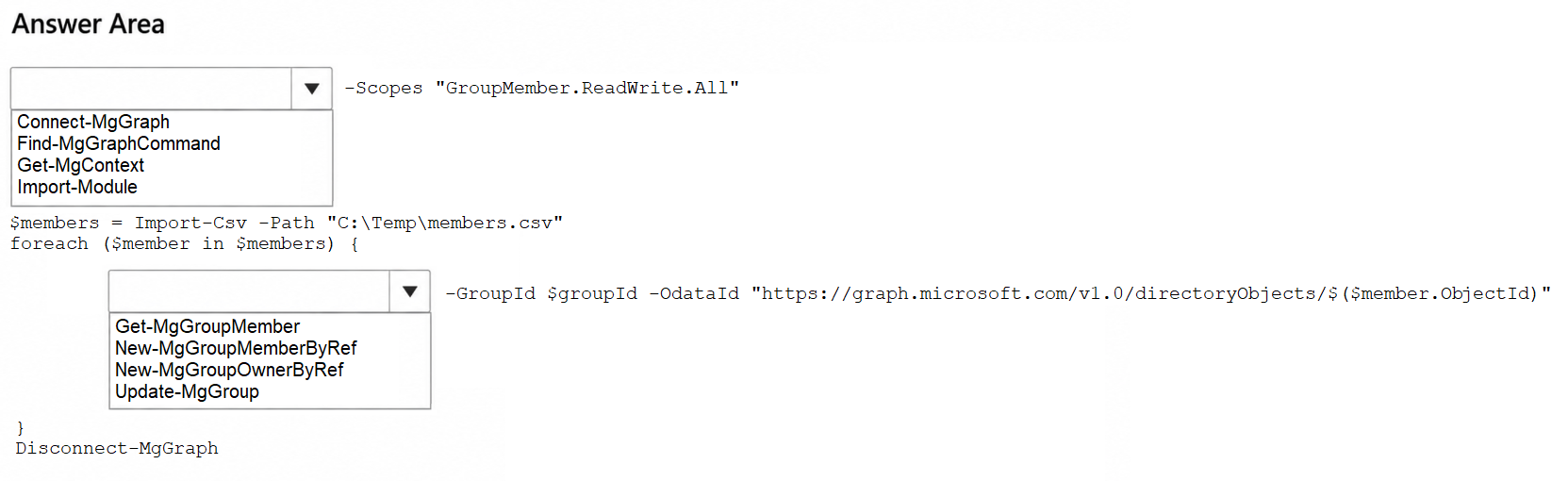
Block 1: Connect-MgGraph; Block 2: New-MgGroupMemberByRef
Question
You have a Microsoft 365 subscription that contains a security group named Group1.The object ID of Group1 is stored in a PowerShell variable named $groupId.
You have a CSV file named C:\Temp\members.csv that contains a column named memberObjectId. The column stores the directory object ID of each user that will be added to Group1.
You need to perform a bulk membership update for Group1 by using Microsoft Graph PowerShell.
How should you complete the script? To answer, select the appropriate options in the answer area.
NOTE: Each correct selection is worth one point.
Key Takeaways
The main trap is confusing module loading with session initialization; you must connect to Graph with proper scopes before running any management cmdlets like New-MgGroupMemberByRef.
Learn how to use Connect-MgGraph and New-MgGroupMemberByRef to perform bulk membership updates for Microsoft 365 security groups using PowerShell and CSV data.
Common mistake: Learners often select Import-Module for the first block, failing to realize that loading the module does not authenticate the user or grant API permissions required for subsequent commands.
Expert Analysis
The scenario requires a secure, authenticated connection to Microsoft Graph PowerShell before executing any management commands. The first block of code must initialize this session. While Import-Module loads the module into memory, it does not establish an active connection or request the necessary OAuth scopes for API access. Therefore, Connect-MgGraph is the correct choice because it handles authentication and permissions. The comment correctly identifies that Find-MgGraphCommand is merely a search utility and Import-Module lacks scope configuration.
For the second block, the goal is to add members to a group in bulk using object IDs stored in a CSV file. The cmdlet New-MgGroupMemberByRef is designed specifically for this purpose, accepting a reference body containing the target object IDs. Other cmdlets like Add-MgGroupMember typically require individual member objects or different parameter structures that are less efficient for bulk operations via CSV data. Using New-MgGroupMemberByRef allows you to pipe the parsed CSV data directly into the command to create the references needed for bulk addition.
Official Reference
https://learn.microsoft.com/en-us/powershell/microsoftgraph/authentication-commands
This link opens the official vendor documentation in a new tab.
Exam Strategy
Always verify authentication status before attempting management tasks in Graph PowerShell. When dealing with bulk operations involving CSV files, look for cmdlets that accept 'ByRef' or collection-based parameters, as they are optimized for handling multiple object IDs efficiently rather than one-by-one additions.
Frequently Asked Questions
Why can't I use Add-MgGroupMember for bulk updates?
What is the difference between Import-Module and Connect-MgGraph?
Discussion 2 contributions
Compiled from public community threads and reader submissions, lightly edited for clarity. Handles and vote tallies are shown as recorded, and comments reflect the views of individual contributors.
From public community threads 2
-
linux_admin 👍 1Connect-MgGraph New-MgGroupMemberByRef Explanation: Connect-MgGraph is correct because it authenticates and creates a connection to Microsoft Graph with specific permissions defined by the Scopes parameter. Import-Module is incorrect because it only loads a module into memory and does not accept a Scopes parameter. Find-MgGraphCommand is incorrect because it searches for Graph commands and does not connect to the service. Get-MgContext is incorrect because it only views current connection details rather than establishing a new session. New-MgGroupMemberByRef is correct because adding members to a group by reference URI using the OdataId parameter corresponds to the Microsoft Graph endpoint for adding group members. New-MgGroupOwnerByRef is incorrect because it assigns group owners instead of members. Update-MgGroup is incorrect because it updates group attributes rather than adding member objects. Get-MgGroupMember is incorrect because it reads group members rather than creating or adding new ones.
-
Nick_UNO 👍 1Shoud be 1 Connect-MgGraph 2 New-MgGroupMemberByRef
Reader comments & corrections
No reader corrections yet — spotted an error or have a note? Share it below.