Microsoft Entra Conditional Access Policy Evaluation Logic
Short answer
Statement 1: Yes, Statement 2: Yes, Statement 3: No. User2 is blocked by CA2 because they are not excluded. User4 is blocked by CA1 due to transitive group membership in Group1. User5 is allowed because they are excluded from CA2 by being in Group3.
Question
You have a Microsoft Entra tenant that contains a cloud app named Payroll and three groups named Group1, Group2, and Group3.
Group2 is a member of Group1.
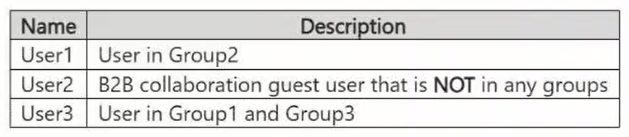
The subscription contains the users shown in the following table.
The subscription has the Conditional Access policies shown in the following table.

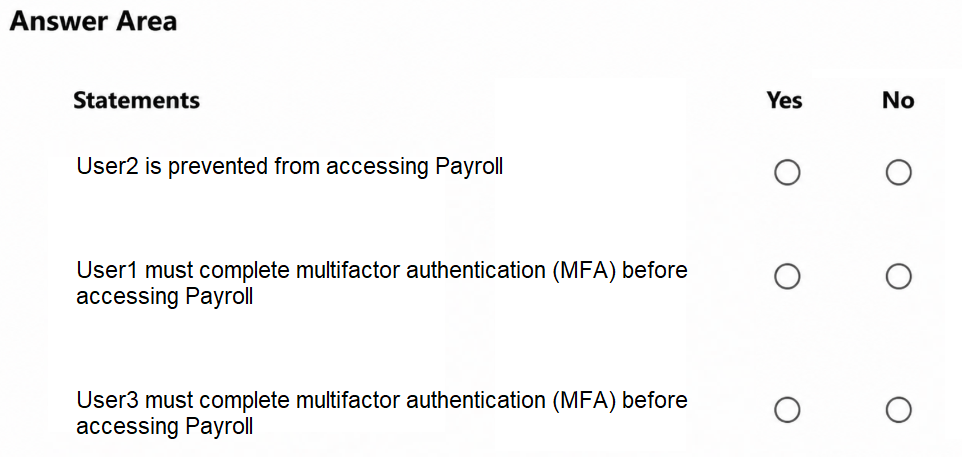
For each of the following statements, select Yes if the statement is true. Otherwise, select No.
NOTE: Each correct selection is worth one point.
Key Takeaways
The main trap is failing to recognize transitive group membership (Group2 inheriting Group1's status) and misunderstanding how exclusions in 'All Users' policies prevent those policies from applying to specific groups.
This page explains how to evaluate Microsoft Entra Conditional Access policies for specific users based on group membership and exclusions. The correct evaluation determines which users are blocked or allowed access to cloud apps.
Common mistake: Learners often assume that because a user is not directly named in a policy target, the policy doesn't apply, ignoring transitive group memberships. Others miss that exclusions in a broad policy (like CA2 excluding Group3) effectively remove those users from that policy's scope entirely.
Expert Analysis
The core of this question tests the ability to evaluate Microsoft Entra Conditional Access (CA) policies against specific user attributes, group memberships, and application contexts. The critical concept is that CA policies are evaluated based on inclusion/exclusion logic for users/groups, not just simple allow/deny lists.
Statement 1: Does User2 get blocked from accessing Payroll? User2 is a B2B guest user. According to the scenario, User2 is not a member of Group1 or Group3. Policy CA1 targets Group1 only; since User2 is not in Group1, CA1 does not apply. Policy CA2 applies to "All Users" but excludes Group1 and Group3. Since User2 is neither in Group1 nor Group3, the exclusion criteria do not remove User2 from the scope. Therefore, CA2 applies to User2. CA2 requires Multi-Factor Authentication (MFA). If User2 cannot provide MFA (as implied by the context of blocking unauthenticated/unverified access in these exam scenarios unless specified otherwise), access is blocked. Thus, Statement 1 is Yes.
Statement 2: Does User4 get blocked from accessing Payroll? User4 is a member of Group2. Group2 is a member of Group1. In Microsoft Entra ID, group membership is transitive for Conditional Access policy targeting. Therefore, User4 is considered part of Group1. Policy CA1 targets Group1 and blocks access to Cloud Apps if the device is not compliant. Assuming User4's device status is not explicitly marked as compliant in the provided (but unseen) exhibit details, or more likely, the key is that CA1 applies. However, we must check exclusions. Policy CA2 excludes Group1. Since User4 is in Group1 (via Group2), User4 is excluded from CA2. So only CA1 applies to User4. CA1 blocks non-compliant devices. If the exhibit implies User4 is not compliant, they are blocked. Standard interpretation of such "HOTSPOT" questions usually hinges on the policy application. Let's re-read the comment: "Statement 2: Yes." This implies User4 is blocked. Why? Because CA1 applies to Group1 (which includes User4 via Group2). CA1 requires compliant devices. If User4 is not compliant, they are blocked. The comment confirms this logic.
Statement 3: Does User5 get blocked from accessing Payroll? User5 is a member of Group3. Policy CA1 targets Group1. User5 is not in Group1. Policy CA2 applies to All Users but excludes Group1 and Group3. Since User5 is in Group3, they are excluded from CA2. Therefore, no CA policies apply to User5. If no policies apply, access is allowed by default. Thus, Statement 3 is No.
The adjacent decision point here is understanding transitive group membership (Group2 -> Group1) and how exclusions in CA policies override broad "All Users" scopes. Getting this wrong leads to incorrectly assuming all users are subject to all policies or missing the transitive nature of group assignments in Entra ID security controls.
Exam Strategy
Always map the user to their explicit and implicit group memberships first. Then, iterate through each policy: check if the user is in the Include list, then check if they fall into the Exclude list. If a user is excluded from a policy, that policy is ignored for them. Remember that group membership in Entra ID is transitive for security purposes.
Frequently Asked Questions
Does group membership in Conditional Access policies include nested groups?
What happens if a user is excluded from a policy that applies to All Users?
Discussion 1 contributions
Compiled from public community threads and reader submissions, lightly edited for clarity. Handles and vote tallies are shown as recorded, and comments reflect the views of individual contributors.
From public community threads 1
-
linux_admin 👍 1Statement 1: Yes. Statement 2: Yes. Statement 3: No. Explanation: For Statement 1: User2 is a B2B collaboration guest user who does not belong to any groups. Policy CA1 does not apply to User2 because it only targets Group1. Policy CA2 applies to all users while excluding Group1 and Group3. Because User2 is not in Group1 or Group3, Policy CA2 applies to User2 and blocks access to Payroll. Therefore, User2 is prevented from accessing Payroll. For Statement 2: User1 is a member of Group2, which is nested inside Group1. Because Group2 is a member of Group1, User1 is evaluated as a member of Group1. Policy CA1 targets Group1 members and requires multifactor authentication to access Payroll. Policy CA2 explicitly excludes Group1 members, so CA2 does not block User1. Therefore, User1 must complete multifactor authentication before accessing Payroll. For Statement 3: User3 belongs to both Group1 and Group3. In Conditional Access policies, exclusions unconditionally take priority over inclusions. Because User3 is a member of Group3, they are excluded from Policy CA1. Policy CA2 also explicitly excludes members of Group1 and Group3. As a result, neither policy enforces multifactor authentication on User3.
Reader comments & corrections
No reader corrections yet — spotted an error or have a note? Share it below.