Enable Passwordless Authentication in Microsoft 365
Short answer
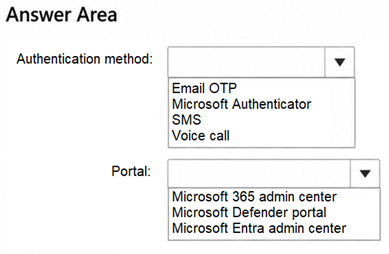
Authentication method: Microsoft Authenticator. Portal: Microsoft Entra admin center.
Question
You have a Microsoft 365 E5 subscription.
You need to enable passwordless authentication for all users.
Which authentication method and portal should you use? To answer, select the appropriate options in the answer area.
NOTE: Each correct selection is worth one point.
Key Takeaways
This question tests knowledge of modern identity management tools, specifically identifying that Microsoft Authenticator is the primary software-based passwordless method and the Microsoft Entra admin center is the required configuration portal.
Learn how to enable passwordless authentication for all users in Microsoft 365 by selecting Microsoft Authenticator as the method and configuring it in the Microsoft Entra admin center.
Common mistake: Learners often mistakenly select SMS-only verification or choose the M365 Admin Center instead of the Microsoft Entra admin center. SMS is not considered robust passwordless authentication compared to push notifications, and the M365 portal does not manage authentication policies.
Expert Analysis
To enable passwordless authentication for all users in a Microsoft 365 E5 subscription, the correct configuration requires selecting Microsoft Authenticator as the authentication method and using the Microsoft Entra admin center (formerly Azure Active Directory) as the portal. This is because Microsoft Authenticator supports multiple passwordless capabilities, including push notifications (Passkey), phone numbers, and email codes, which are managed centrally via Identity and Access Management policies.
The decision hinges on understanding that while other methods like FIDO2 security keys or Windows Hello exist, they often require specific hardware or device configurations. Microsoft Authenticator is the most universal software-based solution for broad user adoption across mobile devices. The portal choice is critical: legacy portals like the classic Azure Portal do not offer granular policy management for modern authentication methods; the Microsoft Entra admin center provides the dedicated Authentication Methods policy blade where administrators can enable, disable, and prioritize these options.
A common operational consequence of getting this wrong is leaving users with weak SMS-based verification instead of secure push notifications, or attempting to configure settings in the M365 Admin Center, which lacks identity-specific controls. If the scenario changed to require hardware-backed keys for high-security roles, the answer would shift to FIDO2. For general enterprise-wide passwordless adoption, Microsoft Authenticator via the Entra admin center is the standard best practice.
Exam Strategy
When asked about authentication methods, always consider the hierarchy of security and usability. For broad deployment, look for software-based solutions like Microsoft Authenticator rather than hardware-specific ones unless specified. Always verify the portal: identity policies live in Microsoft Entra admin center, while general service settings might be in M365 Admin Center. Distinguish between 'authentication' (who you are) and 'authorization' (what you can do).
Frequently Asked Questions
Why not use SMS for passwordless authentication?
Can I configure authentication methods in the M365 Admin Center?
Discussion 1 contributions
Compiled from public community threads and reader submissions, lightly edited for clarity. Handles and vote tallies are shown as recorded, and comments reflect the views of individual contributors.
From public community threads 1
-
linux_admin 👍 1Authentication method: Microsoft Authenticator Portal: Microsoft Entra admin center Explanation: To enable passwordless authentication for all users in the subscription, you select Microsoft Authenticator as the authentication method and configure the policy in the Microsoft Entra admin center. Microsoft Authenticator provides passwordless phone sign-in functionality, allowing users to authenticate securely without entering a password. The Microsoft Entra admin center is the portal where administrators manage identity protection, authentication methods, and tenant-wide sign-in policies
Reader comments & corrections
No reader corrections yet — spotted an error or have a note? Share it below.