Delegate Branch-Specific User Management via Entra Administrative Units
Short answer
Organize Branch1 users in an Administrative Unit and assign Admin1 the User Administrator role scoped to that unit.
Question
You have a Microsoft 365 E5 subscription that contains a user named Admin1.
Your company deploys a new branch office named Branch1.
You need to provide Admin1 with the ability to manage Branch1. The solution must meet the following requirements:
Admin1 must only be able to manage users that have Office location set to Branch1.
Admin1 must be able to reset passwords, manage user licenses, and modify user attributes only for the users in Branch1.
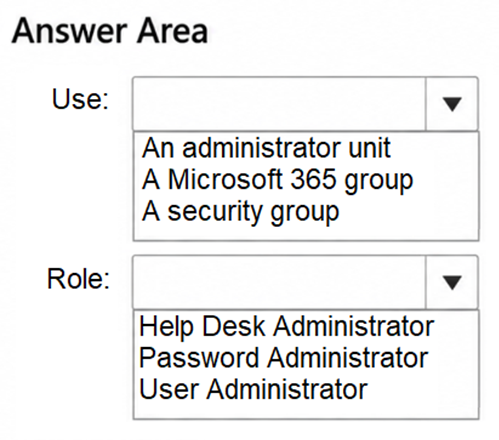
What should you use to organize the Branch1 users, and which role should you assign to Admin1? To answer, select the appropriate options in the answer area.
NOTE: Each correct selection is worth one point.
Key Takeaways
The question tests the ability to combine Administrative Units for object grouping with scoped role assignments to achieve least-privilege delegation.
Learn how to delegate branch-specific user management in Microsoft 365 using Administrative Units and the User Administrator role for precise permission scoping.
Common mistake: Learners often select Global Administrator or try to use standard security groups, which either grant excessive permissions or lack the native scoping capability required for administrative tasks.
Expert Analysis
To restrict Admin1's management privileges exclusively to users in Branch1, you must leverage Microsoft Entra ID's Administrative Units (AUs). Administrative units are the primary mechanism for scoping administrative roles to a specific subset of objects within the tenant, enabling fine-grained delegation without granting broad global permissions.
The correct organizational structure is an Administrative Unit named for Branch1. You would then add all users with their Office location set to Branch1 into this unit. This creates a logical container that isolates these users from the rest of the tenant.
For the role assignment, Admin1 needs to reset passwords, manage licenses, and modify attributes. The User Administrator role in Microsoft Entra ID provides exactly these capabilities: password resets, license management, and user attribute modifications. By assigning the User Administrator role specifically scoped to the Branch1 Administrative Unit, Admin1 gains full control over those users while having zero access to other parts of the organization.
Other roles like Global Administrator are too broad, and standard groups do not support role scoping in the same granular way for administrative permissions as AUs do. Therefore, the solution requires creating an Administrative Unit for Branch1 and assigning the User Administrator role to Admin1 within that scope.
Official Reference
This link opens the official vendor documentation in a new tab.
Exam Strategy
When asked to delegate permissions to a specific subset of users or devices, always look for 'Administrative Unit' as the grouping method. Then, match the required tasks (like password resets or license changes) to the appropriate Entra role, ensuring it is assigned with scope to that AU rather than globally.
Frequently Asked Questions
Why can't I just use a Security Group?
Does User Administrator allow modifying group membership?
Discussion 1 contributions
Compiled from public community threads and reader submissions, lightly edited for clarity. Handles and vote tallies are shown as recorded, and comments reflect the views of individual contributors.
From public community threads 1
-
linux_admin 👍 1Use: An administrative unit Role: User Administrator Explanation: To delegate management over a specific set of users, such as those in Branch1, you create an administrative unit. Administrative units allow you to scope Microsoft Entra administrative permissions to a specific subset of users, groups, or devices, ensuring Admin1 can only manage users assigned to that administrative unit. Assigning the User Administrator role scoped to the administrative unit grants Admin1 the necessary permissions to reset passwords, manage user licenses, and modify user attributes strictly for the members of Branch1, without providing administrative access to users outside of that administrative unit.
Reader comments & corrections
No reader corrections yet — spotted an error or have a note? Share it below.