Configure PIM Eligible Assignment with Approval and MFA
Short answer
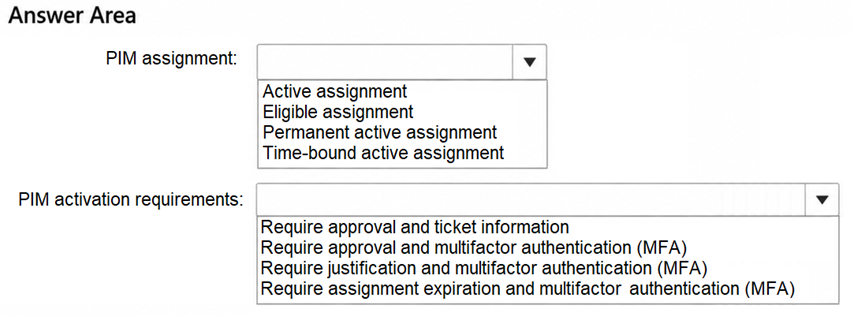
Select Eligible for the Assignment Type, and enable Require approval and Require multifactor authentication (MFA) in the activation settings.
Question
You have a Microsoft 365 subscription that uses Privileged Identity Management (PIM).
A group of support engineers requires access to the User Administrator role in Microsoft Entra.
You need to configure privileged access for the engineers. The solution must meet the following requirements:
The engineers must activate the role before receiving user administrator privileges.
The engineers must complete multifactor authentication (MFA) during role activation.
A designated approver must authorize each activation request.
What should you configure? To answer, select the appropriate options in the answer area.
NOTE: Each correct selection is worth one point.
Key Takeaways
This question tests the distinction between permanent 'Assigned' and temporary 'Eligible' memberships in PIM, specifically requiring the activation policy to include both approval and MFA checks.
To enforce just-in-time access for Microsoft Entra roles, configure Privileged Identity Management using an Eligible assignment type and mandate approval plus MFA during activation.
Common mistake: Learners often choose 'Assigned' membership thinking it grants necessary permissions, failing to realize that 'Assigned' provides immediate, permanent access without the required activation workflow or approval gates.
Expert Analysis
The core challenge in this scenario is configuring Privileged Identity Management (PIM) to enforce a Just-In-Time (JIT) access model for the User Administrator role. The requirements specify three distinct controls: pre-activation necessity, MFA enforcement, and manual approval.
The most attractive but incorrect approach often involves selecting an "Assigned" membership type with standard security settings. This fails because "Assigned" provides permanent, immediate access without any activation workflow, violating the requirement that engineers must activate the role before receiving privileges. It also typically lacks the granular approval gates required by PIM.
The correct configuration centers on two specific selections within the PIM role assignment interface:
- Assignment Type: You must select Eligible. This ensures users do not hold the role permanently; they must explicitly request and activate it, satisfying the first requirement. Permanent "Assigned" members bypass this step entirely.
- Activation Requirements: Within the eligible assignment settings, you must enable Require approval (to designate the approver) and Require multifactor authentication (MFA). These settings are bundled together in the activation policy. Selecting these ensures that every time an engineer clicks "Activate," they undergo identity verification via MFA and await explicit authorization from the designated approver.
Comments correctly identify that the solution requires an Eligible assignment paired with policies that Require approval and MFA. This combination is the only way to satisfy all three constraints simultaneously in Microsoft Entra ID.
Exam Strategy
When configuring PIM, always distinguish between who has the permission ('Assigned') and who can request it ('Eligible'). For JIT scenarios, select 'Eligible' and then drill into the 'Activation' tab to ensure both 'Require approval' and 'Require MFA' are checked. If a requirement mentions 'permanent' or 'immediate', use Assigned; if it mentions 'request', 'activate', or 'temporary', use Eligible.
Frequently Asked Questions
What is the difference between Assigned and Eligible in PIM?
Can I require approval for an Assigned user in PIM?
Discussion 1 contributions
Compiled from public community threads and reader submissions, lightly edited for clarity. Handles and vote tallies are shown as recorded, and comments reflect the views of individual contributors.
From public community threads 1
-
linux_admin 👍 2Eligible assignment, Require approval and multifactor authentication (MFA). Explanation: First Selection (Eligible assignment): Requiring users to perform an activation workflow before receiving permissions requires an eligible assignment. Second Selection (Require approval and MFA): Enforcing approval by a designated user alongside identity verification requires enabling both approval and MFA in the PIM role activation settings.
Reader comments & corrections
No reader corrections yet — spotted an error or have a note? Share it below.