Prepare Agent Flow in Copilot Studio
Short answer
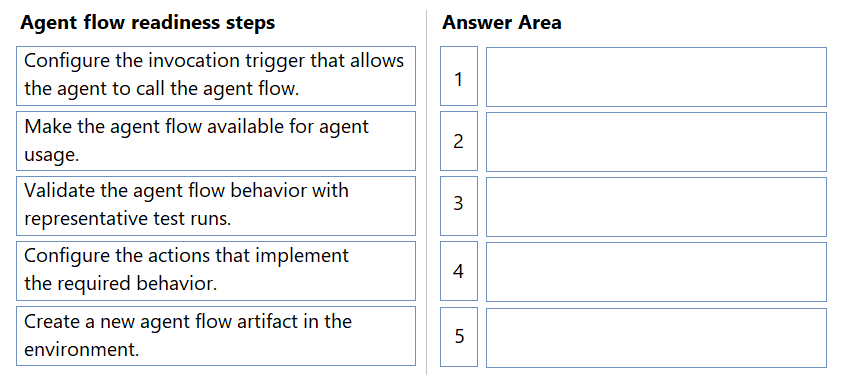
1. Create a new agent flow artifact in the environment. 2. Configure the invocation trigger. 3. Configure the actions. 4. Validate the agent flow behavior. 5. Make the agent flow available for agent usage.
Question
A company is preparing an agent flow so that it can be invoked by an agent during conversations.
The agent flow must meet the following requirements:
The agent must be able to trigger the flow.
The agent flow must be verified.
You need to prepare an agent flow so that it can be used by the agent.
In which order should you perform the actions to prepare the agent flow? To answer, move all actions from the list of actions to the answer area and arrange them in the correct order.
Key Takeaways
The common trap is configuring actions before triggers or skipping validation steps; the correct order ensures the flow is defined, tested, and published sequentially.
This question tests the correct sequence for preparing an agent flow in Microsoft Copilot Studio. The page establishes that you must first create the artifact, then configure triggers and actions, validate behavior, and finally make it available.
Common mistake: Learners often try to configure actions before setting up the invocation trigger, which prevents the flow from being correctly linked to the agent's conversation context.
Expert Analysis
Why the Answer Is Correct
The correct sequence follows the logical lifecycle of building a functional Power Automate flow within Copilot Studio. First, you must create the new agent flow artifact in the environment. Second, you configure the invocation trigger so the agent knows how to call this specific flow. Third, you configure the actions (logic) that implement the required behavior. Fourth, you validate the behavior with representative test runs to ensure it works as expected. Finally, you make the agent flow available for agent usage by publishing or binding it.
Why Other Candidate Answers Are Wrong
Reordering these steps breaks the dependency chain. For example, you cannot configure the invocation trigger without the flow artifact existing. You cannot validate the flow if the actions haven't been configured yet. Making the flow available before validation risks deploying broken logic to production agents.
Community Comment Notes
As Snoopy70 noted, checking the official Microsoft Learn documentation confirms the order: Create -> Configure Trigger -> Configure Actions -> Validate -> Make Available. Another user, harshagracy, provided a clear breakdown matching this exact sequence, emphasizing the importance of validation before availability.
Official Reference
This link opens the official vendor documentation in a new tab.
Exam Strategy
Memorize the 'Create-Configure-Validate-Publish' pattern for all agent flow questions. Always check if a step involves 'validation' or 'testing'—it usually comes after configuration but before making something 'available' or 'published'.
Frequently Asked Questions
Why do I need to validate the agent flow before making it available?
Can I configure actions before the invocation trigger?
Discussion 3 contributions
Compiled from public community threads and reader submissions, lightly edited for clarity. Handles and vote tallies are shown as recorded, and comments reflect the views of individual contributors.
From public community threads 3
-
harshagracy 👍 1Create a new agent flow artifact in the environment. Configure the invocation trigger that allows the agent to call the agent flow. Configure the actions that implement the required behavior. Validate the agent flow behavior with representative test runs. Make the agent flow available for agent usage.
-
Snoopy70 👍 1I have found the answer > https://learn.microsoft.com/en-us/microsoft-copilot-studio/advanced-flow-create#create-a-new-agent-flow-from-the-flows-page The order is correct
-
Snoopy70 👍 1Can someone confirm if the provide order is correct? From my view, and checking in my dev env, I configure the action, then I configure the invocation.
Reader comments & corrections
No reader corrections yet — spotted an error or have a note? Share it below.